


AI Summarize


Share


CookieHub is a consent management platform (CMP) that helps companies to manage their privacy compliance obligations with laws around the world, including the General Data Protection Regulation (GDPR) and the California Consumer Privacy Act (CCPA).
CookieHub is a Google-certified CMP that focuses exclusively on cookie consent rather than broader governance. Some of the key selling points of CookieHub include budget-friendly pricing, IAB TCF 2.3 + Google Consent Mode v2 certified, 60+ language support, and use on 30,000+ sites.
One of the main benefits of CookieHub is its free tier and paid plans from only €6/mo ($7 USD), along with the easy setup, both of which make CookieHub very accessible for small businesses. One of the main limitations of CookieHub is its consent-only scope. It has no broader privacy governance features, although it recently introduced DSAR tools in 2026. The CookieHub plans have session-based limits, which means websites with unpredictable traffic are bumped to higher-cost tiers.
CookieHub offers a Privacy Policy generator but no other legal agreement generators to assist with compliance. For companies or individuals that need a wider range of legal document generation, such as Terms and Conditions, End-User License Agreements (EULAs) or Cookie Policies, TermsFeed is a better fit.
Use our Cookie Consent all-in-one solution (Privacy Consent) for cookies management to comply with GDPR & CCPA/CPRA and other privacy laws:
- For GDPR, CCPA/CPRA and other privacy laws
- Apply privacy requirements based on user location
- Get consent prior to third-party scripts loading
- Works for desktop, tables and mobile devices
- Customize the appearance to match your brand style
Create your Cookie Consent banner today to comply with GDPR, CCPA/CPRA and other privacy laws:
-
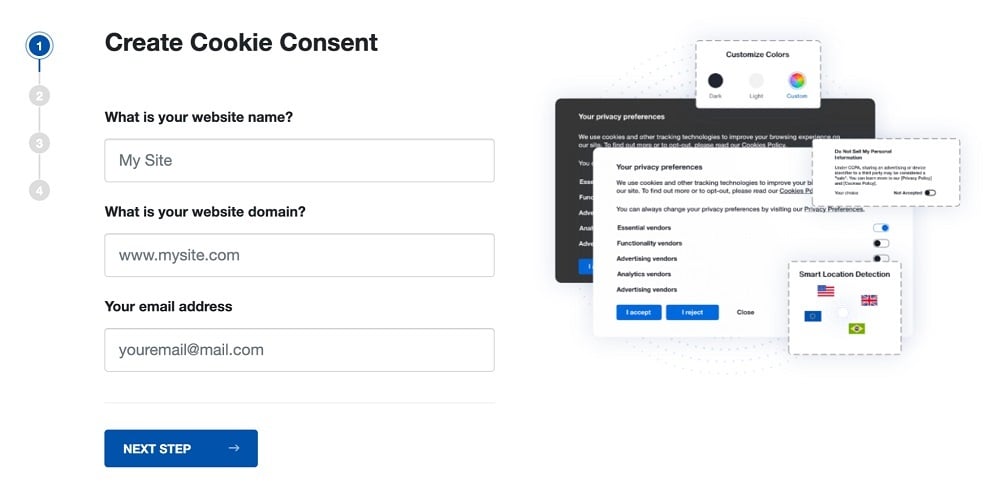
Start the Privacy Consent wizard to create the Cookie Consent code by adding your website information.
-
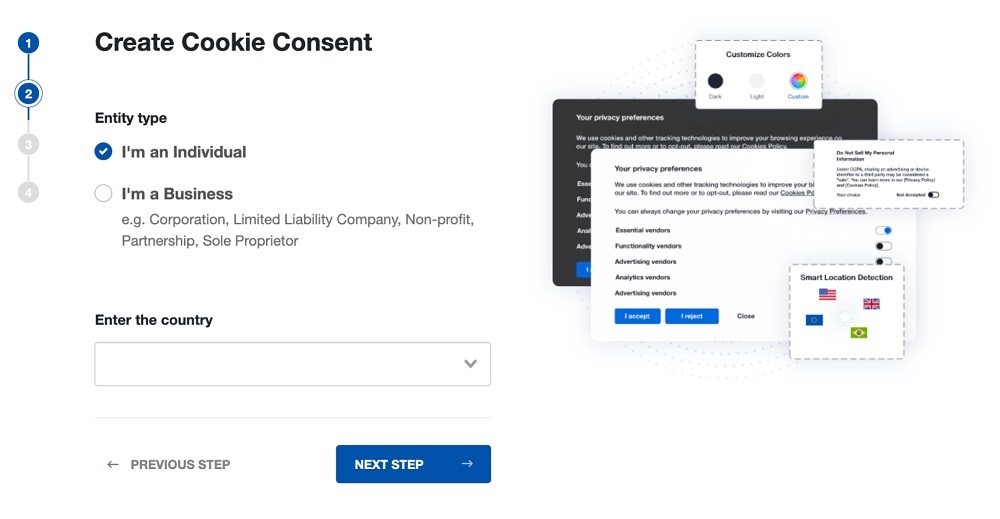
At Step 2, add in information about your business.
-
At Step 3, select a plan for the Cookie Consent.
-
You're done! Your Cookie Consent Banner is ready. Install the Cookie Consent banner on your website:
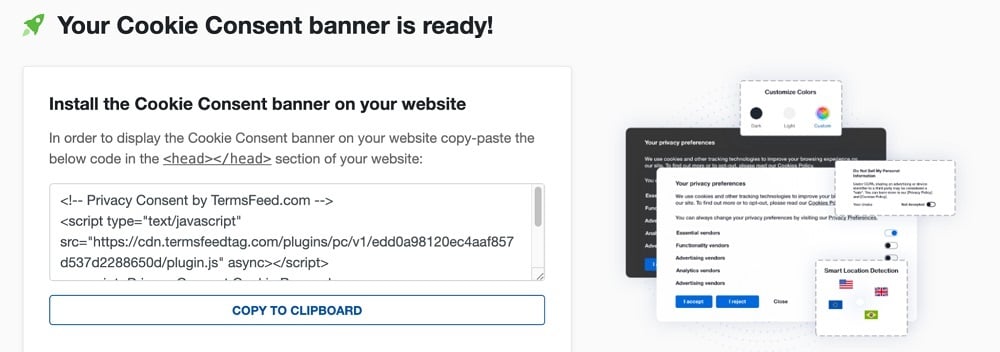
Display the Cookie Consent banner on your website by copy-paste the installation code in the
<head></head>section of your website. Instructions how to add in the code for specific platforms (WordPress, Shopify, Wix and more) are available on the Install page.


- 1. What is CookieHub?
- 2. What is the CookieHub Price?
- 3. What are the Best CookieHub Features?
- 3.1. 1. Automated Cookie Scanning
- 3.2. 2. Customizable Consent Banner
- 3.3. 3. Pre-Consent Script Blocking
- 3.4. 4. Proof of Consent (Consent Logging)
- 3.5. 5. Geo-Targeted Consent Rules
- 3.6. 6. 60+ Language Multilingual Support
- 3.7. 7. Google Consent Mode v2 Integration
- 3.8. 8. IAB TCF 2.3 Support
- 3.9. 9. Global Privacy Control (GPC) Detection
- 3.10. 10. Cross-Domain & Multi-Domain Management
- 3.11. 11. CMS and Platform Integrations
- 4. How does CookieHub Work?
- 4.1. What You Need Before Starting
- 4.2. Setup & Deployment Steps
- 4.3. Limitations & Edge Cases
- 5. What are the Pros of CookieHub?
- 6. What are the Cons of CookieHub?
- 7. What are the alternatives to CookieHub?
- 7.1. What is the history of CookieHub?
What is CookieHub?
CookieHub is a budget-friendly CMP with a consent-only scope, which helps individuals or businesses comply with a wide range of global privacy laws and regulations.
CookieHub provides tools including an automated cookie scanner, customizable consent banner, consent logging, and geo-targeted consent. Some of the CookieHub key features and benefits are in the image below.

CookieHub offers a wide range of coverage for global privacy laws, including for laws and regulations from Europe, the US, Canada, South America, Asia, Africa, and Oceania. Take a look at the selection of these laws in the image below.

CookieHub is intended to be used by small-to-mid-market website owners, web developers, agencies, and compliance specialists. It offers a Partner Program for agencies to support their clients.
CookieHub was founded in 2018 and is based in Iceland.
What is the CookieHub Price?
CookieHub pricing varies depending on the plan, session limits, and included features. The price ranges from a 14-day free trial and a €6/mo ($7 USD) Starter plan, to custom pricing for large enterprises.
Pricing is billed annually or monthly, and the website supports displaying prices in two different currencies: USD and EUR.
Here is the pricing page with the Starter (€6/mo, $7/mo), Basic (€10/mo, $12/mo), Business (€30/mo, $35/mo), and Enterprise plans.

The Starter plan and all higher plans include the proof of consent feature. Auto-detection of language for the multilingual consent banner feature is only available for Basic and above. The removal of CookieHub branding is only available for the Business plan and above.
Other features vary by plan and include the following:
- Number of pages scanned: The Cookie Scanner page limits vary by plan. The Free plan support up to 50 pages (one-time scan), the Starter and the Basic plan supports up to 100 pages, the Business plan supports up to 1,000 pages (monthly automated scans), and the Enterprise plan supports up to 10,000 pages (weekly automated scans).
- IAB TCF 2.3: Supported on the Business and Enterprise plans.
- Session limits: Free plan (up to 1,000 sessions); Starter plan (up to 5,000 sessions); Basic plan (up to 30,000 sessions); Business plan (up to 120,000 sessions); Enterprise plan (from 1,000,000 sessions).
- Reporting: Standard reporting is available on the Free and Starter plans, while Advanced reporting is available from the Basic plan and above.
CookieHub no longer charges overage fees for exceeding session limits. Instead, subscriptions are automatically upgraded to the next plan when they exceed the session limit for two consecutive billing periods.
A free trial is available for all plans, except the Enterprise plan which requires the user to contact CookieHub. No credit card is required to sign up for the free trial.
What are the Best CookieHub Features?
CookieHub includes a range of features designed to help businesses manage cookie compliance and user preferences.
The key features of the CookieHub are outlined below and include the following:
- Automated Cookie Scanning
- Customizable Consent Banner
- Pre-Consent Script Blocking
- Proof of Consent (Consent Logging)
- Geo-Targeted Consent Rules
- 60+ Language Multilingual Support
- Google Consent Mode v2 Integration
- IAB TCF 2.3 Support
- Global Privacy Control (GPC) Detection
- Cross-Domain & Multi-Domain Management
- CMS & Platform Integrations
The following sections go into more detail on each of these features.
1. Automated Cookie Scanning
Automated Cookie Scanning is the CookieHub feature that automatically detects cookies, tracking scripts, and other technologies on your website that collect data from users.
The scanner matches detected cookies with a regularly-updated cookie database. This helps the scanner to categorize technologies and provide accurate reports and compliance documentation.
The CookieHub Automated Cookie Scanning feature is set up with scheduled scans. These scans make sure the website cookie inventory stays accurate, if you make changes to your website.
An example of the Cookie Scanner report is below.

It shows only categories of cookies. The full report is available either through a free trial, paid subscription, or when the user enters their email address to receive the report generated through the website. The example of the full report excerpt from the CookieHub dashboard is shown below.

The full report includes more details about the cookie names, types, and service.
Both the sample report and the full report break down the types of cookies detected by necessary, preference, analytical, marketing, or other. The cookie scan report provides an initial conclusion about compliance.
The Cookie Scanner is available on all plans. The scan frequency depends on the plan. The Free plan includes a one-time scan, the Starter, Basic, and Business plans include monthly automated scans, and the Enterprise plan includes weekly scans.
2. Customizable Consent Banner
Customizable consent banner is the CookieHub feature that allows users to create a cookie banner and customize the theme, position, icons, colors, and size.
The options include changing the number of rows of buttons, the position of the banner on the page, the color of the buttons, and the order in which the buttons are displayed. This means users decide whether the button says "Deny" or "Allow" as the first, second, or third option.
The banner is created in the CookieHub dashboard, along with settings for more detailed cookie preferences, and the cookie icon. These are shown in the image below.

Some features and settings are only available for paid plans. For example, custom CSS is only available for domains with a Business or Enterprise plan subscription.
Hiding the CookieHub branding is only available with a Business or Enterprise plan subscription.
3. Pre-Consent Script Blocking
Pre-consent script blocking is the CookieHub feature that prevents non-essential scripts from firing before consent is given.
Script blocking is required for compliance with the GDPR and the ePrivacy Directive. The GDPR prohibits the processing of personal data without a lawful basis such as consent. The ePrivacy directive prohibits storing or accessing data on a device without consent.
Without script blocking, personal data is processed, or data is stored or accessed, before the user has consented.
The script blocker detects the JavaScripts used by common services that set tracking cookies. The tags are then adjusted to delay the cookie being set. The CookieHub blocker then checks, once the page has fully loaded, whether the user has already consented to cookies.
The user is prompted to consent to or decline cookies, if they have not already consented. The delayed scripts are loaded normally if the user consents.
The automatic blocker covers commonly used services. Scripts from less common or custom services require manual tagging.
The script blocking feature is able to be implemented using Google Tag Manager (GTM). CookieHub provides a guide for installing GTM, as shown in the image below.

CookieHub advises against enabling the automatic blocker when the implementation runs through GTM, because consent-based tag firing is handled within GTM instead.
Installation steps are provided by CookieHub, including configurations for different regions, setup verification, and how to configure additional consent settings.
Pre-consent script blocking is available on all plans.
4. Proof of Consent (Consent Logging)
Proof of Consent is the CookieHub feature that records and stores (logs) visitor consent decisions. This provides a record for businesses to demonstrate compliance with consent regulations.
CookieHub logs the date and time of consent, and a masked IP address. It logs the cookie categories and cookie purposes the visitor consented to, and the URL the customer viewed when the consent was collected.
The consent logs are exportable from the CookieHub dashboard. The consent logs are searchable by recent activity, date, or the unique consent token assigned to the visitor. To look up a record in the consent log, CookieHub provides a step-by-step guide, as shown in the image below.

The "Your ID" tag is used to look up a consent interaction for a specific user in the logs. This is provided to demonstrate consent when necessary.
The Proof of Consent feature is available for all plans. Records are stored for 12 months with
CookieHub on all plans except the free plan, which stores records for only 1 month.
5. Geo-Targeted Consent Rules
Geo-targeted consent rules are the CookieHub changes to the behavior of the consent banner, depending on the location of the website visitor. This includes which text is shown, which language the banner displays in, and other geographically-specific features.
The CookieHub dashboard has a section called "Regions" where users configure these details. CookieHub provides a number of pre-defined regions, including Europe, UK, Switzerland (GDPR or GDPR-equivalent regions) and some US states ("Do not sell or share" states). An excerpt of these pre-defined regions for the US is shown in the image below.

The pre-defined settings for the US, for example, mean that CookieHub presents a "Do not sell or share my personal data" option. CookieHub honors opt-out signals in line with these US state laws. CookieHub automatically updates pre-defined regions as privacy laws change.
Regions are configured in the CookieHub dashboard. Pre-defined regions are used, or regions defined by the user. Regions include single countries, states, or groups of countries with similar rules (such as the EU). This feature is useful for businesses that have international customers or operate in multiple jurisdictions.
Geo-targeted consent is included with the Basic plan and above. The free trial and Starter plans do not include geo-targeting options.
6. 60+ Language Multilingual Support
60+ language multilingual support is the CookieHub feature that displays the cookie consent banner and declaration in a wide range of languages. The correct language is shown to the visitor depending on the location browser settings of the user, website content, or URL prefix.
The complete list of supported languages is shown in the image below. It includes Arabic, Chinese, Dutch, English, French, German, Hindi, Hungarian, Italian, Japanese, Polish, Russian, Spanish, and Vietnamese, among many others.

Multi-language support is useful for businesses with international audiences or websites in multiple languages.
Displaying a consent banner in the language of the user helps the website to be compliant with laws such as the GDPR. Several privacy laws require consent requests to be understandable and in plain language for the visitor. The business risks non-compliance if the banner is displayed in a language the visitor cannot understand.
Multi-language support is available for the Basic plan and above.
7. Google Consent Mode v2 Integration
Google Consent Mode v2 Integration is the CookieHub feature that communicates visitor consent choices to Google, particularly for advertising and analytics services.
This integration works by sending consent signals to Google. A different signal is sent depending on whether the visitor accepts or denies cookies.
Google Consent Mode v2 determines Google tag behavior, such as shifting cookies to a limited functionality mode when a user declines consent. Cookies continue with full functionality when a user consents.
Google Consent Mode v2 is set up with CookieHub with or without GTM, as shown in the image below.

Google requires advertisers and publishers to use a Google-certified CMP together with Consent Mode v2 to serve personalized ads to users in the EEA and the UK. Google introduced the requirement in 2024 in response to the GDPR and the Digital Markets Act (DMA).
With this integration, businesses are able to use Google advertising and analytics services in these regions. As a result, it is particularly useful for businesses operating in the EU, and for international companies.
This feature is available for all CookieHub plans, including the free trial and Starter plan.
8. IAB TCF 2.3 Support
TCF 2.3 Support is the CookieHub functionality used for implementing the IAB Europe Transparency and Consent Framework (TCF). IAB TCF is the mechanism for collecting and communicating consent to advertisers.
IAB TCF and Google Consent Mode v2 work together. A transparency and consent string is generated, based on the choice of the user from the cookie banner, when you use an IAB TCF supporting CMP like CookieHub. This string is then used by Google Consent Mode to adjust settings and behavior.
CookieHub provides some instructions for how to set up IAB TCF, and when to use it, as shown below.

CookieHub automatically displays the TCF-compliant consent message when IAB TCF is enabled. It generates the transparency and consent string automatically. The CookieHub automatic TCF functionality and display is particularly useful for publishers and advertisers who are running personalized ads in the UK or Europe.
IAB TCF is only available for the Business and Enterprise plans.
9. Global Privacy Control (GPC) Detection
Global Privacy Control (GPC) Detection is the CookieHub feature that recognizes the GPC browser signal, and automatically opts users out of the sale or sharing of their personal data.
The GPC browser signal is a browser-level setting that automatically communicates your privacy preferences to websites. This means that the preference is set before the user interacts with a consent banner.
GPC Detection is an important feature because under US state laws like the CCPA and CPRA, businesses must honor requests to opt out of the sale or sharing of personal data. The GPC browser signal is considered a valid opt-out request under these laws.
The CookieHub feature honors the opt-out automatically, so websites avoid processing requests manually. For opt-in locations such as the EU, this feature does not replace opt-in consent banners.
CookieHub provides instructions on how GPC works when using CookieHub, as shown in the image below.

GPC is provided through browsers such as Brave and DuckDuckGo, or is used through an extension on other browsers.
The GPC feature for CookieHub is available on all plans, including the free and Starter plan.
10. Cross-Domain & Multi-Domain Management
Cross-Domain and Multi-Domain Management is the CookieHub feature that shares visitor consent choices across multiple domains or websites. This means visitors only consent once. This feature is called Linker by CookieHub.
CookieHub sends visitor consent information through the Linker settings to other domains in the same configuration, when this feature is enabled. The receiving domain(s) read the consent information and apply the same choices without re-prompting the user.
This feature only forwards consent automatically if the visitor allows all categories.
CookieHub documentation explains how to enable Linker, with examples, as shown below.

The Linker feature is useful for businesses that have multiple branded websites or use multiple domains that interact with each other. It makes the user experience more pleasant when the user doesn't need to consent multiple times within the same group of websites.
Cross-domain consent coordination is available for the CookieHub Business plan and above.
11. CMS and Platform Integrations
CMS and platform integrations are the range of plugins and installation approaches that CookieHub provides for using CookieHub with third-party websites. This includes marketing tools, ecommerce platforms, and website-building tools, among other things.
CookieHub provides integrations for WordPress, Shopify, Wix, Webflow, Weebly, Squarespace, Umbraco, Drupal, and Magento. It supports the WordPress Consent API, HubSpot Consent API, and the Microsoft UET Consent Mode and Clarity Consent API.
CookieHub provides a JavaScript API and a Management API for custom setups. The JavaScript API lets developers control the consent dialog, and change website behavior based on the choices of the visitor. The Management API lets agencies and developers configure domains and settings themselves.
CookieHub documentation provides instructions for how to install these integrations, as the example for Wix shows in the image below.

These integrations make it easier for individuals and businesses to use CookieHub across different sites and platforms.
All integrations are available on all CookieHub plans.
How does CookieHub Work?
CookieHub works by scanning your website to detect and categorize cookies and trackers, and displaying a banner to collect visitor consent.
Non-essential scripts are blocked until consent is given. CookieHub outlines the overarching three steps in the CookieHub platform process, as shown in the image below.

Users sign up to the CookieHub website, and add their website domain to the CookieHub dashboard. CookieHub is deployed through a JavaScript snippet, Google Tag Manager, or through plugins for websites like WordPress.
Once CookieHub is deployed, the website is scanned, and cookies are categorized by type in a cookie report. Cookies are categorized through comparison with a cookie database. This report is available on the CookieHub dashboard.
A customizable cookie banner is created for the website. The banner is adjusted through the CookieHub dashboard. The banner allows users to select whether to accept or decline cookies, and to read more information about which cookies are being set.
CookieHub then records the consent decision of the visitor, and passes that information to integrated tools. Google Consent Mode v2 is integrated to monitor cookie consent decisions automatically.
The process is intended to be carried out automatically and periodically. Users are notified with reports if there are any issues.
What You Need Before Starting
What you need before starting depends on which of the CookieHub features you want to use, and how complex your website is. To get started you will need the following.
-
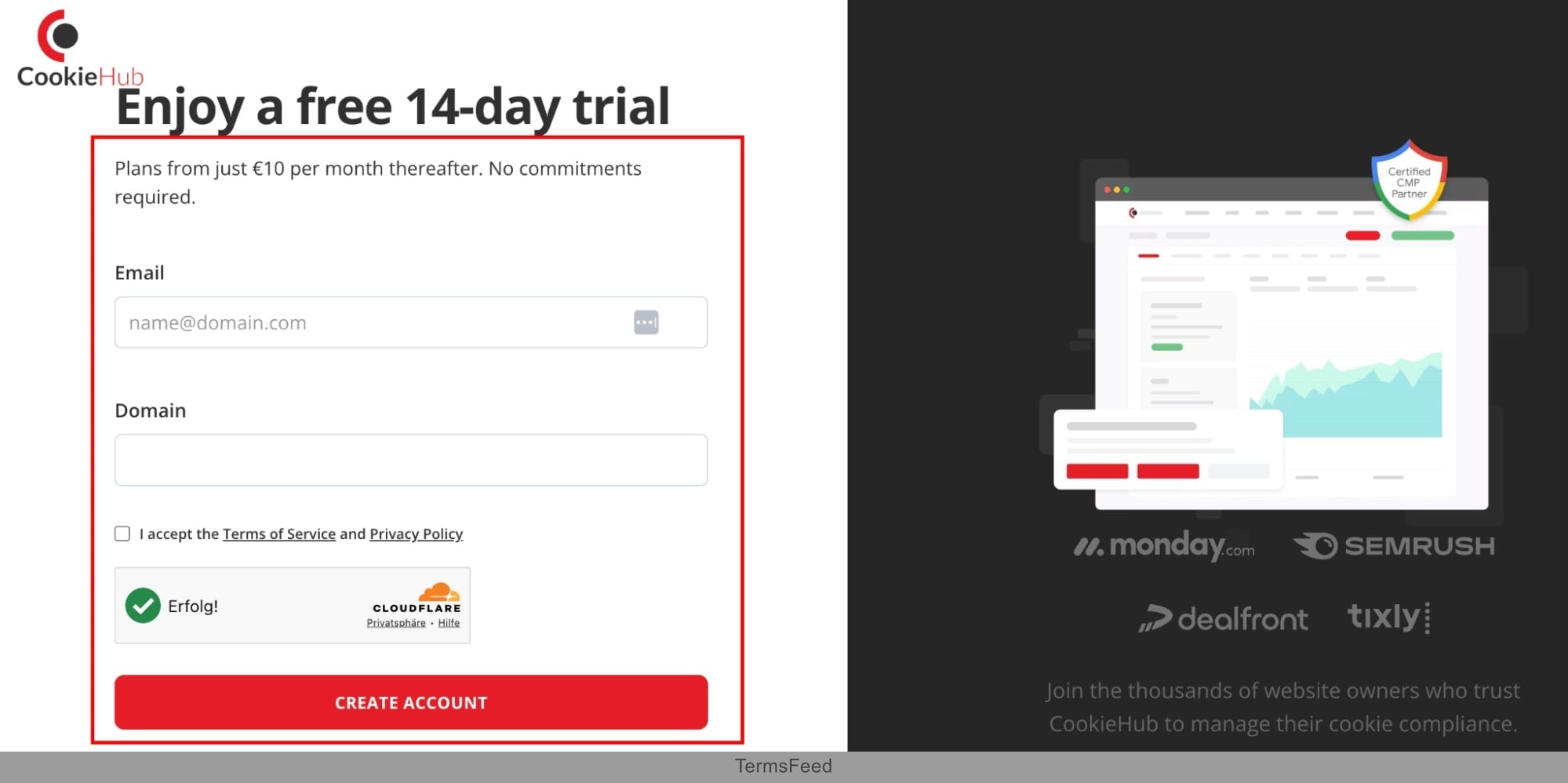
A CookieHub account. Users sign up for an account through the CookieHub website. A credit card is not required to sign up for the free trial. The CookieHub sign-up page is simple and is shown in the image below.
- A website, and access to the site header. Users integrate a supported CMS when desired. This includes platforms like WordPress, Webflow, Drupal, or Magento. Users who use Google Tag Manager need an active GTM account.
- A published Privacy or Cookie Policy URL to link from the consent banner. CookieHub generates a cookie declaration, but it does not generate Privacy or Cookie Policies in more detail. These need to be generated elsewhere, such as through TermsFeed.
- Admin access to analytics and advertising tools for Google Consent Mode integration and IAB TCF 2.3. This is necessary for setting up IAB TCF 2.3 on the Business or Enterprise plan.

Setup & Deployment Steps
Setup and deployment steps include a number of simple steps, most of which are completed quickly. The steps include the following.
- Create a CookieHub account and choose a plan (Starter, Basic, Business, or Enterprise).
- Add your website domain to the CookieHub dashboard.
- Install the snippet or CMS plugin.
- Run the first cookie scan of your website.
-
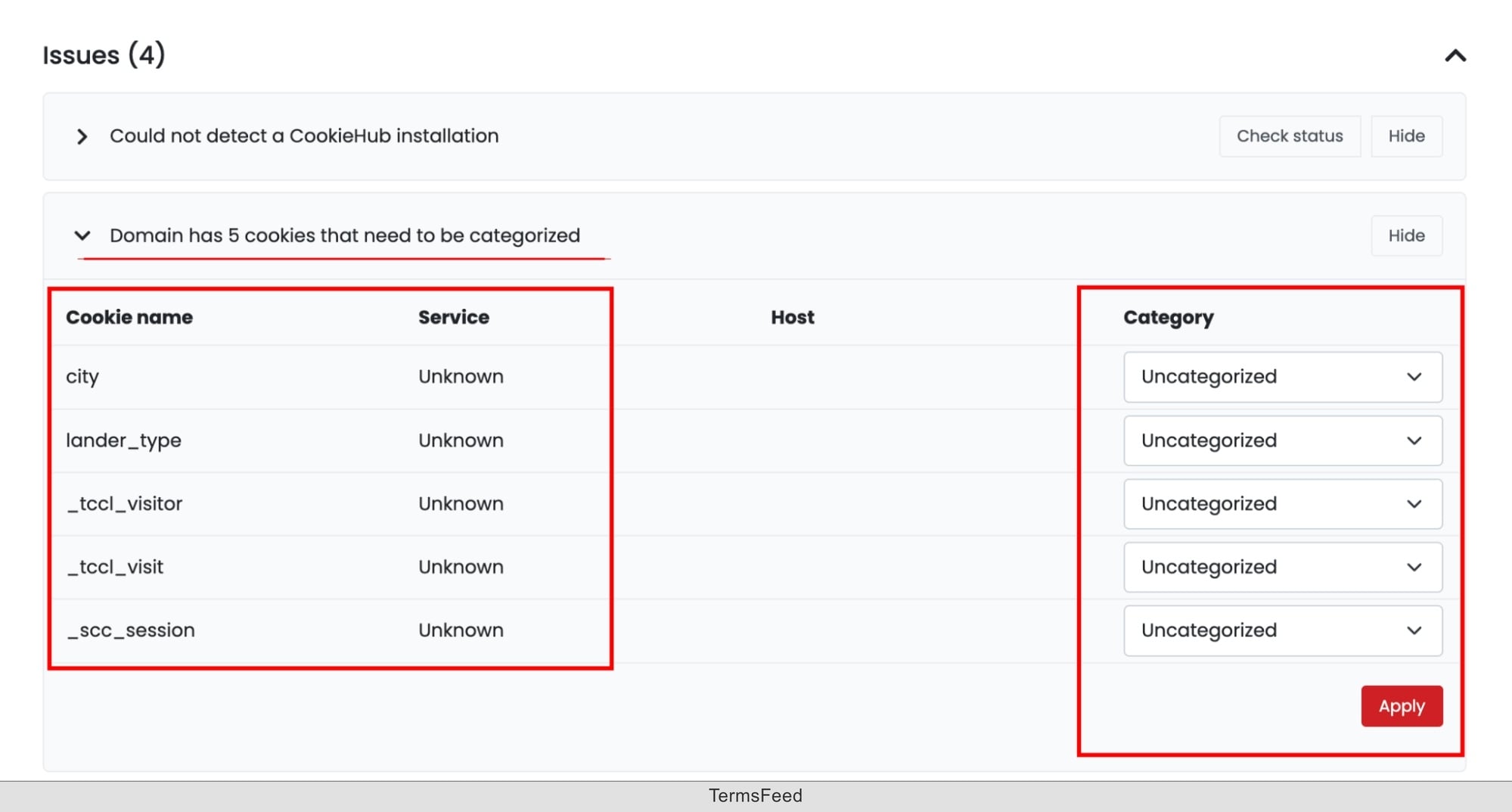
View the report of detected and categorized cookies. Cookies that are displayed as uncategorized are manually assigned to the correct category, as shown in the image below.
- Customize the cookie consent banner that will display on your website.
- Configure geo-targeting rules, Google Consent Mode, and IAB TCF as needed.
- Publish the banner configuration, and verify the banner across regions. Ensure that the banner displays correctly and that regional differences display as expected.

Limitations & Edge Cases
Limitations and edge cases of CookieHub include monthly session limits, a narrow range of features and tools, and plan-gating of useful features.
Firstly, the CookieHub plans are based on monthly session limits. There are no flat usage tiers. This means that traffic spikes push websites into the next tier up, even if the traffic spike is temporary. Businesses with unpredictable traffic potentially face high costs and difficulty planning budgets.
Secondly, CookieHub is primarily a CMP rather than a broader platform. DSAR tools exist, but aren't as deep as enterprise suites. CookieHub does not offer vendor risk-management or governance tools such as those offered by OneTrust or Osano. It has limited document generation, in comparison to companies like TermsFeed. This makes it a better fit for businesses whose needs are relatively limited to cookie consent rather than broader privacy compliance needs.
Thirdly, some of the more useful CookieHub features are only available on higher tiers. For example, support for IAB TCF 2.3 and cross-domain consent syncing, are only available on the Business plan or higher. This means that companies who want to align consent across multiple domains only use the higher plans. Branding removal is another higher-tier feature. For businesses who want to remove CookieHub branding, the higher tiers are required.
What are the Pros of CookieHub?
The pros of CookieHub include the following benefits.
- It has a low entry price with a free trial. CookieHub is an affordable CMP with the Starter pack costing only €6 ($7 USD) per month. This makes it appealing to small businesses or individuals running personal websites, who need lower prices.
- It is a Google-certified CMP with IAB TCF 2.3 and Consent Mode v2 built in. This allows websites to work with Google advertising and analytics. This is a useful feature particularly for websites who want to conduct marketing, customer analysis, or host advertising.
- It has coverage for 60+ languages. This makes CookieHub well-suited for international businesses or websites with visitors from a wide range of countries. Consent banners are able to be displayed in the language of the visitor, which makes the banner more likely to be legally compliant.
-
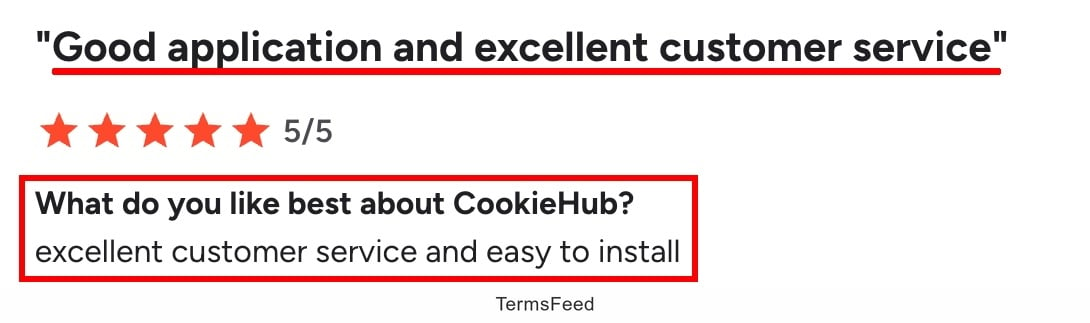
It provides a simple setup and well-reviewed customer support service. Users report a simple setup process, easy implementation with GTM, and fast and competent support. A review from one user from G2 is shown in the image below.
- It has a number of ready-made CMS integrations. CookieHub provides integrations with WordPress, Shopify, Wix, Webflow, GTM, HubSpot, and other frameworks. This makes CookieHub simple to use with already-existing platforms, widgets, and tools.
- It provides cookie scanning with a known-tracker database. The CookieHub cookie scanning feature helps to discover cookies and classifies them. This is appealing for businesses as scans are carried out periodically on an automated basis.

What are the Cons of CookieHub?
The cons of CookieHub include the following downsides.
- It is focused primarily on consent management, without many other tools. CookieHub does not offer broad privacy-governance, vendor-risk, or more detailed tools like many enterprise platforms. This makes it limited in use for larger businesses who need an all-in-one solution or more legal document generation capabilities.
- It has session-based pricing. This means high-traffic sites outgrow tiers (and move into a higher tier), paying more than expected as a result. For businesses that have traffic spikes or fast-growing traffic, this makes pricing unpredictable. Some users report in reviews that the app is too expensive.
- Some advanced features are gated to higher tiers. This includes features such as IAB TCF 2.3, cross-domain consent, and CookieHub branding removal, all of which are only on Business plans or higher. For small businesses this makes CookieHub potentially expensive, as they need to upgrade to higher tiers. However, this is common among other CMPs.
-
Users report that multi-domain syncing is difficult. In particular, making configuration changes is time-consuming, as well as maintaining and syncing settings. One review from a user is shown in the image below.

- It has a smaller ecosystem/community than market leaders. Unlike large competitors such as Osano and OneTrust, CookieHub is relatively small. It has some resources for users but the third-party integrations, tutorials, and troubleshooting resources are relatively limited.
- It doesn't offer a wide range of legal document generation, such as Cookie Policy and Terms and Conditions generators. This makes it less useful for customers who are seeking legally-sound document generation. The focus on consent management means that CookieHub is not an all-in-one platform or legal generator platform. Businesses that need both pair CookieHub with another platform, such as TermsFeed.

What are the alternatives to CookieHub?
The alternatives to CookieHub are platforms focused on legal document generation, risk management and governance, and other CMPs with different pricing and features. Some of the alternatives include the following companies.
-
TermsFeed is a legal agreement generator that provides legal documents and consent solutions for businesses and individuals. Unlike CookieHub, TermsFeed offers a wider range of legal agreement generation options, including Privacy Policies, Terms and Conditions, a Disclaimer Generator, and a Cookie Policy Generator.
Prices for TermsFeed vary depending on the legal agreement generated and its complexity, and are billed on a per-agreement basis. Some free policies are available with limited clauses. For premium legal agreements the price is a "pay only for what you need" approach, with a 7-day refund policy and 100% money back guarantee.
- CookieYes is a CMP designed for small- and medium-size businesses or websites. It has a generous free tier for small sites needing basic consent. Like CookieHub, it offers automatic cookie scanning, a customizable consent banner, and support for a wide range of laws and regulations. Like CookieHub, CookieYes offers a free tier, and support for large businesses.
- Cookiebot is a mid-range CMP with a patented scanner and wide CMS support. Cookiebot is owned by Usercentrics. Like CookieHub, Cookiebot has automated cookie scanning, customizable consent banners, and Google Consent Mode integration. Compared to CookieHub, Cookiebot is best suited for small-to-mid-size websites that want automated compliance with minimal setup.
- Secure Privacy is a budget CMP from $14/month with coverage of 55+ laws. It provides many of the same features as CookieHub. It is well-suited for businesses that are focused on reducing cost, rather than a wide range of features.
- Osano is a compliance-first platform from $199/month. Unlike CookieHub, it has a $500,000 no-fines guarantee. This means that if a customer receives a fine from a regulatory agency as a result of using Osano, Osano will cover it. Osano is more focused on data privacy governance and vendor risk management than CookieHub. It is a good choice for organizations that are looking for compliance assurance.
- OneTrust is an enterprise governance platform with custom and quote-based pricing. Compared to CookieHub, OneTrust is more suitable for large organizations. It provides tools and features to manage privacy, security, and data governance at scale.
What is the history of CookieHub?
The history of CookieHub is focused on the development of privacy compliance tools for businesses. CookieHub was founded in 2018 by Julius Gudmundsson and Astthor Ingi Petursson, and is headquartered in Reykjanesbær, Iceland.
The platform was developed as a dedicated Consent Management Platform, during the time that GDPR enforcement ramped up. The company expanded its coverage to support compliance with the CCPA, CPRA, LGPD, and other laws and regulations. It then grew to the point where it is now used by 30,000+ websites and companies worldwide.
Later, CookieHub became a Google-certified CMP and registered IAB TCF Consent Management Platform. More recently, CookieHub included support for features such as the DSAR workflows in 2026.
In 2026, CookieHub updated its pricing model to a session-based tier approach.

The first step to compliance: A Privacy Policy.
Stay compliant with our agreements, policies, and consent banners — everything you need, all in one place.


