


AI Summarize


Share


OneTrust is an enterprise-grade data privacy platform that helps organizations manage their compliance obligations across multiple jurisdictions and data systems. The platform brings AI governance, consent and preferences, privacy automation, and third-party management under one roof.
OneTrust serves more than 14,000 companies globally, many of them large enterprises, and its pricing reflects that market position. While not publicly listed, OneTrust uses a custom, quote-based model with annual fees ranging from $10,000 to $500,000, depending on scope and modules.
The biggest strength of OneTrust is its scale. The platform gives teams access to a cookie database with over 45 million pre-categorized entries. The tradeoff is operational weight. OneTrust works best for enterprises and is often considered too heavy for small businesses.
These smaller businesses are better suited to TermsFeed, a lightweight privacy compliance platform that delivers attorney-reviewed legal documents as one-time purchases, ready to download and deploy immediately.
Use our Cookie Consent all-in-one solution (Privacy Consent) for cookies management to comply with GDPR & CCPA/CPRA and other privacy laws:
- For GDPR, CCPA/CPRA and other privacy laws
- Apply privacy requirements based on user location
- Get consent prior to third-party scripts loading
- Works for desktop, tables and mobile devices
- Customize the appearance to match your brand style
Create your Cookie Consent banner today to comply with GDPR, CCPA/CPRA and other privacy laws:
-
Start the Privacy Consent wizard to create the Cookie Consent code by adding your website information.
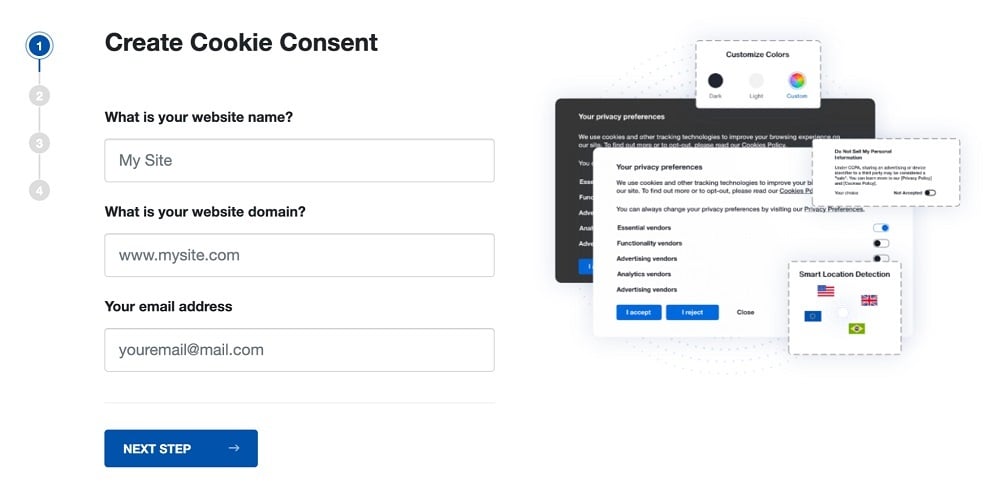
-
At Step 2, add in information about your business.
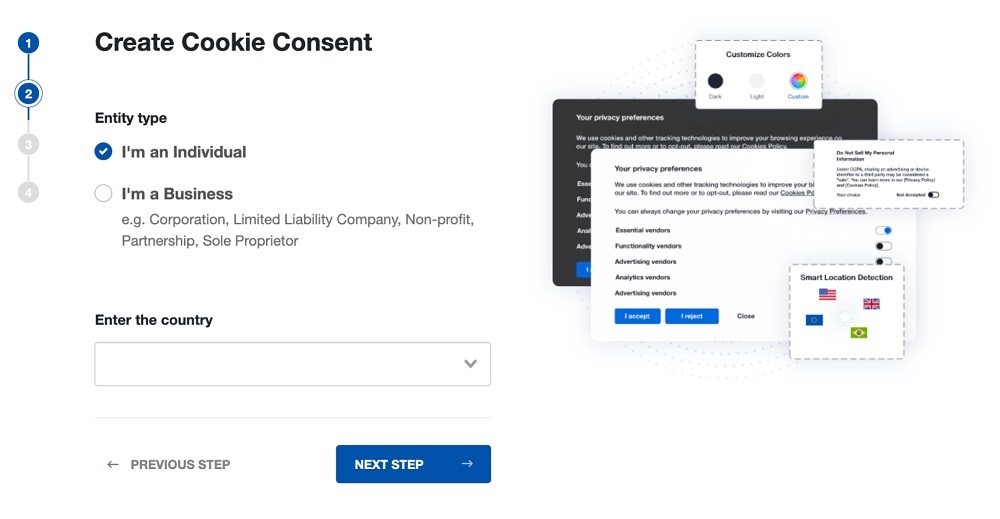
-
At Step 3, select a plan for the Cookie Consent.
-
You're done! Your Cookie Consent Banner is ready. Install the Cookie Consent banner on your website:
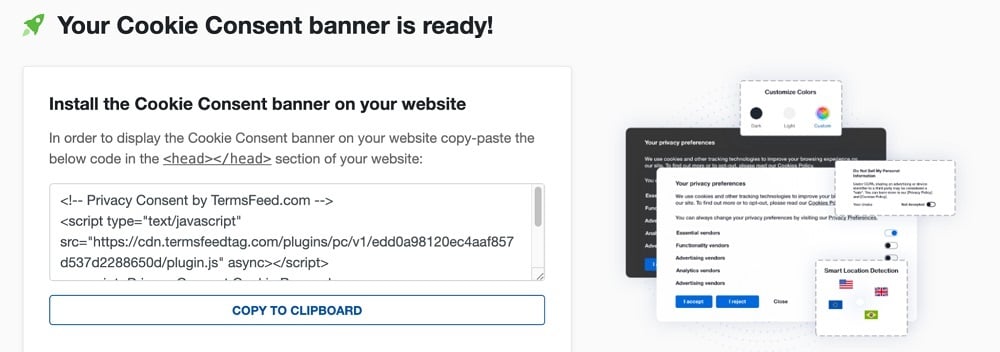
Display the Cookie Consent banner on your website by copy-paste the installation code in the
<head></head>section of your website. Instructions how to add in the code for specific platforms (WordPress, Shopify, Wix and more) are available on the Install page.


- 1. What is OneTrust?
- 2. What is the OneTrust Price?
- 2.1. The 2026 OneTrust Price Floor and Its Impact
- 3. What are the Best OneTrust Features?
- 3.1. 1. Cookie Scanning & Auto-Categorization
- 3.2. 2. Geo-Targeted Consent Banners
- 3.3. 3. Google Consent Mode v2 Integration
- 3.4. 4. IAB TCF v2.2 Framework Support
- 3.5. 5. Centralized Preference Center
- 3.6. 6. A/B Testing for Consent Experiences
- 3.7. 7. Cross-Domain Consent Synchronization
- 3.8. 8. Records of User Consent
- 3.9. 9. Data Subject Request (DSR) Automation
- 3.10. 10. Privacy Impact Assessments (PIAs)
- 3.11. 11. Vendor Risk Management
- 3.12. 12. Universal Consent & Data Governance
- 3.13. 13. Multi-Language Support (100+ Languages)
- 3.14. 14. Enterprise-Grade Security & SSO
- 3.15. 15. Comprehensive Regulatory Intelligence
- 4. How does OneTrust Work?
- 4.1. Prerequisites & Setup Requirements
- 4.2. Implementation Walkthrough
- 4.3. How the Core Engine Works
- 4.4. Common Pitfalls & Edge Cases
- 5. What are the Pros of OneTrust?
- 6. What are the Cons of OneTrust?
- 7. What are the alternatives to OneTrust?
- 7.1. What is the history of OneTrust?
What is OneTrust?
OneTrust is an AI-ready governance platform designed to help organizations manage privacy, security, data governance, and compliance with global regulations like the General Data Protection Regulation (GDPR), California Consumer Privacy Act, and the European Union Artificial Intelligence Act.
The platform serves as a central system for corporate trust. It brings AI governance, privacy automation, consent and preferences, data use, and third-party management into one unified system.
With OneTrust, businesses and compliance teams oversee all areas of governance in a single view without moving between different tools.

A few key characteristics set OneTrust apart in the compliance market.
- Broad module coverage: The platform includes tools for DSR automation, privacy impact assessments, vendor risk management, data mapping, incident response, and AI governance.
- Large-scale data intelligence: A cookie database with more than 45 million pre-categorized entries helps teams automate classification at scale.
- Deep integrations: Nearly 500 integrations connect OneTrust with enterprise systems like Microsoft, Adobe, and Snowflake.
- Regulatory awareness: OneTrust tracks hundreds of global privacy laws, including the General Data Protection Regulation (GDPR) and the California Privacy Rights Act (CPRA), with ongoing updates.
- Enterprise-grade assurance: Certifications such as SOC 2 Type II and FedRAMP support secure deployments, including government use cases.
- Ad ecosystem support: Native support for the IAB Transparency and Consent Framework v2.2 and Google Consent Mode v2 helps maintain compliant advertising and analytics.
- Market maturity: OneTrust boasted over 300 patents and gained recognition as a Leader in the 2025 International Data Corporation (IDC) MarketScape.
The target audience of OneTrust is mid-market and large enterprise organizations that operate across multiple regions and handle large volumes of personal data. More than 14,000 customers, including Samsung, Adobe, DHL, Pfizer, and Atlassian, use the platform to stay compliant.

For these global companies and their compliance teams, the most significant value of OneTrust is maintaining a unified, defensible compliance posture across every system and jurisdiction they operate in.
What is the OneTrust Price?
The OneTrust price is not publicly listed and follows a custom, quote-based model. Current market estimates suggest that businesses pay a minimum of $10,000 per year, scaling to $500,000 or more. This pricing structure effectively positions OneTrust as an enterprise-first solution.
OneTrust uses what it describes as value-based usage meters to determine pricing. Features that cover privacy, third-party risk, AI governance, and compliance programs are priced based on admin users and the amount of inventory managed within the platform.
Features that cover consent and responsible data collection are priced using visitor counts, data profiles, or overall data volume. This means pricing grows alongside the scale and complexity of organizations.
2026 market estimates suggest the following annual ranges by organization size.
- SMB organizations pay from $10,000 to $40,000 per year.
- Mid-market organizations pay from $40,000 to $120,000 per year.
- Large enterprise deployments range from $120,000 to $500,000 or more per year.
Module-level pricing provides another view into how costs build over time. The total spend increases as organizations expand their compliance coverage.
- Cookie Consent module: From about $827 to $1,100 per month.
- CCPA/CPRA compliance module: Around $1,125 per month.
- GDPR compliance module: Around $2,275 per month.
- Privacy Essentials Suite: From approximately $3,680 to $3,860 per month.
OneTrust structures contracts on annual or multi-year terms. Longer agreements sometimes include negotiated discounts, though they tend to increase switching costs over time.
By contrast, privacy compliance solutions like TermsFeed publish offer a free plan and support one-time purchases for compliance documents, with paid plans for ongoing features starting at $10 per month.
The 2026 OneTrust Price Floor and Its Impact
OneTrust introduced a $10,000 per year minimum spend in 2026, tied to a usage-based metering model. Organizations that previously paid under £1,000 annually have reported renewal quotes exceeding £17,000.
This price hike drew widespread criticism, especially from the nonprofit sector. In response, OneTrust stated it is engaging with affected customers to find a viable solution. In the words of Jim Monroe, Chief Customer Officer at OneTrust.
"OneTrust recently evolved its packaging and pricing structure to better reflect how organisations use our platform and the value it delivers, including the introduction of usage-based components. We understand that nonprofit organisations operate within distinct financial constraints, and we take that seriously. We are actively engaging with impacted customers to ensure they have viable paths forward that support both regulatory compliance and their mission."
OneTrust pricing is justifiable for multinational enterprises with dedicated budgets for regulatory infrastructure. However, a growing business or solo website owner who just needs legally sound compliance documents and consent tools will pay for more than they will use.
What are the Best OneTrust Features?
The best OneTrust features are its enterprise-grade consent management, privacy compliance automation, third-party management, and regulatory intelligence.
The following compliance modules represent the strongest parts of OneTrust.
- Cookie Scanning & Auto-Categorization
- Geo-Targeted Consent Banners
- Google Consent Mode v2 Integration
- IAB TCF v2.2 Framework Support
- Centralized Preference Center
- A/B Testing for Consent Experiences
- Cross-Domain Consent Synchronization
- Records of User Consent
- Data Subject Request (DSR) Automation
- Privacy Impact Assessments (PIAs)
- Vendor Risk Management
- Universal Consent & Data Governance
- Multi-Language Support (100+ Languages)
- Enterprise-Grade Security & SSO
- Comprehensive Regulatory Intelligence
Below, we break down what each feature does, why it matters for compliance teams, how end users benefit, and what each looks like in practice.
1. Cookie Scanning & Auto-Categorization
Cookie Scanning & Auto-Categorization is an automated detection and classification system that scans websites for cookies on a scheduled basis and classifies each cookie using a database of over 45 million pre-categorized entries.

After scanning for cookies and other trackers, the system assigns them to categories by purpose (strictly necessary, functional, analytics, targeting, etc.) and by type (first party, third party)

OneTrust automatically updates relevant legal documents like your Privacy Policy or Cookies Policy, based on the scan results. This allows for more accurate privacy disclosures and consent choices.
For example, a multinational retailer operating in 50 regional sites schedules weekly scans across all domains. When a new affiliate marketing cookie appears on the French site, the automated cookie scan catches it, categorizes it, and updates the cookie list instantly.
2. Geo-Targeted Consent Banners
Geo-Targeted Consent Banners is a feature that automatically displays region-specific consent experiences based on visitor geolocation. The system detects where a visitor is connecting from and adapts the banner language, opt-in or opt-out requirements, and privacy disclosures to match relevant laws.

This feature gives compliance teams jurisdictional precision across privacy laws. For instance, the GDPR and ePrivacy Directive require explicit opt-in consent for non-essential cookies whereas the CPRA follows an opt-out model with key disclosures like the "Do Not Sell or Share My Personal Information" notice.
The OneTrust geo-targeting feature lets compliance teams honor these region-specific consent choices automatically without maintaining separate systems for each market.
A website visitor in Munich, for instance, receives a GDPR-compliant cookie banner with clear "Accept All" and "Decline All" buttons alongside granular options for cookie categories.

A visitor in California, however, receives a CPRA-compliant banner with a clear option to opt out of the sale or sharing of their personal information.

3. Google Consent Mode v2 Integration
Google Consent Mode v2 Integration is a native integration that allows OneTrust to communicate the consent status of users directly to the analytics and advertising tags of Google.
Google Consent Mode v2 integration works by sending customer consent signals to services like Google Analytics 4 (GA4), Google Ads, and Google Tag Manager. This allows websites to adjust how tracking tags behave based on whether a visitor accepts or rejects cookies.
A Digital Markets Act (DMA) enforcement in March 2024 made Consent Mode v2 mandatory for any business running Google Ads or Analytics while targeting visitors in the European Economic Area (EEA).
The native support for this feature on OneTrust means compliance teams keep their analytics and ad services functional within the boundaries of European privacy law without a separate implementation. A publisher running Google Ad Manager across 20 European markets, for instance, maintains ad revenue while honoring every consent choice.
4. IAB TCF v2.2 Framework Support
IAB TCF v2.2 Framework Support is a technical integration that certifies OneTrust as a registered Consent Management Provider (CMP) under the Interactive Advertising Bureau (IAB) Transparency and Consent Framework (TCF).
Version 2.2 of the IAB TCF introduced stricter transparency requirements and removed legitimate interest as a legal basis for most advertising activities, which increased compliance pressure on publishers.
The OneTrust CMP captures consent choices and passes standardized signals to advertising vendors who participate in the IAB TCF ecosystem.

Compliance teams value this feature because Google requires the use of the IAB TCF v2.2 framework for publishers who serve ads in the European Economic Area (EEA). A news publisher serving European visitors, for example, uses OneTrust to manage consent across dozens of advertising partners simultaneously without risking compliance violations.
5. Centralized Preference Center
Centralized preference center is a unified, user-facing dashboard where visitors manage their consent choices across cookie categories, email communications, and other data processing activities, all in one place.
Privacy laws like the GDPR and CCPA/CPRA require that withdrawing consent be as easy as giving it. In other words, these laws expect organizations to make preference changes or updates extremely easy and accessible.
For compliance teams, centralized controls reduce fragmentation and create a cleaner audit trail across systems. End users receive a simpler consent experience because they do not need to repeat preferences across different channels.
A retail brand operating ecommerce, loyalty, and email marketing systems, for example, uses a centralized preference center to synchronize customer choices across all channels.
6. A/B Testing for Consent Experiences
A/B Testing for consent experiences is a OneTrust feature that lets organizations test different consent banner designs, layouts, and messaging to measure which version delivers the highest opt-in rates.
You run controlled experiments in which a percentage of visitors see one banner version while the rest see another, with results tracked via the OneTrust dashboard.

A/B testing lets compliance teams balance both legal requirements and user experience. Organizations test button colors, wording, color contrast, and banner size against visitor behavior to learn which configuration increases consent without resorting to deceptive consent practices, known as dark patterns.
A streaming platform, for example, tests simplified cookie banner language against a longer, legal-focused copy to determine which version produces stronger engagement while remaining compliant.
7. Cross-Domain Consent Synchronization
Cross-Domain Consent Synchronization is a technical process that shares user consent preferences across websites, apps, and connected digital systems within a corporate portfolio.
The system recognizes a visitor through a shared identifier to ensure that their consent choices apply across all digital properties owned by the organization. OneTrust provides an infographic showing what this looks like.

Cross-domain consent synchronization provides smoother privacy management at scale, especially for large organizations with hundreds of digital properties. Compliance teams maintain centralized governance while reducing consent banner fatigue for their users.
A retailer with separate domains for different countries uses synchronized consent to ensure a visitor who declines tracking on a parent company site is not prompted again on subsidiary sites.
8. Records of User Consent
Records of User Consent is a secure ledger that stores detailed logs of every consent event for audit and compliance purposes. The system captures the identity of the visitor, the timestamp, the specific version of the policy accepted, and how preferences changed over time.

Under Article 7 of the GDPR, organizations bear the burden of demonstrating valid consent. Many other privacy laws mirror this provision in some form. The consent records feature generates logs that satisfy this legal requirement automatically.
Compliance teams use these logs to defend against regulatory inquiries and lawsuits. Administrators gain a centralized record that supports dispute resolution and internal reporting.
9. Data Subject Request (DSR) Automation
Data Subject Request (DSR) Automation is a workflow that handles the intake, routing, identity verification, and fulfillment of privacy requests submitted by users who exercise their rights under the GDPR, CCPA (CPRA), and similar laws.

The GDPR requires DSR responses within 30 days, while the CPRA sets a 45-day deadline. DSR automation helps organizations fulfill high-volume, complex requests within these legal deadlines by coordinating with relevant internal databases.
For compliance teams, this feature automates key DSR activities like ID verification, as well as data retrieval, deletion, and redaction. For users, it delivers faster and more consistent responses to DSRs. A SaaS company, for example, uses OneTrust to verify identities, route DSRs to the appropriate internal team, and automatically track fulfillment status.
10. Privacy Impact Assessments (PIAs)
Privacy Impact Assessments (PIAs) is a module that provides templates and workflows for evaluating data processing risks before launching new projects or systems.
Under Article 35 of the GDPR, PIAs (also known as Data Protection Impact Assessments) are required for high-risk data processing activities, and launching without one exposes organizations to enforcement action.
OneTrust centralizes PIA workflows, assigns reviewers, tracks completion, and stores results as auditable records. OneTrust provides a helpful infographic of the results as seen in the charts below.

For compliance teams, this feature creates a structured, repeatable process instead of ad hoc reviews. A fintech company, for example, conducts a PIA before launching a new credit-scoring model to ensure data usage aligns with data protection requirements.
11. Vendor Risk Management
Vendor Risk Management is a OneTrust feature that monitors third-party vendors for privacy and security risks throughout the relationship lifecycle.
The system centralizes vendor inventories, automates risk scoring, and tracks all vendor contract terms, certifications, and sub-processor relationships. It then provides over 50 control frameworks to help organizations manage vendor risks internally.

This feature gives compliance teams better visibility into third-party vendor exposure to inform their decisions. A healthcare provider, for example, uses OneTrust to evaluate whether a cloud vendor meets data protection standards before sharing sensitive patient information.
12. Universal Consent & Data Governance
Universal Consent & Data Governance is a module that connects consent management with broader data governance processes by mapping data flows, tracking processing activities, and managing retention schedules alongside consent signals.
This feature creates a unified view of what data an organization holds, why it holds it, how long it keeps it, and whether valid consent supports the processing.
This ensures that what users agree to reflects how data is handled internally within organizations. After all, collecting valid consent means little if the downstream data handling contradicts it.
For example, a multinational retailer uses this to prove to regulators that its data flows and consent practices adhere to the provisions of its published Privacy Policy.
13. Multi-Language Support (100+ Languages)
Multi-Language Support (100+ Languages) is a technical capability that localizes consent banners, preference centers, and other parts of the platform interface for international privacy operations.
OneTrust provides 100+ out-of-the-box translations across many areas of the platform, including menus, settings, banners, privacy disclosures, and public-facing consent tools. This helps international organizations deliver region-specific privacy experiences without rebuilding interfaces for every market.
There are limits, however. OneTrust does not provide automatic translations for custom fields, custom templates, or certain preview features. A company using a custom questionnaire, for example, needs to translate the text independently to ensure accuracy.
14. Enterprise-Grade Security & SSO
Enterprise-Grade Security & SSO is a set of high-level protections within OneTrust, including SOC 2 Type II certification and Single Sign-On (SSO) integration for account access.
OneTrust specifically uses Security Assertion Markup Language (SAML) Single Sign-On (SSO) to simplify the login and logout process for large teams.

Combined with role-based access controls, these security features help organizations limit who accesses sensitive compliance data and administrative settings. Financial institutions, for instance, are able to meet strict industry security audits with the enterprise-grade security safeguards within OneTrust.
15. Comprehensive Regulatory Intelligence
Comprehensive Regulatory Intelligence is a centralized database of more than 800 global privacy regulations that update automatically as laws change. The system maps each regulation to applicable platform modules and alerts compliance teams when new requirements affect their configured workflows.
OneTrust monitors all legal and privacy developments across the world to ensure the system remains current. With this feature, compliance teams spend far less time monitoring legal developments manually across dozens of jurisdictions.

A multinational company expanding into Brazil, for example, uses OneTrust to map requirements under the Lei Geral de Proteção de Dados (LGPD) alongside existing GDPR workflows instead of rebuilding policies and assessments from scratch.
How does OneTrust Work?
OneTrust works by placing a JavaScript-based Consent Management Platform (CMP) script on a website or app, which then scans for trackers, records user privacy choices, and distributes those signals across connected systems.
The process starts with a master script installed in the <head> section of a website. That script acts like a traffic controller for cookies, pixels, analytics tools, and advertising tags.

Behind the scenes, OneTrust continuously scans all digital properties for cookies and classifies them using its cookie database. It then displays consent banners and privacy disclosures based on location-specific rules.
Once a visitor accepts or rejects tracking, OneTrust connects those consent choices to downstream systems through APIs, GTM integrations, CMS plugins, and mobile SDKs. A rejected advertising category, for example, prevents marketing pixels from loading across connected tools.
OneTrust extends beyond banner management as well. The platform automates privacy activities like data subject requests, syncs consent signals across domains, and stores detailed audit logs of user choices for regulatory reporting.
Prerequisites & Setup Requirements
Prerequisites & setup requirements for OneTrust include technical access to the website, visibility into data collection systems, and internal teams that manage privacy operations.
Most implementations start with adding the OneTrust CMP script to the <head> section of the site before analytics or advertising scripts load. Organizations then connect OneTrust to systems such as Google Tag Manager (GTM), customer relationship management (CRM) platforms, mobile apps, and analytics tools through APIs or native integrations.
Several moving parts usually need alignment before launch.
- Legal teams define consent language and regional rules
- Marketing teams identify tracking technologies in use
- IT teams configure scripts, domains, and integrations
- Security teams review access controls and data flows
This process is an enterprise-level project that often takes weeks to finalize. In other words, OneTrust is ideal for organizations running complex privacy programs across multiple systems and jurisdictions. A small business looking for a basic cookie banner or Privacy Policy rarely needs this level of compliance coordination.
Implementation Walkthrough
Implementation walkthrough for OneTrust starts with script deployment, then moves into scanning, configuration, testing, and ongoing governance.
The process usually works as follows.
- Firstly, install the OneTrust JavaScript tag through direct code placement, GTM, or a supported CMS integration.
- Secondly, run a full site scan, so OneTrust identifies cookies, trackers, pixels, and embedded third-party scripts automatically.
- Thirdly, review the detected technologies and assign or adjust consent categories where needed.
- Fourthly, configure the consent banner, preference center, geolocation behavior, and integrations with analytics or advertising systems.
- Fifthly, test whether non-essential scripts remain blocked before consent and confirm that audit logs capture user choices correctly.
Enterprise deployments go beyond basic consent banner setup. They often involve configuring multiple domains, regional privacy rules, internal approval workflows, and API-based integrations. This explains why OneTrust fits companies with dedicated compliance operations and budgets rather than small websites.
How the Core Engine Works
How the core engine works in OneTrust centers on detecting data collection activity, enforcing consent rules, and propagating user choices across connected systems.
The scanning engine crawls websites and apps to identify all cookies, SDKs, tracking pixels, and third-party scripts. OneTrust then compares those findings against its database of more than 45 million categorized cookie trackers to ensure nothing is misclassified.
The dynamic tag manager reads the location and serves the correct banner when a visitor arrives. The engine sends a "kill signal" to marketing tools to stop data flow immediately if the visitor opts out. Furthermore, the engine uses APIs to connect to your CRM, which lets it find and delete the data of a customer automatically if they submit a deletion request.
OneTrust stores every interaction, including timestamps, consent status, policy versions, and change history in an audit trail meant for regulatory reporting.
This architecture matters most in large organizations where dozens of systems collect personal data at the same time. Smaller businesses rarely need this level of orchestration, which makes the operational weight and pricing of OneTrust difficult to justify for simpler compliance needs.
Common Pitfalls & Edge Cases
Common pitfalls & edge cases in OneTrust usually involve incomplete scans, script conflicts, misconfigured consent rules, and operational sprawl across large environments.
Websites often load trackers dynamically through tag managers, embedded videos, or chat widgets. Some trackers escape detection during initial scans, especially on heavily customized sites. Compliance teams usually need recurring scans and manual reviews to catch new trackers introduced after deployment.
Consent enforcement is another key consideration. Optimization plugins or incorrectly placed scripts sometimes allow tracking tags to fire before consent loads. This issue defeats the purpose of the CMP entirely.
Multi-domain deployments add more complexity. Consent synchronization breaks easily when regional settings, subdomains, or mobile SDK configurations differ across properties.
These problems rarely appear on small informational websites, but they become much more common inside enterprise environments with multiple departments and regions, which is exactly the market OneTrust targets.
What are the Pros of OneTrust?
The pros of OneTrust are the depth of its compliance tooling, the scale of its automation, and the ability to centralize privacy operations across large organizations.
Reviewers and enterprise teams consistently highlight the following strengths.
- Comprehensive Privacy Management Suite: OneTrust combines consent management, DSAR automation, privacy assessments, AI governance, vendor risk monitoring, and data mapping inside one platform. Large organizations avoid stitching together multiple point solutions, which reduces operational fragmentation.
- Largest Pre-Categorized Cookie Database in the World: OneTrust maintains a database of more than 45 million categorized cookies and trackers. This reduces the manual review work compliance teams face during site scans and recurring audits.
- Strong Regulatory Coverage: OneTrust tracks more than 800 global laws and frameworks across privacy, data governance, AI, and security. Compliance teams receive ongoing updates as regulations evolve, which matters for businesses operating across multiple jurisdictions.
- Enterprise-Grade Security Controls: SOC 2 Type II certification, SAML Single Sign-On (SSO), role-based access controls, and audit-ready consent logs make OneTrust suitable for heavily regulated industries such as healthcare, finance, and government contracting.
- Native Google Consent Mode v2 and IAB TCF Support: OneTrust integrates directly with Google Consent Mode v2 and the IAB Transparency and Consent Framework (TCF) v2.2. Publishers and advertisers maintain privacy-compliant ad measurement workflows without manually building custom integrations.
- Advanced A/B Testing Consent Optimization: OneTrust includes A/B testing for banner layouts, wording, and consent flows. Large marketing teams use this to improve opt-in performance while staying aligned with all regional legal requirements.
- Built for Multi-Brand Enterprise Environments: OneTrust scales across thousands of domains, apps, business units, and regional privacy rules from one centralized dashboard. This becomes especially valuable for multinational organizations managing compliance across dozens of countries simultaneously.
What are the Cons of OneTrust?
The cons of OneTrust are the high cost, operational weight, and implementation complexity that come with its enterprise-focused nature. While powerful, the platform introduces significant friction for teams without massive budgets or dedicated technical staff.
The following drawbacks appear consistently across customer reviews and deployment experiences.
- Enterprise-Only Pricing ($10,000/yr Minimum): OneTrust pricing starts around $10,000 per year and scales significantly from there. This places the platform outside the budget of many startups, solo operators, and small businesses. For many, paying five figures is a non-starter, especially when many alternatives offer similar legal coverage at a fraction of the cost.
- No Transparent Cost Breakdown: Businesses must contact the OneTrust sales team and move through a quote process before understanding the actual cost. This slows down evaluation and makes competitor comparisons harder early in the buying process.
- Steep Learning Curve: OneTrust covers many modules and workflows at once. Legal teams, marketers, developers, and IT staff often need onboarding before they use the system effectively. Some organizations find they need to hire a specialized consultant just to keep the system configured correctly.
- Implementation Takes Weeks or Months: Between mapping data flows, setting up APIs, and testing signal propagation, a full OneTrust deployment often takes weeks or months.
- Too Heavy for Basic Compliance Needs: OneTrust is considered excessive for organizations without multi-jurisdictional compliance obligations and websites that just need a simple cookie banner and Privacy Policy.
- Costs Increase as Modules Expand: OneTrust pricing follows a modular structure tied to usage, domains, users, and compliance features. Costs increase quickly once organizations add DSAR automation, advanced A/B testing, AI governance, or vendor risk tools.
- Interface Feels Dense for New Users: Reviewers frequently note that OneTrust feels cluttered and complex, given its sheer number of workflows and administrative controls. Teams unfamiliar with enterprise governance platforms find the interface difficult to navigate compared to lighter data privacy compliance tools.
What are the alternatives to OneTrust?
The alternatives to OneTrust are privacy compliance platforms that serve different business sizes, budgets, and operational needs. While OneTrust targets large enterprises, many competitors focus on simplicity, affordability, or faster deployment.
- TermsFeed: A lightweight, affordable privacy solution that focuses on fast, practical compliance for small and midsize businesses. The platform generates attorney-reviewed legal agreements, including Privacy Policies, Terms and Conditions, Cookie Policies, and consent banners.
- Cookiebot: Best known for its mid-market CMP and acclaimed for its automated cookie scanning and strong WordPress integration.
- Osano: A compliance-first platform with a strong focus on reducing regulatory exposure. Its "No Fines, No Penalties" pledge promises up to $500,000 in coverage if a customer faces fines while correctly using the platform.
- Secure Privacy: A CMP offering affordable consent management with broad legal coverage. Pricing starts around $14 per month, and the platform supports more than 55 privacy laws globally.
- CookieYes: A lightweight CMP designed for websites that need straightforward cookie compliance. Best suited for publishers, small ecommerce stores, and businesses that only need cookie compliance rather than broader governance features.
- Enzuzo: Focuses on ecommerce and Shopify merchants. Its generous free plan and Shopify-native workflows make it attractive for smaller online stores that want quick compliance coverage without enterprise pricing or long implementation cycles.
What is the history of OneTrust?
The history of OneTrust is closely tied to the rapid growth of global privacy regulation over the last decade. What began as a compliance platform for GDPR preparation quickly expanded into one of the largest trust governance companies in the world.
Key milestones in the history of OneTrust are provided below.
- 2016: Kabir Barday founded OneTrust in Atlanta, Georgia, to help businesses prepare for the upcoming GDPR enforcement deadline.
- 2016: OneTrust acquired Optanon (the parent company of Cookiepedia), which significantly strengthened its cookie classification and scanning capabilities.
- 2021: OneTrust reaches its peak private valuation of $5.3 billion following a Series C funding round, becoming one of the highest-valued companies in the compliance software market. This era marks its expansion into ESG (Environmental, Social, and Governance) and ethics management.
- 2022-2024: OneTrust expanded its data governance capabilities as businesses faced growing scrutiny around AI systems and cross-border data processing.
- 2025: OneTrust was recognized as a Leader in the IDC MarketScape for Data Privacy Compliance Software and continued expanding its enterprise governance ecosystem.
- 2026: OneTrust pivots heavily into AI Governance, launching tools to help companies manage the risks of Large Language Models (LLMs) and automated decision-making.
Today, OneTrust serves over 14,000 customers, including 75% of the Fortune 100, and maintains the largest regulatory research database in the world through its DataGuidance acquisition.

The first step to compliance: A Privacy Policy.
Stay compliant with our agreements, policies, and consent banners — everything you need, all in one place.


