


AI Summarize


Share


Privacy UX is about hitting the sweet spot between a great user experience and compliance with data privacy laws. Short for "privacy user experience," effective privacy UX allows businesses to collect the data they need while allowing customers to retain full control over how it is used.
This balance can be hard to strike. Companies aim to provide a streamlined user experience that delivers great business results, but cutting corners on data privacy is out of the question. In this article, we'll take a look at how a well-designed privacy UX can protect your company without sacrificing usability for customers. This includes looking at how to design the core components of data privacy compliance, including clickwrap agreements, cookie banners, and consent flows in a way that doesn't make customers click away.
We'll also draw lessons from some real-world examples of what happens when a privacy UX goes wrong. Let's get started.
Use our Cookie Consent all-in-one solution (Privacy Consent) for cookies management to comply with GDPR & CCPA/CPRA and other privacy laws:
- For GDPR, CCPA/CPRA and other privacy laws
- Apply privacy requirements based on user location
- Get consent prior to third-party scripts loading
- Works for desktop, tables and mobile devices
- Customize the appearance to match your brand style
Create your Cookie Consent banner today to comply with GDPR, CCPA/CPRA and other privacy laws:
-
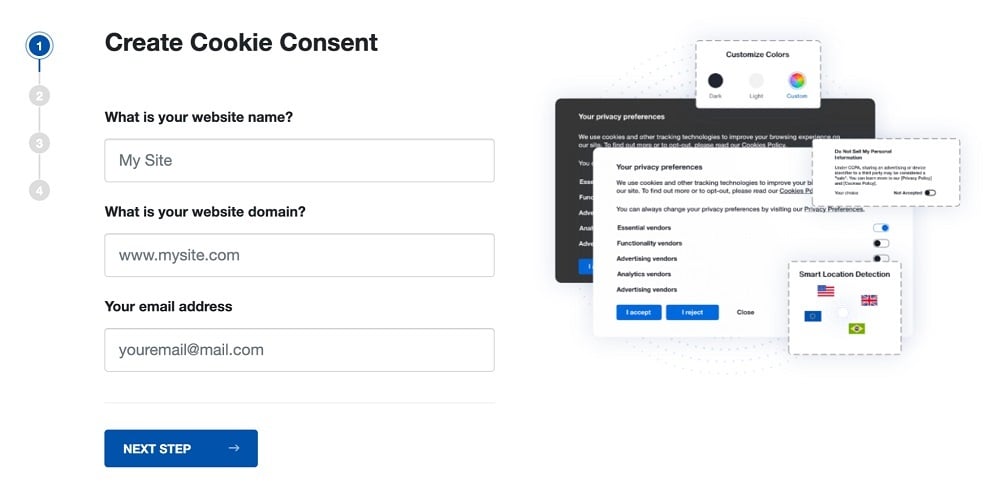
Start the Privacy Consent wizard to create the Cookie Consent code by adding your website information.
-
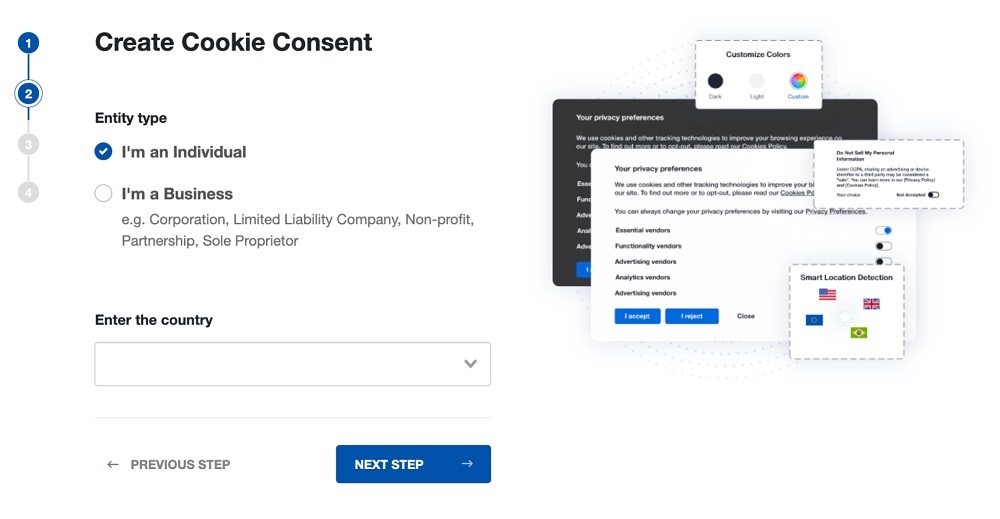
At Step 2, add in information about your business.
-
At Step 3, select a plan for the Cookie Consent.
-
You're done! Your Cookie Consent Banner is ready. Install the Cookie Consent banner on your website:
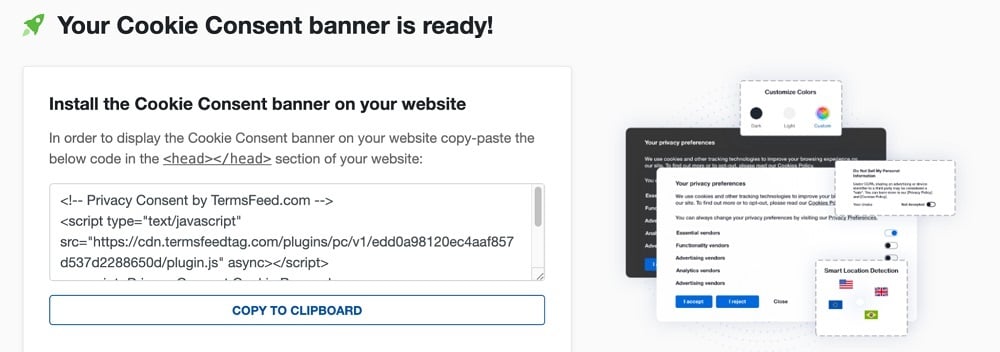
Display the Cookie Consent banner on your website by copy-paste the installation code in the
<head></head>section of your website. Instructions how to add in the code for specific platforms (WordPress, Shopify, Wix and more) are available on the Install page.


- 1. Clickwrap vs. Browsewrap: How Design Impacts Compliance
- 1.1. Browsewrap: Good for UX, but tough to enforce
- 1.2. Clickwrap: Gold standard, but UX needs careful design
- 1.3. Clickwrap design best practices
- 1.4. Legal dangers of poor privacy UX
- 2. Consent Flows: Make Sure "Yes" Really Means Yes
- 2.1. Design traps to avoid for consent flows
- 2.2. Penalties for breaches of consent regulations
- 3. The Dangers of Dark Patterns
- 3.1. How dark patterns contravene the law
- 3.2. Severe penalties for violators
- 4. Balancing Business Goals With Legally Sound UX
- 4.1. Implementing privacy by design
- 4.2. Checklist for privacy UX
- 5. Summary
Clickwrap vs. Browsewrap: How Design Impacts Compliance
There are two main ways of obtaining user consent to the terms of your Privacy Policy: clickwrap and browsewrap. While browsewrap is a clear winner for general UX, for privacy UX, businesses should give serious thought to clickwrap.
Browsewrap: Good for UX, but tough to enforce
Browsewrap means that by simply browsing a website, you consent to the company collecting your personal data. Some websites display a cookie notice that directs users to their Privacy Policy, while others include a link somewhere on their home page.
California-based clothing retailer American Apparel uses a classic browsewrap agreement on its retail site. New customers are welcomed by a prominent cookie notice that includes a link to its Privacy Policy:

The Privacy Policy clearly states that simply browsing the website constitutes consent for American Apparel's parent company, Gildan Activewear Inc., to collect your personal data. The only way to withhold consent is to leave the site.

While the CCPA, California's data privacy law, does not require clickwrap, companies may find browsewrap hard to enforce. Therefore, while not explicitly required, clickwrap may be the safer option.
This was well illustrated by the 2014 case of Nguyen vs Barnes & Noble. In this landmark case, the United States Court of Appeals for the Ninth Circuit found that a browsewrap agreement Mr Nguyen had entered into was unenforceable.
So, while browsewrap may seem good for UX, it could leave your business exposed if you try to enforce your Privacy Policy or other agreements on your site in the future.
Clickwrap: Gold standard, but UX needs careful design
Clickwrap requires the user to take action, such as clicking "I Agree" to the terms of your Privacy Policy or Terms & Conditions.
Clickwrap is considered the gold standard for obtaining consent. Courts consistently uphold clickwrap as enforceable, which means your Privacy Policy and Terms & Conditions are more likely to be upheld if a complaint comes to court.
Some data privacy laws, such as the General Data Protection Regulation (GDPR), which covers much of Europe, effectively require clickwrap as they insist on clear and affirmative consent.
The GDPR-compliant English translation of the cookie banner from Amazon.fr appears at the bottom of the screen, blocking out the bottom third until the user makes a choice. The buttons are clear, and there is the option to customize consent. Links to the Cookie Notice, Privacy Policy, and list of third parties who use customers' cookies are prominently displayed and linked.

Clickwrap design best practices
Clickwrap can seem clunky and detract from the user experience. However, with good design, a clickwrap banner or pop-up can be visually appealing and legally compliant.
For legal compliance, ensure it ticks the following boxes:
- Use a checkbox and "I agree" button (never pre-check the box)
- Make the wording clear and explicit
- Include links to your Privacy Policy and any other relevant terms
- Maintain up-to-date consent logs
From a UX perspective, the following tips can enhance the experience:
- Use a readable font size
- Don't cramp the checkbox – use sufficient padding
- Use consistent color contrast to avoid accusations of dark patterns (read on for why to avoid them)
The example below from the British luxury retailer Smythson shows consistent color contrast for the "Accept All" and "Configure Your Cookies" options.

This consistency carries through into the Privacy Preference Center, with equal weight given to opt-in and opt-out.

Good privacy UX design builds customer confidence by promoting transparency. It can also protect your company from legal challenges based on the use of dark patterns--deliberate, non-transparent design features that coerce users into doing something they don't want to.
Legal dangers of poor privacy UX
Get your privacy UX wrong, and a clunky user experience will be the least of your worries. In December 2021, the French data protection authority, the CNIL, imposed a €150 million fine on Google LLC and Google Ireland Limited.
The CNIL claimed google.fr and youtube.com users were not given the option to refuse cookies as easily as accept them. The takeaway? Poor privacy UX design led to a substantial fine.

Google complied with the order and avoided further penalties. However, it's worth noting that neither Google LLC nor Google Ireland Limited is based in France. This illustrates how important it is for companies to follow data privacy laws in the jurisdiction where the customers they are targeting live, not just where the company is based.
Consent Flows: Make Sure "Yes" Really Means Yes
While standards for consent vary depending on the jurisdiction, the most rigorous is probably the GDPR standard. The GDPR requires consent to be:
- Freely given
- Specific
- Informed
- Unambiguous
This means customers actively choose to give consent, with full understanding of what they are signing up for. As data privacy regulations are likely to become more stringent, implementing this standard is good future-proofing, even if you do not currently target EU customers.
Design traps to avoid for consent flows
Consent must be obtained transparently. However, the following practices are anything but clear and easy to understand:
- Bundled consents: For example, agreeing to sign up for a newsletter also opts you into third-party data sharing.
- No real choice: Hiding the button for withholding consent, or stating "You must agree to proceed" takes away choice, so consent is not freely given.
- Deliberately confusing UI features: Pre-ticked boxes or toggles that say the opposite of what a reasonable person would expect are sneaky and could have legal ramifications.
Embedding data protection "by design and default" - a key tenet of the GDPR and other data privacy laws - will help you obtain consent legally and improve your privacy UX.
Some best practices include:
- Separating opt-ins for each data use purpose (as seen in the Smythson example above)
- Clear language, no legalese, explaining why you are collecting the data
- Consent withdrawal options clearly explained
A layered approach, as endorsed below by the UK Information Commissioner's Office, is often the best solution for a great privacy UX. A layered dashboard begins with a short notice with key information, followed by the option to expand each section to learn more.
UX designers can use this to their advantage to design dashboards and interfaces that are both compliant and easy to use.

Penalties for breaches of consent regulations
In 2020, the Norwegian Consumer Council filed a complaint against Grindr, a data app, for unlawfully sharing personal data with other companies for marketing purposes. Grindr was found to have collected data without valid reasons. Additionally, it failed to obtain valid consent from users because it did not openly explain how their personal data would be used.
The result? Grindr was hit with an administrative fine of €6.5 million for failure to comply with the GDPR's laws on consent.
The Dangers of Dark Patterns
Dark patterns are not the same as poor UX design. Dark patterns are deliberately deceptive UX practices that aim to make users give consent they would otherwise not have given. These practices can turn customers off and could even be illegal.
Here are a few examples of dark patterns every business should avoid:
- Confirmshaming: If businesses guilt-trip customers into giving consent, it may not be legally valid. For example, having someone click "No thanks, I hate saving money."
- Roach motel: Easy to give consent, very hard to withdraw it. If you can sign-up for a subscription with one click, but it takes five steps to cancel, you';re in a roach motel.
- Hidden costs: Extra charges that only appear at the final stage of checkout.
- Forced continuity: Hard to cancel a subscription after the free trial period ends.
- Misdirection: Using color, confusing layouts, or language to highlight one choice and draw attention away from others.
These practices are not just annoying - they can be illegal and have resulted in penalties for violating data privacy and trade laws.
How dark patterns contravene the law
The practice of using dark patterns goes against key statutes of data privacy laws. For example, the California Consumer Privacy Act (CCPA) defines and prohibits dark patterns.

Recently, prominent companies have been fined for violating both data privacy and trade laws by using dark patterns to deceive customers or make it harder for them to provide informed consent.
Severe penalties for violators
An online children's education provider operating as ABCmouse was found guilty of using dark patterns to charge customers ongoing fees for its services without their consent. The Federal Trade Commission (FTC) issued a $10 million fine for these breaches and made the comments below.

Whether obtaining consent for cookies or charging customers for ongoing subscriptions, businesses need to be up-front and transparent.
Balancing Business Goals With Legally Sound UX
One of the biggest challenges for businesses in privacy UX design is navigating the inherent tension between business goals and obligations under data privacy laws.
Marketing and product teams want to streamline the user experience. That might mean interfaces that limit clicks, display fewer pop-ups, and provide a faster path to sign-ups. However, that needs to be balanced with ensuring users are actually providing informed, lawful consent.
To manage this tension, your business needs to build privacy into UX conversations from the start, not bolt it on as an afterthought. Legally sound privacy UX doesn't have to ruin the user's experience, but it does have to be transparent, clear, and result in accurate consent logs.
Implementing privacy by design
Privacy by design is a mindset that everyone in your business needs to share. Some practical ways to implement this in small businesses include:
- Training UX designers to factor in legal considerations when designing sign-ups, subscriptions, or anything else that uses personal data.
- Rigorous user testing – listen to feedback from users on whether they felt coerced or confused when asked for consent.
- Create a system for storing a timestamped consent log as soon as your site goes live, showing what version of the terms the user agreed to.
The result will be clear, unambiguous consent banners, cookie notices, and subscription sign-ups such as this one from the news agency Reuters. Equal weight is given to the accept and reject options, which have consistent coloring and design. The "Show Purposes" button benefits from a contrasting design that differentiates it from the two main options.

Checklist for privacy UX
When reviewing each element of the user experience, ask yourself:
- Is consent optional where it legally should be?
- Where consent is required, are users told clearly what';s being collected and why?
- Am I only collecting the minimum data required for the purpose?
- Is opting out as easy for customers as opting in?
- Can customers easily update or revoke consent later?
- Do I have a system for creating robust consent logs that stand up to scrutiny from auditors?
When executed well, privacy by design can enhance the user experience. It may mean a few more clicks, but it builds user trust and protects your business.
Summary
UX isn't just about usability. It's about staying on the right side of the law, protecting your customers and business. The colors you choose, the buttons you use and where you place them, and the wording you include can all impact whether your UX design complies with data privacy laws.
To be compliant from day one, your UX needs to be designed with user privacy in mind. Clear designs that completely avoid dark patterns are essential. When obtaining consent, make it just as easy for users to say no as yes. Implement layered consent dashboards that allow users to easily find the level of detail they require and make it easy to access and understand your Privacy Policy.

The first step to compliance: A Privacy Policy.
Stay compliant with our agreements, policies, and consent banners — everything you need, all in one place.


