


AI Summarize


Share


CookieScript is a consent management platform (CMP) from Lithuanian company Objectis Ltd. It has a reputation as a budget-friendly way to create a consent banner for a company website that complies with data privacy regulations. CookieScript offers a free tier, and paid plans start from €8 (approximately $9) per month. This pricing model positions CookieScript as an affordable option that still meets the requirements of the General Data Protection Regulation (GDPR), the ePrivacy Directive, the California Consumer Privacy Act (CCPA), and more. Key features include cookie scanning, consent collection, script blocking, and a customizable banner.
Most businesses consider CookieScript because they need to comply with data privacy regulations, want a system that is quick to set up and implement, and are working to a tight budget. For these reasons, it is a better fit for small to medium-sized websites, WordPress users, and agencies managing a small number of sites, rather than large websites with heavy analytics and privacy operations needs. CookieScript pricing and services are on par with TermsFeed, yet in terms of simplicity and affordability, TermsFeed is the better choice for small to medium-sized businesses that want consent management and legal policy generation from the same provider.
This CookieScript review breaks down everything business owners need to know to decide whether it is a good fit for their company.
Use our Cookie Consent all-in-one solution (Privacy Consent) for cookies management to comply with GDPR & CCPA/CPRA and other privacy laws:
- For GDPR, CCPA/CPRA and other privacy laws
- Apply privacy requirements based on user location
- Get consent prior to third-party scripts loading
- Works for desktop, tables and mobile devices
- Customize the appearance to match your brand style
Create your Cookie Consent banner today to comply with GDPR, CCPA/CPRA and other privacy laws:
-
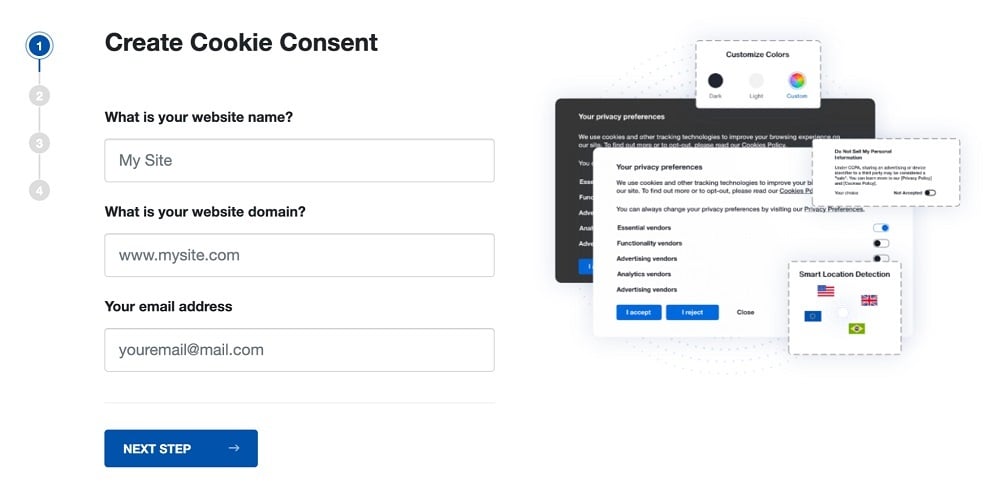
Start the Privacy Consent wizard to create the Cookie Consent code by adding your website information.
-
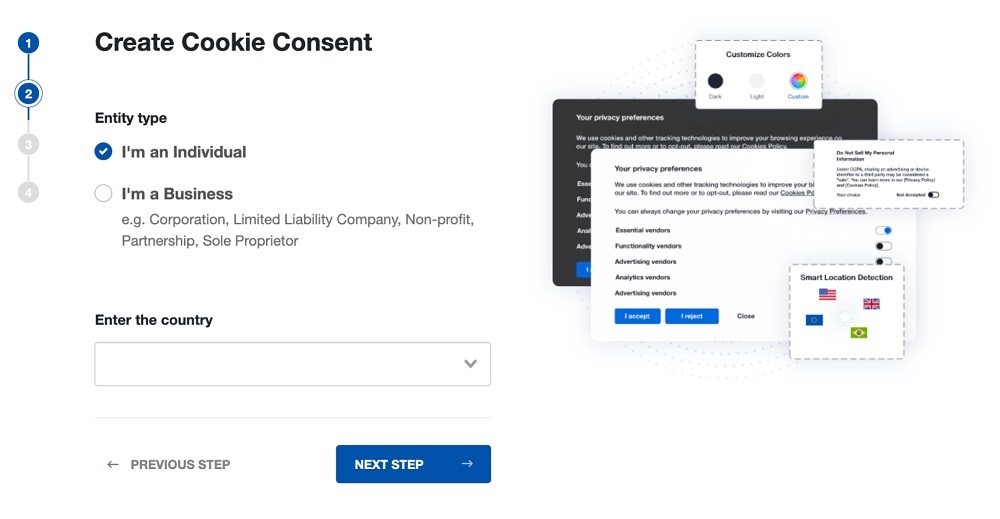
At Step 2, add in information about your business.
-
At Step 3, select a plan for the Cookie Consent.
-
You're done! Your Cookie Consent Banner is ready. Install the Cookie Consent banner on your website:
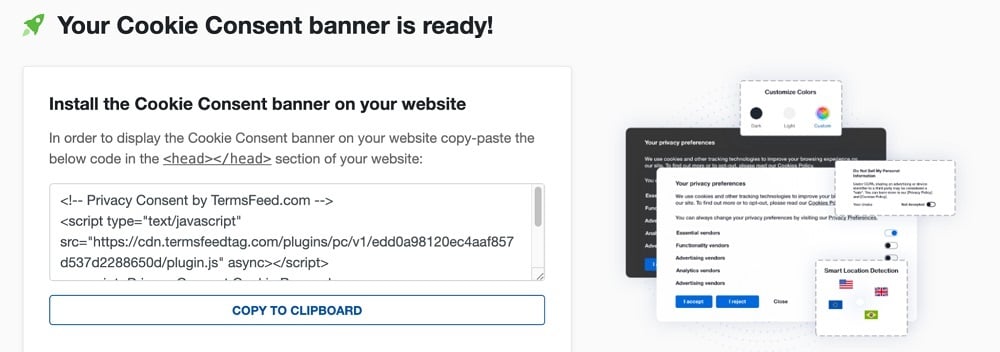
Display the Cookie Consent banner on your website by copy-paste the installation code in the
<head></head>section of your website. Instructions how to add in the code for specific platforms (WordPress, Shopify, Wix and more) are available on the Install page.


- 1. What is CookieScript?
- 2. What is the CookieScript Price?
- 3. What are the Best CookieScript Features?
- 3.1. 1. Automated Cookie Scanner
- 3.2. 2. Geo-Targeting for Regional Compliance
- 3.3. 3. Auto-Blocking Before Consent
- 3.4. 4. 40+ Language Support
- 3.5. 5. IAB TCF 2.3 Integration
- 3.6. 6. Maintained Cookie Database
- 3.7. 7. Banner Customization (No-Code)
- 3.8. 8. Multi-Domain Support
- 3.9. 9. Google Consent Mode v2 Integration
- 3.10. 10. Native WordPress Plugin
- 3.11. 11. White-Label Options (Agency Plan)
- 3.12. 12. REST API Access
- 3.13. 13. Compliance Reports
- 3.14. 14. Affordable Lite Plan (€8/month entry)
- 4. How does CookieScript Work?
- 4.1. Before You Install
- 4.2. Quick Setup Guide
- 4.3. How the Scanner & Banner Engine Works
- 4.4. Things to Watch For
- 5. What are the Pros of CookieScript?
- 6. What are the Cons of CookieScript?
- 7. What are the alternatives to CookieScript?
- 7.1. What is the history of CookieScript?
What is CookieScript?
CookieScript markets itself as an "all-in-one compliance solution". It focuses on 6 core tools, seen below:

These tools allow website owners to:
- Scan for cookies
- Collect and record user consent
- Block third-party scripts until a user agrees to them
- Generate a bespoke Privacy Policy and cookie banner
The major selling point of CookieScript is its affordability. Its permanent free tier and paid tiers start from €8 per month, positioning it as an economical choice for users looking for compliance without an enterprise contract.
As shown on the CookieScript homepage below, its target customers range from small businesses with a single website through to agencies managing multiple sites for various clients.

The owner of CookieScript, Objectis Ltd., base themselves in Vilnius, Lithuania. It stores all client data on servers within the European Union, which makes it easier to comply with the GDPR.
What is the CookieScript Price?
The CookieScript price is dependent on the number of domains and the compliance features a business requires. As the developer is Lithuanian, prices are in Euros rather than dollars. All paid plans use annual billing rather than monthly.
The screenshot below shows CookieScript pricing for 2 domains, with domain scans and page view limits increasing in line with the monthly price.

As monthly prices increase, the cost per domain decreases. The most expensive option is the Plus tier for 200 domains, which costs €216 per month (approximately $247), and works out to a per-domain cost of €1.08 ($1.23).
Here is a breakdown of the relative cost and features of each of the 4 CookieScript tiers:
| Feature | Free | Lite | Standard | Plus |
| Price (billed annually) | Free | €8/mo (~$9) | €15/mo (~$17) | €19/mo (~$21) |
| Per-domain price (2 domains) | Free | €4 | €7.50 | €9.50 |
| Pages scanned per domain | 10 | 100 | 1,000 | 3,000 |
| Monthly pageviews | 10,000 | Unlimited | Unlimited | Unlimited |
| Google Consent Mode v2 | ✓ | ✓ | ✓ | ✓ |
| 40+ languages | ✓ | ✓ | ✓ | ✓ |
| "Powered by" branding removed | ✗ | ✓ | ✓ | ✓ |
| Privacy Policy generator | ✗ | ✓ | ✓ | ✓ |
| Self-hosted code | ✗ | ✓ | ✓ | ✓ |
| Geo-targeting | ✗ | ✓ | ✓ | ✓ |
| Custom banner colors | ✗ | ✓ | ✓ | ✓ |
| Automatic monthly rescans | ✗ | ✗ | ✓ | ✓ |
| Automatic script blocking | ✗ | ✗ | ✓ | ✓ |
| Banner analytics | ✗ | ✗ | ✗ | ✓ |
| User-consent recording (logs) | ✗ | ✗ | ✗ | ✓ |
| Interactive Advertising Bureau Transparency & Consent Framework (IAB TCF) integration | ✗ | ✗ | ✗ | ✓ |
| Cross-domain consent | ✗ | ✗ | ✗ | ✓ |
| Sharing banners | ✗ | ✗ | ✗ | ✓ |
| Application Programming Interface (API) access | ✗ | ✗ | ✗ | ✓ |
The free tier is permanent, and CookieScript offers a 14-day free trial of the Plus plan that does not require a credit card.
In the past, CookieScript offered plans with unlimited domains. However, it no longer offers this feature. It does consider requests from agencies handling in excess of 200 domains, however, as seen below.

This means that if business needs increase, it is possible to continue using CookieScript. However, the lack of built-in capacity to cope with higher-level demands underlines that it is mainly focused on smaller businesses and agencies.
What are the Best CookieScript Features?
The best CookieScript features let users comply with a range of data privacy regulations by completing a series of short setup tasks.
Each of these CookieScript features supports specific compliance obligations:
- Automated cookie scanner
- Geo-targeting
- Pre-consent script blocking
- Wide language support
- IAB TCF integration
- Maintained cookie database
- No-code banner customization
- Multi-domain support
- Google Consent Mode v2 integration
- Native WordPress plugin
- White-label options
- REST API access
- Compliance reporting
- Affordable lite plan
We will now take a detailed look at what each feature offers to users.
1. Automated Cookie Scanner
Automated Cookie Scanner is the tool that crawls your site, detects the cookies and trackers in use, and sorts them into categories such as necessary, analytics, and marketing. This is a valuable feature, because you cannot disclose or block cookies that your business has not identified. CookieScript monthly scans, which feature on the Standard plan and higher, automatically update your cookie declaration on your Cookie Policy and cookie banner, keeping your site compliant.
A key differentiator is that the CookieScript scanner browses your pages with a real browser engine, allowing it to catch cookies set by JavaScript, up to the page limit of your plan (10, 100, 1,000, or 3,000 pages). More basic scanners only read static HTML and tend to miss cookies dropped by dynamic scripts. CookieScript carries out its monthly scans at night to reduce the load on your server, as the screenshot below explains.

CookieScript allows Lite users and those on higher tiers to manually trigger cookie scans from the admin panel up to one time per day.
2. Geo-Targeting for Regional Compliance
Geo-targeting for regional compliance is the feature that shows a different banner to visitors based on their location. This is critical for businesses serving multiple jurisdictions because privacy laws are not identical. For example, a European visitor needs an opt-in banner under GDPR, while a California visitor needs an opt-out and a "do not sell or share" option under CCPA.
Users configure which regions see which banner and consent model, and CookieScript serves the right version by visitor location. Compared with cheaper banner plugins that show one banner to everyone, geo-targeting lets a single site stay compliant across several jurisdictions at once. It is available from the Lite plan up.
3. Auto-Blocking Before Consent
Auto-blocking before consent is the mechanism that stops third-party scripts, cookies, and storage from loading until the visitor gives permission. This addresses one of the strictest parts of the GDPR and the ePrivacy Directive, which require that non-essential trackers do not run before consent, not merely that they stop afterward.
As the image below shows, users have two options for blocking third-party cookies on CookieScript, but it recommends choosing only one for optimum user experience.

CookieScript blocks scripts, local storage, and session storage. On the Standard plan and above, the blocking runs automatically once the scanner categorizes your cookies. Blocking browser storage is something many competing tools skip, so this is a point in favor of CookieScript for genuine prior-consent compliance.
4. 40+ Language Support
40+ language support is a tool that automatically detects the browser language of the user and serves them a translated cookie banner. CookieScript supports additional languages through its customizable features, meaning users face no language limitations, as seen below.

This solves the problem that consent has to be understandable to the user to be valid. Users select the languages they need, and CookieScript serves the matching banner text, with the option to edit the wording. Broad language coverage on even the free and entry plans is unusual among low-cost CMPs.
5. IAB TCF 2.3 Integration
IAB TCF 2.3 Integration is the way CookieScript implements the IAB Europe Transparency and Consent Framework. This is the standard that passes a structured consent signal from your site to advertising vendors. It addresses a specific need, as to serve targeted ads to EU and EEA users through certified partners, such as Google, you must run a certified CMP that emits a valid TCF consent string.
Users enable it in their account under Settings > Frameworks by switching on the "Enable IAB TCF 2.3" option. After this, they select vendors manually or use the auto-detect advertising vendors tool, and edit the required disclosure texts under Settings, then Texts. CookieScript is a Google-certified CMP listed in the Google CMP catalogue and holds Gold-tier status in Google CMP tiering, which sets it apart from uncertified banner tools. This integration is exclusive to the Plus plan.
6. Maintained Cookie Database
Maintained cookie database is the reference library CookieScript keeps of known cookies and their purposes. The automatic cookie scanner uses the database to describe what each cookie does. It solves the awkward step of writing accurate descriptions for cookies you did not set yourself, which a proper cookie declaration requires.
The scanner matches the cookies it finds during scanning against this database and pre-fills the category and description. This usually covers roughly 80% of the cookies a typical site uses automatically, and the user fills in the rest. A well-kept database saves businesses huge amounts of time compared with tools that require you to research and label every cookie manually.
7. Banner Customization (No-Code)
Banner customization (no-code) is the visual editor that lets you change the banner layout, colors, text, position, and buttons without requiring any coding skills. A customized, branded consent banner is much more likely to capture the attention of users than a generic pop-up.
CookieScript offers four banner layouts plus color, text, and placement controls, all editable from the dashboard. A non-developer produces a clean, on-brand banner in minutes. Being genuinely usable without Cascading Style Sheets (CSS) knowledge is where it stands out for small teams, though sites looking for very fine-grained design control will find the CookieScript options more limited than some pricier platforms.
8. Multi-Domain Support
Multi-domain support is the CookieScript pricing and management model for running consent across multiple websites from one account. Agencies and businesses operating several sites manage them all from a single dashboard. The pricing structure means plans sell in domain packages of 2, 5, 10, 20, 50, 100, or 200, and the per-domain price falls as the package grows. The more domains you cover, the less you pay for each.
This descending per-domain rate is something CookieScript points to as a differentiator, since some competitors charge a flat per-site fee with no volume discount.
9. Google Consent Mode v2 Integration
Google Consent Mode v2 integration is the feature that passes consent signals from CookieScript to Google tags such as Google Analytics 4 and Google Ads. It addresses the requirement, in force for EU and EEA traffic, that Google tags respect user consent, adjusting or withholding data collection when consent is missing or partial. CookieScript prides itself on its easy setup procedure, outlined in the image below:

CookieScript connects through Google Tag Manager or direct tagging and relays the choices of the visitor, ensuring Google tools behave correctly. CookieScript is a Google-certified partner and includes Consent Mode support even on the free plan, which makes it easier to set up here than with tools that gate it behind higher tiers.
10. Native WordPress Plugin
Native WordPress Plugin is the official CookieScript plugin that installs the banner on a WordPress site without manual code edits. It reduces the challenge of adding and maintaining a script tag by hand, which is a common stumbling block for non-technical site owners.
Users install the plugin, connect it to their CookieScript account, and the banner and consent logic load automatically, with WordPress handling updates. CookieScript integrates with OpenCart, Shopify, Joomla, Drupal, Magento, Shopware, Wix, Squarespace, Weebly, and PrestaShop. However, its WordPress integration is the most mature, and the reason many WordPress users pick it.
11. White-Label Options (Agency Plan)
White-Label Options (Agency Plan) covers the CookieScript features for agencies that want to present the tool as their own service. Agencies reselling compliance want the client-facing banner to carry the brand of the client, rather than that of the vendor. As we see in the screenshot below, this full rebranding capability even filters through to emails and notifications.

Removing the "powered by CookieScript" branding from the banner comes with any paid plan from Lite upward. Agencies managing many client sites work through the "For Partners" program for volume pricing and account handling.
To use the CookieScript white-label solution, an agency buys the top-tier Plus plan plus a separate yearly white-label fee, then hands over the Domain Name System (DNS) details for its domains so CookieScript configures the branded site. From there, the agency sets up the cookie banner of each client, shares it through the CookieScript banner-sharing feature, and bills its clients directly and independently of CookieScript. The main trade-off is cost. White-labeling sits on the most expensive plan and carries an extra annual charge.
12. REST API Access
REST (Representational State Transfer) API Access is the programmatic interface that lets developers pull consent data and manage configuration outside the CookieScript dashboard. It meets the needs of teams that want to automate reporting, sync consent records into their own systems, or manage many domains at scale. Businesses use the API to retrieve consent logs and account data and to integrate CookieScript into internal workflows, as we see below.

The Plus plan includes API access. It sits with the more advanced compliance features rather than the entry tiers. It is worth budgeting for this advanced feature if automation matters to you.
13. Compliance Reports
Compliance reports include the cookie declaration and consent records CookieScript produces to evidence your compliance. Every business must be ready to show regulators clear records that evidence regulatory compliance. This means not just showing that you asked for consent, but that you recorded the outcome.
The scanner generates a cookie declaration that you publish. On the Plus plan, CookieScript records user consents with timestamps so you have an audit trail if a regulator or partner asks what happened. The timestamped consent logging is the meaningful part for proof of compliance, and it is one of the features reserved for the top tier.
14. Affordable Lite Plan (€8/month entry)
Affordable Lite Plan (€8/month entry) is the CookieScript entry paid tier. Priced at 8 euros per month, it includes two domains and requires an annual payment, with no monthly payment option. It addresses the very common situation of a small site that has outgrown the branded free plan but does not want to pay enterprise rates.

As shown above, for that 8 euros, you lift the page-scan limit to 100 pages, drop the monthly pageview cap, and gain geo-targeting, custom colors, self-hosted code, and a Privacy Policy generator. This is among the lowest entry prices for a paid CMP from a Google-certified vendor, which is the core of the budget appeal of CookieScript.
How does CookieScript Work?
CookieScript works by:
- Installing a small piece of code on your site
- Scanning it for cookies
- Showing visitors a consent banner
- Blocking non-essential scripts until they choose
- Recording their consent decisions
CookieScript deploys with a single line of JavaScript in the page head, a Google Tag Manager template, or a native plugin for platforms like WordPress and Shopify. Most sites go live without developer input.
Once installed, the scanner crawls your pages, identifies and categorizes the cookies it finds using the CookieScript cookie database, and builds a cookie declaration. The banner then presents those categories to visitors, and the consent choice they make travels downstream. Scripts and storage stay blocked until the user gives consent, and signals flow to connected tools such as Google Consent Mode. The system logs consent, so you have a record to report on and audit later.
Before You Install
Before you install CookieScript, decide how many domains you need to cover and how large each site is. Those two figures drive which plan you choose and your cost. CookieScript pricing scales with features and domain count rather than with traffic. Paid plans lift the monthly pageview limit entirely, which makes the bill predictable even for a site that grows fast.
The rub with CookieScript is that costs climb with features rather than traffic. Practically, this means that the features many businesses are looking for, such as automatic script blocking (Standard €15 plan and up), consent logging, and IAB TCF, are on the Plus plan (€19 per month). In the EU, businesses that require consent logging, IAB TCF support, and advanced compliance features will generally need the Plus plan. Lower tiers could prove to be a false economy.
Quick Setup Guide
Quick setup guide helps users hit the ground running. The basic steps include:
- Create a CookieScript account: Add your domain, let the scanner run and produce your cookie list and declaration, then adjust the categories and descriptions where needed.
- Style the banner in the no-code editor: Adjust it to match your brand and set your consent model, using geo-targeting if you serve more than one region.
- Add the CookieScript code to your site: Use the WordPress or Shopify plugin, a Google Tag Manager template, or a single script tag in the page head, and publish.
The paid tiers remove pageview limits, so you are mainly choosing a plan on domain count and feature needs rather than expected traffic. The €8 Lite plan is the usual first paid step up from the branded free tier.
How the Scanner & Banner Engine Works
The scanner and banner engine work as two connected parts. The scanner visits your pages with a real browser so it triggers and catches cookies set by JavaScript. It then matches what it finds against the CookieScript-maintained cookie database to auto-categorize and describe them, and refreshes on a schedule (automatically each month on Standard and above).
The banner engine then takes those categories and renders the consent interface, holding non-essential scripts and browser storage until the visitor chooses. The price rises with the number of features and domains rather than traffic, so a busy site does not push you into a higher bill for the banner itself. However, your page count still needs to fit within the scan limit of your plan.
Things to Watch For
Things to watch for start with billing. Paid plans use yearly billing, not monthly, so the €8 Lite figure is really €96 a year, and there is no monthly payment option at present. The free plan keeps CookieScript branding on the banner and enforces the 10-page scan and 10,000-pageview limits, which is fine for a small static site but restrictive for anything client-facing.
The Plus plan includes several features commonly used to support GDPR compliance, including consent logging and IAB TCF support. This is a very important consideration for many businesses, so make sure that you do not assume you are compliant at the lower tiers and expose your business to risk.
Finally, since pricing scales by features and domains rather than traffic, work out which features you actually need before you pick a tier. Plus is where the heavier compliance tools live, and it is the baseline tier for any business targeting customers in jurisdictions that use the GDPR.
What are the Pros of CookieScript?
The pros of CookieScript are its genuine, permanent free tier, affordably-priced entry tier, ease of use, and certification. Some popular features include:
- Cost: CookieScript is one of the lowest-cost certified TCF CMPs out there. Paid plans start from €8 per month, and CookieScript is a Google-certified, Gold-tier CMP with IAB TCF support. That combination usually costs considerably more elsewhere. While the headline price is similar to competitors like Cookiebot, starting at $8 per month, this is for a single domain.
- Free tier: The permanent free plan covers up to 2 domains with Google Consent Mode and full language support. That is enough for many static or brochure sites, provided you accept the branded banner. By contrast, Cookiebot only covers 1 domain and up to 50 subpages.
- Strong WordPress integration: The native plugin gets a compliant banner live on a WordPress site quickly, without manual code, which is a major reason so many users like CookieScript.
- No-code banner customization: The CookieScript banner tools are genuinely easy for non-developers to use. Four layouts plus color, text, and placement controls make it practical to produce an on-brand banner from the dashboard alone.
- Transparent public pricing: All paid tiers and their per-domain rates are visible on the site, so there is no need for a sales call. This compares favorably with competitors like OneTrust, who give pricing on a quotation basis.
This upfront and simple approach has helped CookieScript carve out a strong reputation, but it remains limited for some users.
What are the Cons of CookieScript?
The cons of CookieScript are mostly about its lack of depth and scope rather than reliability. Some users express the following concerns:
- Less analytics depth than Cookiebot or OneTrust: Consent reporting is present, but users note it is not as detailed as the analytics on larger platforms, and some find the consent stats confusing. Some users complain that cookie report checkboxes are clumsy, which makes consent management more challenging.
- Limited data-subject-request and broader privacy-ops features: CookieScript focuses on cookie consent, so teams that need Data Subject Access Request (DSAR) handling or wider privacy operations will require additional tooling.
- Server-side deployment is not a first-class option: The tool is web-focused, with no dedicated mobile Software Development Kit (SDK) and no server-side tag manager, and its client-side script affects page-speed metrics.
- Vendor-list management is more manual than some competitors: Selecting and maintaining IAB TCF vendors tends to involve more hands-on work than platforms that use more automated systems.
- The branded free plan is restrictive for client-facing sites: The "powered by" banner and low scan and pageview limits make the free tier unsuitable when businesses need an unbranded, professional result.
While CookieScript bases its reputation on affordable pricing, users mention that it becomes costly to access the features they really need.
What are the alternatives to CookieScript?
The alternatives to CookieScript are other budget and mid-range consent tools, several of which bundle legal documents alongside the banner. CookieScript is a direct alternative to TermsFeed, so we will now explore how it stacks up against the competition:
- TermsFeed: A CMP that bundles legal policy generators (Privacy Policy, Terms and Conditions, and more) with cookie consent into a single package at a similar price point. For most small businesses that want policies and consent handled together rather than juggling separate tools, TermsFeed is a simpler and more affordable option.
- CookieYes: A similarly budget-friendly CMP with comparable scanning, blocking, and banner features, and a familiar choice for WordPress users.
- CookieHub: A close competitor in the same low-cost tier, covering scanning, consent, and blocking for small and medium sites.
- iubenda: Slightly pricier, but with stronger legal-document bundling for businesses that want policies and consent from one vendor.
- Termly: A comparable all-in-one entry point that pairs consent management with policy generators for small businesses.
Any of these tools will handle consent basics. However, for most small businesses, TermsFeed is the simplest place to start. It provides all the tools businesses need for compliance in one place, pairing a consent banner with the Privacy Policy, Terms and Conditions, and Cookies Policy generators that most sites require.
What is the history of CookieScript?
The history of CookieScript begins in 2015, when it launched as an accessible, low-cost way for small websites to handle cookie compliance. With the GDPR coming into force in 2018, CookieScript began by providing small sites with full consent coverage without enterprise pricing. It grew steadily within the WordPress ecosystem, where its plugin and low entry price made it an easy recommendation for site owners and agencies.
As the IAB Europe Transparency and Consent Framework and Google certification requirements reshaped the ad-consent landscape, CookieScript registered as an IAB TCF CMP and became a Google-certified CMP. It later reached Gold-tier status in the Google CMP tiering. It has continued to widen its language coverage, now past 40 languages, and to expand integrations across content management systems, while keeping its budget positioning as the core of its appeal.

The first step to compliance: A Privacy Policy.
Stay compliant with our agreements, policies, and consent banners — everything you need, all in one place.


