


AI Summarize


Share


If your business connects with users via email, SMS, websites, and apps, you may be collecting personal data across multiple legal risk zones.
Here's how to manage consent across all touchpoints and stay compliant with privacy laws like GDPR, CCPA, and more. This article explains what multichannel marketing is, why you need to get user consent, and how to manage consent across multiple channels.
Use our Cookie Consent all-in-one solution (Privacy Consent) for cookies management to comply with GDPR & CCPA/CPRA and other privacy laws:
- For GDPR, CCPA/CPRA and other privacy laws
- Apply privacy requirements based on user location
- Get consent prior to third-party scripts loading
- Works for desktop, tables and mobile devices
- Customize the appearance to match your brand style
Create your Cookie Consent banner today to comply with GDPR, CCPA/CPRA and other privacy laws:
-
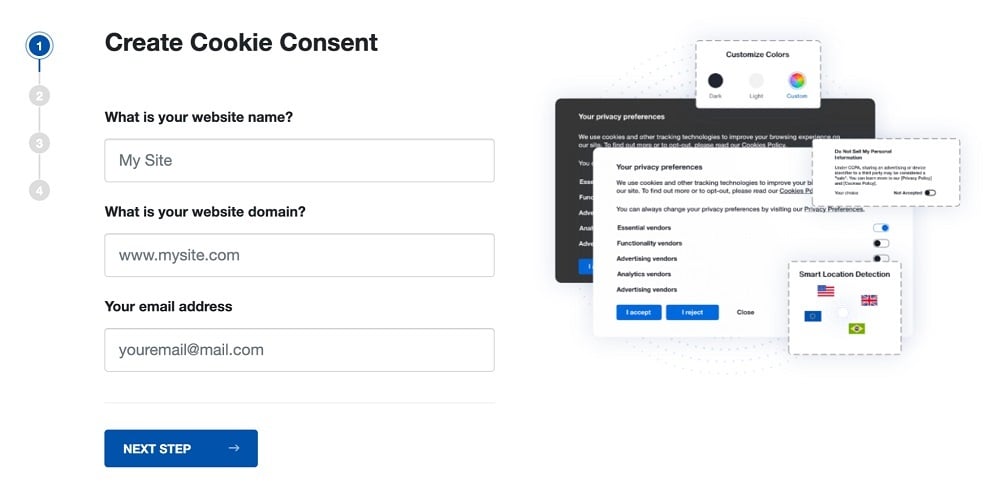
Start the Privacy Consent wizard to create the Cookie Consent code by adding your website information.
-
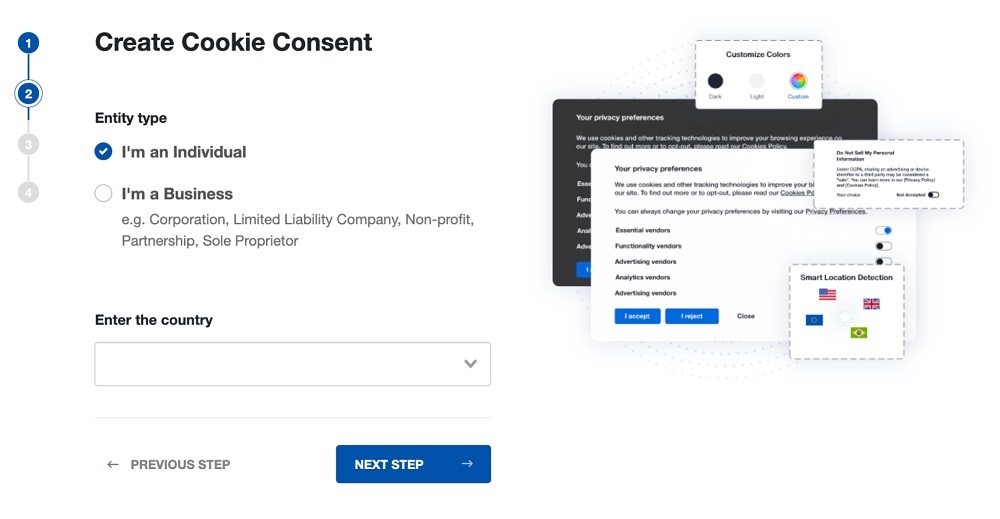
At Step 2, add in information about your business.
-
At Step 3, select a plan for the Cookie Consent.
-
You're done! Your Cookie Consent Banner is ready. Install the Cookie Consent banner on your website:
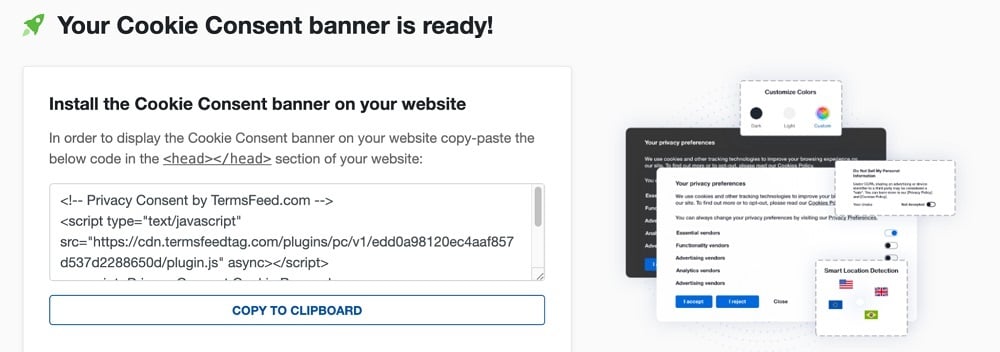
Display the Cookie Consent banner on your website by copy-paste the installation code in the
<head></head>section of your website. Instructions how to add in the code for specific platforms (WordPress, Shopify, Wix and more) are available on the Install page.


- 1. What Is Multichannel Marketing?
- 2. Why Do You Need to Get Consent for Multichannel Marketing?
- 2.1. General Data Protection Regulation GDPR
- 2.2. ePrivacy Directive
- 2.3. California Consumer Privacy Act (CCPA)
- 3. How to Manage Consent Across Multiple Channels
- 3.1. Maintain an Updated Privacy Policy
- 3.2. Get Separate Consent for Each Channel
- 3.3. Provide a Way for Users to Withdraw Consent
- 3.4. Give Users a Way to Opt Out
- 3.5. Keep Consent Records
- 3.6. Set Up a Preference Center
- 3.7. Stay Informed About Privacy Legislation
- 4. Summary
What Is Multichannel Marketing?
Multichannel marketing uses multiple platforms-such as email, Short Message Service (SMS), websites, and social platforms-to communicate with customers. The main goal of multichannel marketing is to reach as many customers as possible through channels that operate independently of one another.
For example, you might run separate ad campaigns via Facebook, your website, your app, and in-store with no or limited connection between the channels.
Multichannel marketing is less integrated than other forms of marketing such as omnichannel marketing and cross-channel marketing.
Omnichannel marketing focuses on unifying all of a brand's channels to create an integrated customer experience. Channels are coordinated with cross-channel marketing, but aren't as fully integrated as with omnichannel marketing.
For instance, a business that uses cross-channel marketing might send an email to a customer, who then clicks on a link that takes them to a sales page. If the customer puts an item in the cart but doesn't complete the purchase, they may later get a generic SMS cart reminder.
With omnichannel marketing, a customer might make a purchase via an Instagram ad and later receive a customized email promoting the business's other products. If the customer adds one of the products to their cart but doesn't complete the purchase, they may later receive a personalized SMS cart reminder with a discount offer for the cart item.
When you use a less integrated approach to marketing like multichannel marketing, it's important to get consent for each independent channel.
Let's take a look at why you need to get consent for multichannel marketing.
Why Do You Need to Get Consent for Multichannel Marketing?
Several state and global privacy and data protection laws require businesses to get user consent before collecting and processing (using) their personal information.
Personal information is data that can be used to identify an individual, including names, email addresses, phone numbers, and financial and health information.
Multichannel marketing often relies on personal information to communicate with users and send them marketing materials.
For example, email and SMS marketing requires users' names, email addresses, and phone numbers, while ad campaigns based on users' preferences or purchase history can depend on cookies, IP addresses, and browsing behavior.
Target requires users' names and email addresses to send personalized emails to its Target Circle members.

Let's take a look at a few of the privacy laws that require certain businesses to get consent before processing users' personal information.
General Data Protection Regulation GDPR
The European Union's (EU) General Data Protection Regulation (GDPR) applies to businesses based in the EU or those located outside of the EU that offer goods or services to or monitor the behavior of EU residents. Applicable businesses must have a legal basis for processing EU data subjects' (those to whom personal information belongs) personal data, one of which is user consent.
Article 6 of the GDPR describes the lawful bases for processing personal data, including user consent.

ePrivacy Directive
The ePrivacy Directive (also known as the "Cookie Law") is an EU directive that requires website and app operators to get consent before storing or accessing personal information (other than that necessary to enable communication over a network or to provide a user-requested online service) from users' devices.
Article 5(3) of the ePrivacy Directive explains that users must be informed about the storage or access of information on their devices and be given the option to refuse the data processing.

California Consumer Privacy Act (CCPA)
The California Consumer Privacy Act (CCPA) requires certain businesses that meet its criteria and process California residents' personal information to get consent before selling or sharing a minor's data.
Furthermore, applicable businesses must give California consumers the ability to limit how their sensitive personal information - data such as geolocation, race and ethnicity, and health and financial information-is used and give consumers a way to opt out of the sale or sharing of their personal data. That means that businesses that sell or share California users' personal data for advertising purposes need to provide a way for them to opt-out of those data processing activities.
Section 1798.135 of the CCPA explains that businesses that sell or share California consumers' personal information or share their sensitive personal information for certain purposes must maintain links that enable consumers to opt-out of the sale or sharing of their info and limit the use of their sensitive personal information.

In addition to helping you comply with privacy laws, obtaining user consent-and giving users a way to withdraw their consent-can help promote transparency and build consumer trust.
How to Manage Consent Across Multiple Channels
Complying with data protection laws comes down to understanding the laws that apply to you and protect your users and implementing the right consent management strategies for each channel.
Consent strategies such as maintaining a Privacy Policy, getting separate consent for each channel, and giving users a way to withdraw their consent can help you manage consent across multiple channels.
Maintain an Updated Privacy Policy
A Privacy Policy describes how you treat personal information and how users can exercise their privacy rights.
Many laws require businesses to maintain a clearly written, easily accessible, and regularly updated Privacy Policy. A Privacy Policy plays an important role in ensuring users can give informed consent.
Privacy Policies typically include the following clauses:
- The types of information the business collects
- What the business does with personal information
- The categories of third parties the business shares personal information with
- How long the business keeps personal information
- How the business keeps personal information safe
- How users can exercise their privacy rights, including withdrawing consent
- The business's contact information
Indiana University Health's Digital Privacy and Tracking Notice explains that it uses the information it collects for several reasons, including for communication, customer experience optimization, and advertising purposes.

The Digital Privacy and Tracking Notice goes on to let users know that by giving Indiana University Health their email address, phone number, or fax number, they are consenting to receive communications-including marketing communications-from the organization.

You should put a link to your Privacy Policy anywhere you need to get user consent-including wherever you collect names, email addresses, and phone numbers.
Providing access to your Privacy Policy in places such as consent banners that pop up when users first visit your website, newsletter sign up pages, and in-app menus can help ensure that users have the information they need in order to give informed consent.
Indiana University Health includes a link to its Privacy Policy on its account sign in page.

When users sign up for a Guardian newsletter they are presented with a Privacy Notice that explains that the company's newsletters may contain information about charities, online advertisements, and third party-funded content. It includes links to its Privacy Policy and Terms of Service agreement.

Get Separate Consent for Each Channel
With multichannel marketing it's important to get separate consent for each channel. One way to do this is through the use of a checkbox next to a statement describing what you want the user to agree to. Many companies get user consent through a statement that says that by checking a box users are agreeing to their linked Privacy Policy.
For instance, AP News' newsletter sign-up form includes a checkbox next to a statement that the user agrees that it can use their data as described in its Privacy Policy. Users must tick the checkbox before signing up.

AP News' Privacy Policy lists its reasons for processing users' data, including advertising and marketing purposes.

You can also use the checkbox method for getting user consent to send promotions and updates via SMS.
When users sign up for C2E2's newsletter, they have the option of providing their phone number to receive text messages from the company. They must tick a checkbox indicating that they consent to receive texts and that they understand that they can opt out of receiving SMS messages by replying "STOP".

Another way to get consent is through a consent banner. A consent banner is a notification that pops up on a website or app and asks users' permission to process their personal data.
CNN's consent banner lets users know that by submitting their email address, users are agreeing to its legal documents, including its Privacy Policy.

Many companies use a cookie banner to ask users to agree to their use of cookies for advertising purposes.
Visitlondon.com's cookie banner pops up as soon as visitors open its site and explains that it uses cookies for targeted advertising, social media, and analysis purposes. It includes Preferences, Statistics, and Marketing toggles that users can switch on or off to adjust their preferences. Users must click OK before navigating to the site.

Similarly, visitors to the Royal Albert Hall website are presented with a pop-up box that explains why it uses cookies. It includes a Customize button for users who want to adjust their preferences as well as an Allow all button for those who are ok with the company's use of non-essential cookies.

Users who click on the Customize button can turn cookies-such as those used for statistics and marketing-on or off.

Provide a Way for Users to Withdraw Consent
You should give users a way to easily withdraw their consent. The method you provide for users to control their preferences depends on the channel.
For instance, if you send promotional materials via email, it's a good idea to include an "Unsubscribe" link or a link to a page where users can manage their preferences within your emails. If you engage in SMS marketing, you'll want to include information about how users can stop receiving messages from you within the text.
Citi enables users to withdraw consent by clicking a link within a marketing email.

When users click on the opt-out link, they are taken to a page where they can submit their preferences.

MyEyeDr. explains that users can reply "STOP" to an SMS message to stop receiving texts from the company.

Give Users a Way to Opt Out
Providing a way for users to opt out of certain data processing activities can help you comply with laws such as the CCPA.
Dropbox's cookie banner lets users know that they can opt out of having their personal data sold to or shared with third parties via its Customize cookies button.

Clicking on the Customize cookies button takes users to another pop-up box where they can opt out of the sale or sharing of their personal information as well as set their cookie preferences.

Keep Consent Records
The method you use to obtain user consent should also store their consent. Many businesses use a Consent Management Platform (CMP) to obtain and record user consent (such as TermsFeed Privacy Consent CMP). A CMP can help businesses collect and record user consent, typically through a consent banner.
Set Up a Preference Center
A tricky situation that can arise in multichannel marketing is when a user provides or withdraws consent for only one channel.
For instance, they may have consented to receive both email marketing and SMS messages from your company, but then decide to withdraw their consent to receive emails.
While in this situation you can technically still send SMS messages until they withdraw their consent, providing a centralized place where users can manage their consent choices for all of your business's channels can make the process more user-friendly.
Setting up a preference center makes it easy for users to make consent decisions for multiple channels in one place.
Spotify enables users to adjust how it processes their personal data-including for personalized advertising purposes-via its Safety and Privacy Center.

Users can easily change their tailored advertisement preferences by clicking on the Privacy Settings page link and switching the "Process my personal data for tailored ads" toggle off.

P&G's preference center provides a way for users to make requests concerning their data, including limiting the use of their sensitive personal information and unsubscribing from marketing emails, SMS, and postal mail.

Stay Informed About Privacy Legislation
Privacy laws are nuanced and ever-evolving. Keeping abreast of legislation changes that affect your business and consumers is an important step in ensuring compliance.
For example, states including New Jersey, New Hampshire, Minnesota, and Maryland all have privacy laws that take effect in 2025.
Summary
Multichannel marketing focuses on reaching as many users as possible by engaging with consumers through multiple, independently operated channels. Multichannel marketing is a less integrated approach than omnichannel or cross-channel marketing and requires user consent for each channel.
Maintaining consent management strategies for multichannel marketing can help you comply with privacy laws such as the GDPR, ePrivacy Directive, and the CCPA, and help build trust with your audience.
Strategies for managing consent for multichannel marketing include:
- Maintaining a Privacy Policy
- Getting separate consent for each channel
- Giving users an easy way to withdraw their consent
- Providing a way for users to opt out of certain data processing activities
- Keeping consent records
- Setting up a preference center
- Staying up to date with privacy laws

The first step to compliance: A Privacy Policy.
Stay compliant with our agreements, policies, and consent banners — everything you need, all in one place.


