


AI Summarize


Share


Termly is a data privacy compliance software that helps businesses generate legal documents, manage cookie consent, and stay compliant with global data privacy regulations from a single dashboard. The Termly tool is for small and medium-sized businesses (SMBs), freelancers, and agencies that need to meet data privacy regulations, including the European Union (EU) General Data Privacy Regulation (GDPR), the California Consumer Privacy Act (CCPA), and the Canadian Personal Information Protection and Electronic Documents Act (PIPEDA), without legal expertise or significant legal fees. The Termly software covers 3 core functions: legal policy generation, consent management, and automated cookie scanning.
Pricing for the Termly tool starts from $10 per month (annual billing) on the Starter plan, rising to $15 per month on the Pro+ plan. A free plan caters to businesses in the startup or development phase. Businesses can request Agency pricing for multi-site management. The main pro of Termly is its free plan and broad policy library covering over 10 document types. The main con is that key features, including consent logs, multi-language support, and custom banner styles, are locked behind the Pro+ plan at $15 per month, making the Free and Starter plans limited for businesses that need more than basic compliance tools.
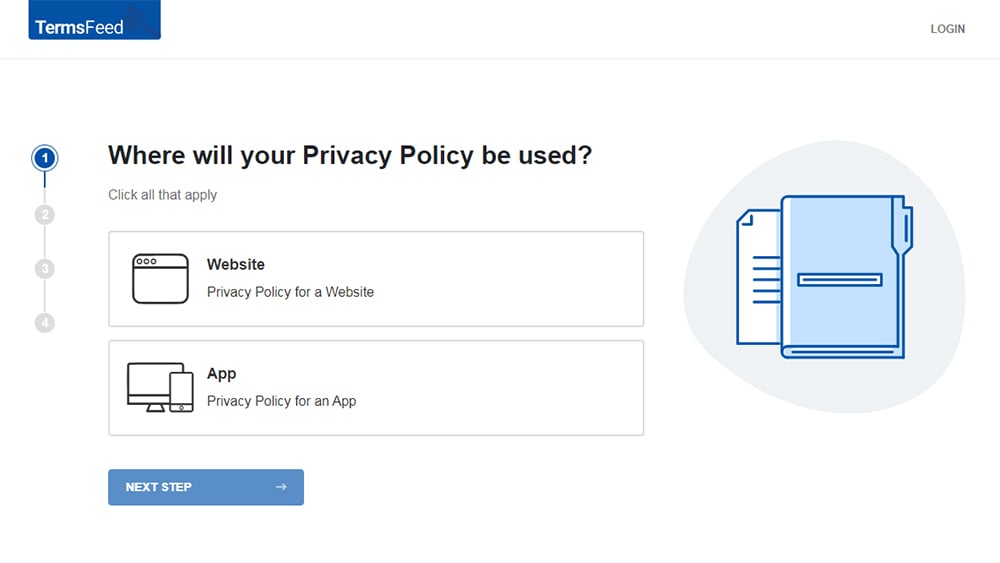
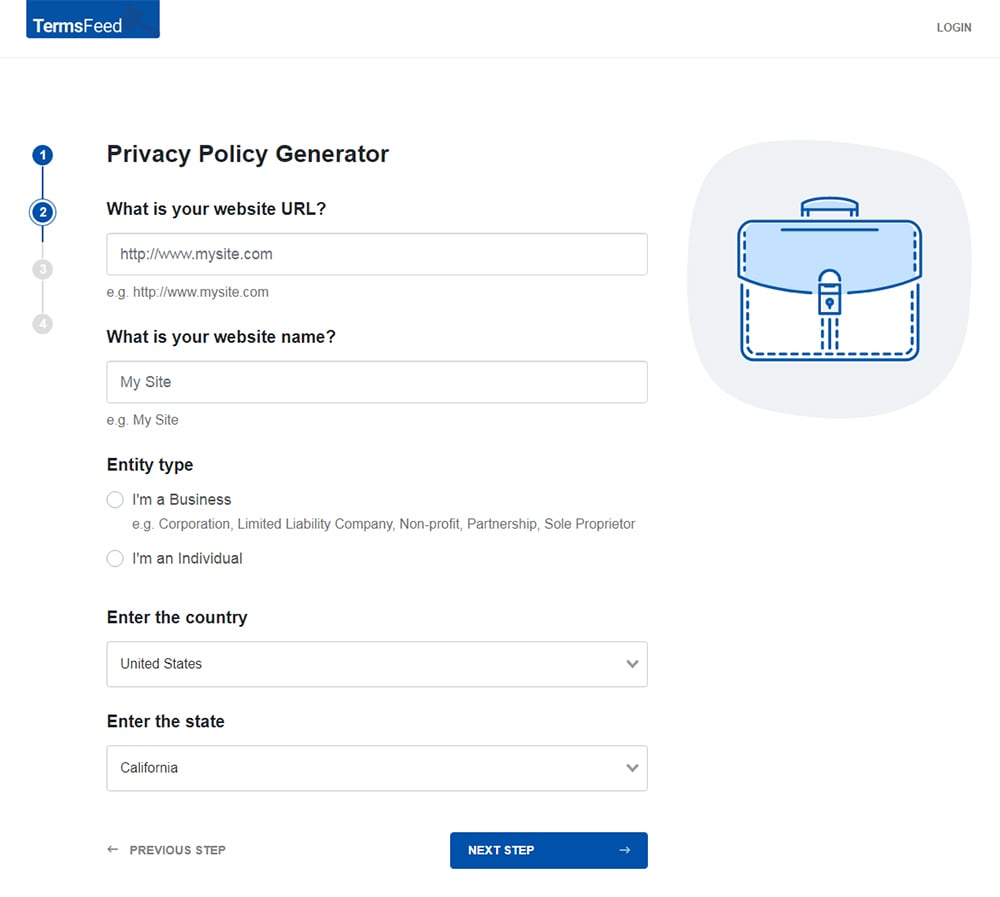
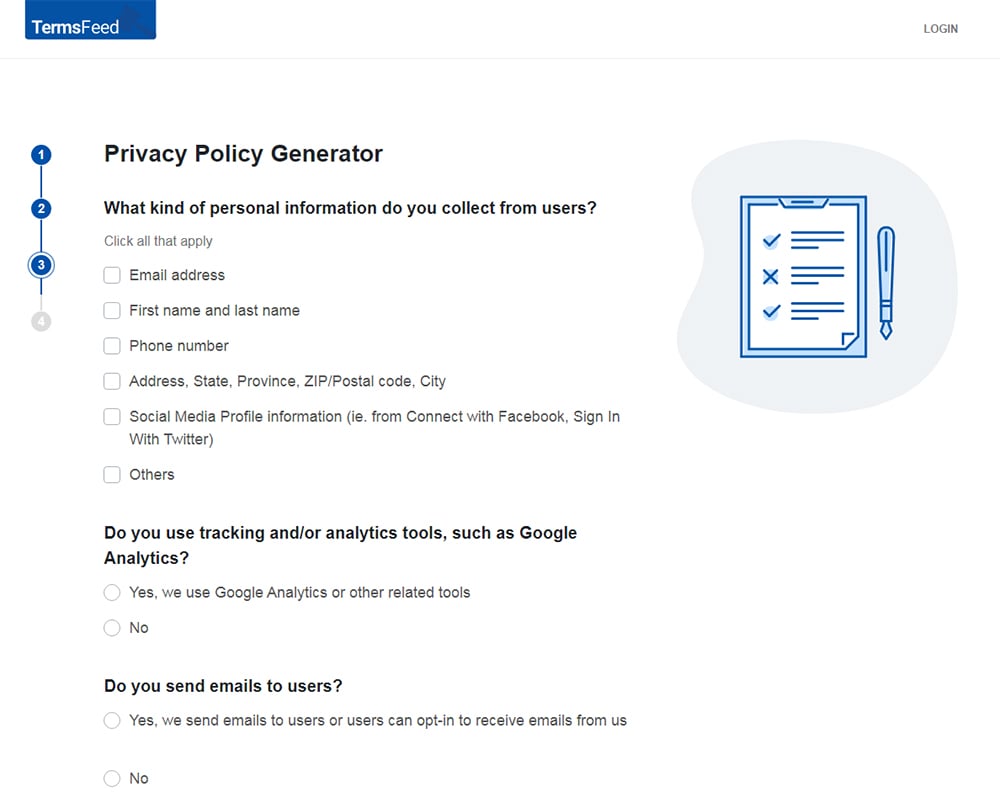
Our Privacy Policy Generator makes it easy to create a Privacy Policy for your business. Just follow these steps:
-
At Step 1, select the Website option or App option or both.
-
Answer some questions about your website or app.
-
Answer some questions about your business.
-
Enter the email address where you'd like the Privacy Policy delivered and click "Generate."
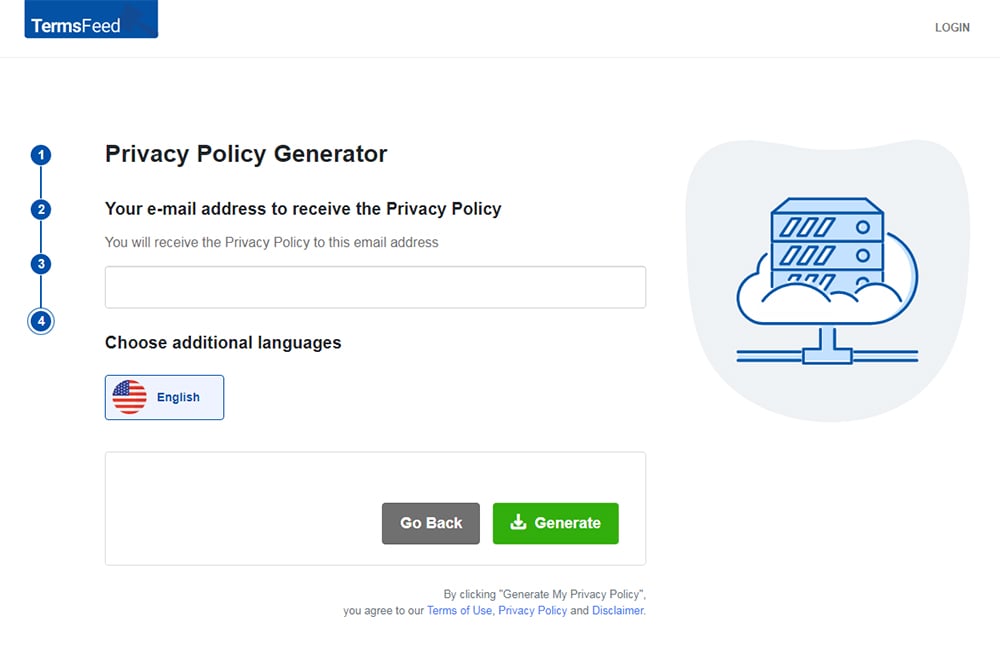
You'll be able to instantly access and download your new Privacy Policy.


- 1. What is Termly?
- 2. What is the Termly Price?
- 3. What are the Best Termly Features?
- 3.1. 1. Comprehensive Terms and Conditions Generator
- 3.2. 2. Legally-backed Policy Generators
- 3.3. 3. GDPR-friendly Legal Policies
- 3.4. 4. Automatic Compliance Updates
- 3.5. 5. Automated Consent Management Software
- 3.6. 6. Google Consent Mode v2 Compatibility
- 3.7. 7. Scheduled Automatic Cookie Scans
- 3.8. 8. Compliance with Major Regulations
- 3.9. 9. Guidance Through the Compliance Process
- 3.10. 10. User-friendly Interface and Easy Website Integration
- 3.11. 11. Reliable Customer Support
- 3.12. 12. Affordable Pricing Tiers
- 3.13. 13. Data Subject Access Request Management
- 4. How does the Termly Tool Work?
- 4.1. Prerequisites & Components
- 4.2. Step-by-Step Process Flow
- 4.3. Key Mechanisms Explained
- 4.4. Edge Cases & Failure Modes
- 5. What are the Pros of Termly?
- 6. What are the Cons of Termly?
- 7. What are the alternatives to Termly?
- 8. History of Termly
- 9. Conclusion
What is Termly?
Termly is a data privacy compliance software that generates legal documents and manages cookie consent for businesses operating online. The Termly tool handles the legal documentation and consent processes websites need to comply with global data privacy laws, without the cost of a lawyer or the complexity of drafting documents from scratch.
The screenshot below shows that the main purpose of the Termly software is to simplify compliance for businesses that lack in-house legal expertise. A business owner answers a guided questionnaire, and the Termly tool produces ready-to-use legal documents tailored to that business. The software scans the website for cookies automatically, deploys a consent banner, and monitors regulatory changes to keep documents current.

Termly serves four main groups:
- Small business owners
- Freelancers
- SaaS founders
- Digital agencies managing multiple client websites
Termly designs the software for users without a legal background, creating documents using plain language. A team of lawyers and legal experts reviews and updates these documents as regulations change.
The key characteristics of the Termly tool are its broad policy library, its free entry plan, and its all-in-one structure. A business gets access to over 10 document types (Privacy Policies, Terms and Conditions, Cookie Policies, Disclaimer, EULA, and more) alongside a full consent management platform, from a single dashboard.
What is the Termly Price?
The Termly price is free for its most basic plan, with paid plans starting from $10 per month, billed annually. The Termly tool offers 4 tiers, each with a different level of coverage:
- Free Plan: Includes 1 basic legal policy, 10,000 monthly banner views, a cookie consent banner, a script auto blocker, a WordPress plugin, and quarterly cookie scans.
- Starter Plan: Includes 2 legal policies, 10 policy edits, 50,000 monthly banner views, monthly cookie scans, regulation monitoring, and regular policy updates.
- Pro+ Plan: Includes unlimited legal policies, unlimited policy edits, unlimited banner views, weekly cookie scans, auto-updated policies, consent logs, multi-language support, custom banner styles, Google Consent Mode v2, IAB TCF 2.3, regional consent rules, and removes Termly branding.
- Agency Plan: Covers a minimum of 10 websites and includes everything in Pro+, plus multi-domain management, bulk import, custom marketing materials, training, onboarding, and compliance support.
Here is a breakdown of the cost of Termly when businesses choose the Monthly and Annual plans:
| Plan | Monthly | Annual |
| Free | $0 | $0 |
| Starter | $14/mo | $10/mo |
| Pro+ | $20/mo | $15/mo |
| Agency | On request | On request |
Is Termly worth it?
Yes, for some businesses, Termly software is a useful way to generate data privacy compliance documents. However, unlike a service like TermsFeed, which gives you ownership of your policy documents, with Termly, businesses lose access if they downgrade or cancel and need to continue paying for a subscription to benefit from policy documents.
Hiring a lawyer to draft these documents is significantly more expensive than using a generator like Termly. However, businesses that need a simpler setup, more affordable entry pricing, or a wider range of customization options from day one get more from TermsFeed.
What are the Best Termly Features?
The best Termly features include its comprehensive policy generators, legally-backed documents, automated consent management, and a user-friendly interface that guides businesses through the compliance process from start to finish.
The Termly software stands out for its automatic compliance updates, Google Consent Mode v2 compatibility, and scheduled cookie scans. Additional Termly capabilities include Data Subject Access Request (DSAR) management, affordable pricing tiers, and reliable customer support.
The key Termly features and capabilities include:
- Comprehensive Terms and Conditions Generator
- Legally-backed Policy Generators
- GDPR-friendly Legal Policies
- Automatic Compliance Updates
- Automated Consent Management Software
- Google Consent Mode v2 Compatibility
- Scheduled Automatic Cookie Scans
- Compliance with Major Regulations
- Guidance Through the Compliance Process
- User-friendly Interface and Easy Website Integration
- Reliable Customer Support
- Affordable Pricing Tiers
- Data Subject Access Request Management
1. Comprehensive Terms and Conditions Generator
Comprehensive Terms and Conditions Generator is a guided questionnaire tool within the Termly software that produces a legally reviewed Terms and Conditions (T&C) document tailored to a specific business, its industry, and the services it offers. The Termly tool asks questions about the nature of the business, its users, and its policies around payments, refunds, and intellectual property, then generates a ready-to-use document.
A Terms and Conditions agreement sets the legally binding rules between a business and its users. Without one, a business has no enforceable ground rules covering liability, disputes, account termination, or intellectual property. Lawyer-drafted Terms and Conditions typically cost hundreds or even thousands of dollars, depending on complexity. The Termly tool claims it produces a Terms and Conditions document in under 10 minutes.
A SaaS founder launching a subscription product, for example, gets a T&C document covering user accounts, payment terms, cancellation rights, and limitations of liability without engaging a lawyer. An e-commerce store owner gets clauses covering returns, shipping, and consumer rights specific to their jurisdiction.
All plans include the Terms and Conditions Generator. The Free plan produces 1 basic legal policy, which covers a T&C document. The Starter plan at $10 per month allows up to 2 legal policies and 10 edits. Unlimited policies and unlimited edits require the Pro+ plan at $15 per month.
2. Legally-backed Policy Generators
Legally-backed Policy Generators is a suite of document creation tools within the Termly software, which a team of lawyers and legal experts regularly review. The Termly tool produces documents that reflect current legal requirements across multiple jurisdictions, updated as regulations change.
The distinction between a legally-backed generator and a basic template tool matters in the real world. A generic template does not account for jurisdiction-specific requirements, recent regulatory changes, or the specific data practices of a business. The legal team at Termly monitors global privacy laws and publishes updates to keep generated policies compliant, reducing the risk of a business operating on outdated documents.
A content publisher based in the US with readers in the EU, for example, gets a Privacy Policy that addresses both CCPA requirements for California residents and GDPR requirements for EU visitors. The document reflects the specific data collection practices the publisher discloses during the questionnaire, rather than a one-size-fits-all template.
The Termly software covers over 10 policy types (Privacy Policies, Terms and Conditions, Cookie Policies, Disclaimers, EULAs, and more). The Free plan provides access to 1 basic policy. The Starter plan at $10 per month covers 2 policies with 10 edits. The full policy library with unlimited edits and auto-updated documents requires the Pro+ plan at $15 per month.
3. GDPR-friendly Legal Policies
GDPR-friendly Legal Policies is a feature of the Termly software that ensures every generated document meets the specific disclosure and consent requirements of the General Data Protection Regulation (GDPR). The GDPR is the primary data privacy law governing the processing of personal data of individuals in the European Union (EU) and European Economic Area (EEA). The Termly tool builds GDPR requirements into every relevant policy at the point of generation, rather than requiring businesses to add compliance clauses manually afterward.
The GDPR applies to any business that processes the personal data of EU or EEA residents, regardless of where the business itself is located. A US-based e-commerce store selling to customers in Germany, for example, falls under GDPR obligations. Termly generates a Privacy Policy and Cookie Policy that address the specific disclosures, lawful bases for processing, and user rights the GDPR requires.
The screenshot below shows that Termly stores European user data within the EU and EEA. The GDPR does not require data to be stored in the EU, but it restricts transfers of personal data outside the EEA unless specific legal safeguards are in place, such as adequacy decisions or Standard Contractual Clauses (SCCs). By keeping data within the EU and EEA, Termly helps businesses reduce compliance risks related to international data transfers.

GDPR-friendly policies are available across all plans. The Free plan provides basic GDPR compliance. Full GDPR coverage, including consent logs, regional consent rules, and multi-language support, requires the Pro+ plan at $15 per month.
4. Automatic Compliance Updates
Automatic Compliance Updates is a feature of the Termly software that updates legal policies and consent mechanisms to reflect changes in data privacy laws without manual work from the business. The Termly automatic compliance updates system monitors regulatory changes across jurisdictions and updates generated documents, including Privacy Policies and Cookie Policies. Businesses avoid the need to track legal updates or rewrite documents manually.
This feature matters because privacy laws change frequently. An outdated policy creates compliance gaps and increases regulatory risk. Regulators expect disclosures to reflect current legal requirements and actual data practices.
From the Starter tier upward, Termly maintains policies after generation. The system updates clauses to align with laws such as the GDPR, CCPA, and PIPEDA. So, a SaaS company or ecommerce business operating across multiple regions benefits from continuous updates without repeated legal reviews.
The Free tier does not include these features, but the Starter and Pro+ tiers include regular monitoring and policy updates.
5. Automated Consent Management Software
Automated Consent Management Software is a system within the Termly tool that collects, manages, and stores user consent for cookies and tracking technologies in line with data privacy laws. The Termly automated consent management software displays a cookie consent banner when a user visits a website. The banner allows users to accept, reject, or customize cookie preferences. The system records each choice as proof of consent, which regulators require during audits or investigations.
This is a crucial feature because laws such as the GDPR and the EU ePrivacy Directive (ePD) require prior consent before placing non-essential cookies. A business that fails to obtain valid consent risks fines and enforcement action.
The benefit for a business is operational control and legal protection. The system blocks cookies until consent is given, logs user preferences, and applies those preferences across sessions. E-commerce stores use this to manage advertising cookies, and SaaS platforms need it to control analytics tracking.
The Free and Starter plans include a basic consent banner with limited functionality. Full features, including consent logs, regional consent rules, and advanced customization, require the Pro+ plan.
6. Google Consent Mode v2 Compatibility
Google Consent Mode v2 Compatibility is a feature that allows the Termly tool to adjust how Google services operate based on user consent choices. The Termly Google Consent Mode v2 compatibility feature integrates with Google Analytics and Google Ads and changes how data is collected depending on consent status. The system restricts tracking and sends limited, anonymized signals instead of full identifiers when a user declines cookies.
This functionality is essential for businesses that rely on Google advertising or analytics in the European Economic Area (EEA). As Google notes below, it requires Consent Mode v2 to maintain access to key advertising and measurement features.

Without it, tracking capabilities become limited, and campaign performance data is incomplete. Google Consent Mode v2 compatibility enables businesses to measure performance while honoring user consent. An ecommerce store models conversions even when users opt out, and a SaaS platform monitors traffic patterns without relying on full tracking.
The Free and Starter plans offer basic support for Google Consent Mode v2 . Full integration and configuration are available on the Pro+ and Agency plans.
7. Scheduled Automatic Cookie Scans
Scheduled Automatic Cookie Scans is a feature that regularly scans a website to detect cookies and tracking technologies in use, then updates the cookie disclosures on the site accordingly. The Termly scheduled automatic cookie scans feature runs periodic scans of a website to identify active cookies, including first-party cookies (set by the website) and third-party cookies (set by external services such as analytics or advertising providers). The system categorizes these cookies and updates the Cookie Policy and consent banner to reflect what is actually in use.
This capability addresses a common compliance gap. Websites often add new scripts or plugins over time, which introduce new cookies without being documented. Privacy laws such as the GDPR and the ePrivacy Directive require accurate and up-to-date disclosures, so outdated cookie information creates legal risk.
From a practical standpoint, this reduces the need for manual audits. A marketing team adding a new tracking tool does not need to manually update disclosures, as the system captures and reflects those changes. An ecommerce site running multiple third-party integrations benefits from continuous visibility into tracking activity.
The Free plan includes quarterly scans. The Starter tier includes monthly scans, and the Pro+ tier includes scans for cookies every week.
8. Compliance with Major Regulations
Compliance with Major Regulations is a feature that enables the Termly tool to help businesses meet the legal requirements of key data privacy laws across multiple jurisdictions. The Termly compliance with major regulations feature allows businesses to build legal documents and consent mechanisms that align with many international laws, including:
- GDPR (includes UK GDPR)
- PIPEDA
- EU ePrivacy Directive & Regulation
- The California Online Privacy Protection Act (CalOPPA)
- Brazil - Lei Geral de Proteção de Dados Pessoais (LGPD)
- South Africa - Protection of Personal Information Act (POPIA)
- Senegal - Data Protection Act (DPA)
- India - Personal Data Protection Bill 2018
- Switzerland - Federal Act on Data Protection (FDAP)
- Australian Privacy Act
- Argentina - Personal Data Protection Law (PDP)
- China - Cyber Security Law
- Philippines - Data Privacy Act of 2012
As shown below, Termly helps businesses create documents tailored to each of these regulations on its paid plans.

The platform tailors disclosures and consent flows based on how a business collects, uses, and shares personal data. This reduces the complexity of interpreting legal requirements across regions. Each law defines specific obligations, such as user rights, consent standards, and disclosure requirements. Managing these manually requires ongoing legal input, especially for businesses operating internationally.
For example, a SaaS company with users in the EU and California generates a Privacy Policy that reflects both GDPR and CCPA requirements. An ecommerce business configures cookie consent to follow opt-in rules in the EU and opt-out rules in California.
The Free and Starter plans support basic policy generation with limited jurisdictional coverage. The Pro+ tier includes broader regulatory coverage, customization, and advanced compliance features.
9. Guidance Through the Compliance Process
Guidance Through the Compliance Process is a feature that provides step-by-step instructions within the Termly tool to help businesses set up and maintain data privacy compliance. It uses guided questionnaires, prompts, and in-platform explanations to walk users through tasks such as generating legal policies, configuring cookie consent banners, and enabling data subject request handling. Users answer structured questions instead of interpreting legal requirements directly.
This reduces errors when setting up legal documents. Privacy laws include detailed rules around consent, disclosures, and user rights, and errors lead to invalid consent or incomplete policies. Businesses use this guidance to complete setup, but still review the output to confirm that policies and consent settings reflect actual data collection and use.
In practice, a small ecommerce business follows prompts to create a Privacy Policy based on its data practices. A SaaS company configures consent settings for different regions without relying on in-house legal support.
All plans include questionnaires to generate bespoke policies. However, only the Pro+ tier provides multi-language support.
10. User-friendly Interface and Easy Website Integration
User-friendly Interface and Easy Website Integration is a feature that allows businesses to set up and deploy compliance tools without technical expertise. This feature provides a dashboard where users generate policies, configure consent banners, and manage settings through guided steps. Once configured, the platform supplies a code snippet to install on a website or direct integrations for platforms such as Shopify and WordPress.
This design removes technical barriers that non-coding business owners face. Some compliance tools require manual coding or developer support, which slows implementation and increases cost. A simplified interface allows non-technical users to complete the setup accurately.
For example, a small business owner installs a cookie banner by pasting a short script into the website header. An ecommerce store connects to Termly through a platform integration and applies compliance tools without modifying its core site code. Updates made in the dashboard reflect automatically on the live site.
The Free plan includes basic setup and a single-domain installation. The Starter and Pro+ packages expand domain limits, integration options, and customization controls.
11. Reliable Customer Support
Reliable Customer Support is a feature that provides users with access to assistance when setting up or managing compliance tools within the Termly platform. This support feature includes help documentation, setup guidance, and direct support channels such as email or chat. These resources address issues related to policy generation, consent banner configuration, and data request workflows.
Support plays a critical role in compliance tools. Misconfiguration leads to gaps such as invalid consent collection or incomplete disclosures. Timely support helps resolve issues before they create legal exposure.
In practice, a small business owner uses support resources to troubleshoot a cookie banner that fails to block scripts before consent. A SaaS company contacts support to clarify how to configure region-specific consent rules or update policy settings after expanding into a new market.
Termly users receive access to customer support on all subscription tiers. Online support tickets receive priority based on when Termly receives them, not the plan the user is on, as shown in the screenshot below. Users contact Termly via email, phone, and through its chat widget.

12. Affordable Pricing Tiers
Affordable Pricing Tiers is the Termly price structure, and it includes multiple subscription levels with different capabilities and price points.
The Termly affordable pricing tiers model includes a Free plan, a Starter plan, and a Pro+ plan. Each tier unlocks additional features, higher usage limits, and more advanced compliance tools. The Free plan covers basic policy generation and a limited cookie banner. The Starter plan expands functionality with additional customization and domain support. The Pro+ plan includes full feature access, such as advanced consent management and Google Consent Mode v2 integration. The Agency tier is priced according to individual businesses' needs.
This structure allows businesses to match cost with complexity. A business with limited data collection avoids paying for advanced features, while a company operating across multiple jurisdictions gains access to tools required for broader compliance.
For example, a small website starts on the Free plan to generate a Privacy Policy and display a basic banner. As the business grows and introduces analytics or advertising tools, it upgrades to Starter or Pro+ to access expanded consent controls and compliance features. Each upgrade increases functionality, usage limits, and support levels.
13. Data Subject Access Request Management
Data Subject Access Request Management is a feature that enables businesses to receive, track, and respond to requests from individuals who want to access, delete, or control their personal data. The Termly data subject access request management feature provides a request form and a dashboard to manage incoming requests. A data subject access request (DSAR) is a formal request from an individual to access or act on their personal data under laws such as the GDPR and CCPA. The system logs each request, tracks deadlines, and organizes responses.
This function addresses a core legal obligation. Many privacy laws require businesses to respond to DSARs within a set timeframe, often 30 to 45 days. Missed deadlines or incomplete responses create compliance risk.
In practice, a user submits a request to access their data through a website form. The business receives the request in the dashboard, verifies identity, and provides the required information. An ecommerce company processes deletion requests. A SaaS platform handles access and portability requests across user accounts.
All Termly plans include an embeddable DSAR form, allowing all users to manage DSARs using the Termly tool.
How does the Termly Tool Work?
The Termly Tool works by guiding users through a structured setup process that generates legal policies, deploys consent tools, and manages ongoing compliance from a single dashboard. The Termly platform begins with a questionnaire. Users answer questions about how their business collects, uses, and shares personal data. Based on these inputs, the system generates documents such as a Privacy Policy and Terms and Conditions.
After document creation, the platform provides tools to implement compliance on a live website. Users install a code snippet or use a direct integration with platforms such as Shopify or WordPress. This step activates features such as the cookie consent banner and policy hosting.
The system then manages ongoing compliance tasks. It scans the website for cookies, records user consent choices, and processes data subject requests. Automatic updates on certain tiers ensure that generated policies comply with the latest legal requirements.
For businesses asking how to use Termly, the process follows this sequence:
- Complete the questionnaire
- Generate policies
- Install the script or integration
- Monitor compliance through the dashboard
Prerequisites & Components
Prerequisites & Components needed to set up and operate Termly include access to a website, a Termly account, and the ability to install a script or use a supported integration. Termly requires users to sign up, select a subscription plan, and complete an initial questionnaire about data collection and usage. The website must allow placement of a code snippet, typically in the header, or support integrations with platforms such as Shopify or WordPress.
The core components of Termly include policy generators, a cookie consent manager, and a compliance dashboard. The policy generators create legal documents based on user inputs. The consent manager controls cookie behavior and records user choices. The dashboard allows users to manage settings, monitor activity, and update configurations.
These components work together to connect the platform to a live website and maintain ongoing compliance.
Step-by-Step Process Flow
Step-by-Step Process Flow begins with account setup, then moves through policy generation, installation, configuration, and testing. Before setup begins, the business needs a live website, a Termly account, and access to the site header, tag manager, or a supported platform integration such as WordPress or Shopify.
-
Create a Termly account
Sign up and choose the plan that matches the level of compliance needed.
-
Complete the setup questionnaire
Enter details about the business, the website, and data collection practices. Termly uses these answers to generate the legal documents and compliance settings.
-
Generate the required policies
Create documents such as a Privacy Policy, Terms and Conditions, or Cookie Policy from the dashboard.
-
Install Termly on the website
Paste the script into the site header or connect Termly through a supported integration.
-
Configure the consent banner
Set banner behavior, consent options, and regional rules based on the jurisdictions the business targets.
-
Review cookie scan results
Check detected cookies and confirm that the categories and disclosures are accurate.
-
Test the setup
Visit the website, confirm that the banner appears correctly, and verify that consent choices are recorded and applied properly.
Key Mechanisms Explained
Key Mechanisms Explained outlines how Termly delivers compliance through a combination of automation, user input, and continuous monitoring. Firstly, Termly converts user inputs to create legally structured documents and consent configurations. The platform uses guided questionnaires to capture how a business collects and uses personal data, then maps those inputs to required legal disclosures.
Secondly, Termly uses script-based deployment. Scripts contain instructions that a website follows each time it loads. Once installed on a website, the Termly script controls the cookie consent banner, blocks non-essential cookies before consent, and records user choices. This ensures that tracking behavior aligns with user permissions.
Thirdly, the platform relies on automated scanning and updating. Termly scans websites for cookies and updates disclosures to match actual tracking. At the same time, on the Starter, Pro+, and Agency packages, it updates policy language to reflect changes in applicable laws.
Finally, Termly centralizes all compliance activity in a single dashboard. This allows businesses to manage policies, consent settings, and data requests without switching between tools.
Edge Cases & Failure Modes
Edge Cases & Failure Modes are situations where Termly does not function as expected or where setup gaps create compliance risks. Termly relies on accurate user inputs. Businesses that provide incomplete or incorrect information on the questionnaire receive generated policies that do not reflect actual data practices. This creates a mismatch between disclosures and real operations.
Script installation is another potential failure point. The cookie banner does not load or fails to block non-essential cookies before consent when a business places the Termly script incorrectly, uses scripts that block it, or overrides it through a tag manager. This results in invalid consent under laws such as the GDPR.
Cookie scans have limitations. Some cookies load dynamically or only after user interaction, which means they do not appear in initial scans. Without manual review, disclosures remain incomplete.
Integration conflicts present another edge case. Websites that use multiple tracking tools, custom code, or complex tag manager setups experience inconsistent consent behavior across scripts.
These scenarios highlight the need to verify setup, review outputs, and test functionality regularly to ensure Termly operates as intended.
What are the Pros of Termly?
The pros of Termly are its ability to simplify compliance, reduce manual workload, and provide scalable tools that adapt to different business needs. Here is a detailed breakdown:
- Centralized compliance tools: Termly combines policy generation, consent management, and request handling in one platform. A business avoids managing multiple vendors, which reduces cost and setup complexity.
- Guided setup reduces legal interpretation: The platform translates legal requirements into structured questions. A small business completes compliance tasks without needing in-house legal expertise.
- Automatic updates maintain accuracy: Policies and consent mechanisms update to reflect changes in laws such as GDPR and CCPA. This reduces the risk of outdated disclosures.
- Built-in consent management: The system blocks non-essential cookies before consent and records user choices. This supports compliance with consent-based laws and provides audit-ready records.
- Scalable pricing structure: Termly offers Free, Starter, and Pro+ plans. A business starts with basic tools and upgrades as data practices become more complex.
- Integration with common platforms: The tool works with platforms such as WordPress and Shopify and uses a simple script for other websites. This allows fast deployment without development work.
- Support for multiple jurisdictions: The platform generates policies and consent settings aligned with major regulations, which support businesses operating across regions.
What are the Cons of Termly?
The cons of Termly are its limited customization options, customer support inconsistencies, restricted free tier functionality, cost concerns at higher tiers, a lack of legal authority, and data loss on plan downgrade. Here are the details:
- Limited Customization: Reviewers report that customization options for generated documents are limited, particularly for businesses with niche or industry-specific legal requirements. Custom banner styles and policy style customization require the Pro+ plan at $15 per month.
- Customer Support Issues: Some users complain of receiving no response from Termly customer support and long wait times that expose their business to compliance risks.
- Restricted Free Tier: The free plan covers only 1 basic legal policy with 10,000 monthly banner views and no policy edits. Termly branding appears on all documents. Some users feel this is not communicated clearly upfront.
- Cost and Value Concerns: Key features, including consent logs, multi-language support, custom banner styles, and branding removal, require the Pro+ plan at $15 per month, making the pricing structure feel restrictive for smaller businesses.
- Renewal Process and Data Loss: The Terms of Use state that downgrading a plan results in immediate loss of access to premium features and documents created under that plan.
- Lack of Legal Authority and Need for Legal Review: Termly is not a law firm and does not provide legal advice. The platform states that all documents are for informational and self-help purposes only. Businesses in regulated industries (healthcare, finance, legal services) require independent legal review alongside Termly-generated documents.
- Invoicing Issues: Some Termly users report problems with billing documentation, including invoices missing key details that tax authorities require.
- Website and Installation Difficulties: Some non-technical users struggle with setting up Termly and integrating it with their website.
- Overall Rating Discrepancy: Termly ratings vary across review platforms, with some sites showing lower scores than others. Prospective users get an inconsistent picture of the platform depending on where they look.
- Limited Customer Review Detail: While a high volume of reviews of Termly are available online, many lack detail. This makes it harder for prospective users to independently assess the platform.
What are the alternatives to Termly?
The alternatives to Termly are TermsFeed, PolicyMaker, Ketch, Osano, Axeptio, Complianz, CookieYes, Avodocs, iubenda, Termshub.io, GetTerms.io, Cookiebot, Cassie, OneTrust, and Usercentrics. Each has different pros and cons to consider:
- TermsFeed: Generates Privacy Policies, Terms and Conditions, Cookie Policies, and more across multiple jurisdictions. The TermsFeed consent management platform handles cookie consent, consent logs, and banner deployment from a single dashboard. Ideal for businesses that need an all-in-one compliance solution with strong legal coverage and scalable tools.
- PolicyMaker: A straightforward policy generator for small businesses that need basic legal documents quickly. Best for early-stage businesses with simple compliance needs.
- Ketch: An enterprise-grade data privacy and consent management platform. Best for large businesses with complex, multi-jurisdiction data operations.
- Osano: A data privacy management platform covering consent, vendor monitoring, and DSAR management. Best for mid-sized businesses that need end-to-end privacy program management.
- Axeptio: A consent management platform known for its user-friendly, design-forward cookie banners. It's a good option for businesses that prioritize user experience in their consent flow.
- Complianz: A WordPress-specific consent management plugin. Best for WordPress site owners who want a native compliance solution without a third-party dashboard.
- CookieYes: A cookie consent and compliance platform covering GDPR, CCPA, and other regulations. Best for small to medium businesses that need a dedicated cookie consent tool.
- Avodocs: Generates free legal documents for startups and small businesses. Best for early-stage businesses that need basic documents at no cost.
- Iubenda: A compliance platform covering policy generation and consent management across multiple regulations. Best for businesses that need scalable compliance with strong multilingual support.
- Termshub.io: A policy generator covering Privacy Policies, Terms and Conditions, and Cookie Policies. Best for small businesses that need a simple, affordable document generator.
- GetTerms.io: An all-in-one compliance platform covering policy generation and cookie consent management from $5 per month. Best for small businesses that need a simple, affordable, all-in-one compliance solution.
- Cookiebot: A cookie consent and compliance platform by Usercentrics. Best for businesses that need automated cookie scanning and consent management with strong GDPR credentials.
- Cassie: An enterprise consent and preference management platform. Best for large businesses with complex consent requirements across multiple channels.
- OneTrust: A privacy, security, and data governance platform. Best for enterprises that need comprehensive compliance management across multiple global regulations.
- Usercentrics: A consent management platform with extensive customization options and detailed consent analytics. Best for businesses that need advanced consent reporting and Google Consent Mode v2 support.
History of Termly
The history of Termly is that of a compliance software company that CEO David Reynier and co-founders established in 2017 in Spokane, Washington.
The answer to "What is Termly?" is a tool that started as a policy-generation system and has grown into an all-in-one compliance platform for small to medium-sized businesses. In January 2024, group.one, a Sweden-based web services company, acquired Termly.
Conclusion
Termly is a capable compliance tool, but businesses that need simple pricing, stronger customer support, and a fully integrated consent management solution get more from TermsFeed.
Firstly, TermsFeed offers flexible, transparent pricing with no key compliance features locked behind premium tiers. Secondly, TermsFeed combines policy generation and consent management in a single, affordable platform. Thirdly, TermsFeed users consistently praise its outstanding customer support. Get started with the best Termly competitor today.

The first step to compliance: A Privacy Policy.
Stay compliant with our agreements, policies, and consent banners — everything you need, all in one place.


