


AI Summarize


Share


If your business collects, stores, or processes personal data, you are subject to privacy laws. But if you operate across different regions or serve users in multiple countries, your compliance obligations grow quickly. Laws such as the GDPR (EU), UK GDPR (UK), CPRA (California), and the LGPD (Brazil) all apply based on the individual's location, not the location of your business.
To comply and protect your business from data breaches, reputational damage, and hefty fines, you must know what personal data you hold, where it came from, where it's going, and how it's being used. That's where data mapping comes in.
This article discusses what you need to know about data mapping and the importance of tracking and classifying data by jurisdiction. We'll cover:
- What data mapping is, and why it's essential for compliance
- How to tag and track data by geographic origin
- How geolocation affects legal obligations
- Practical steps to implement jurisdiction-aware data maps
- Tools and frameworks to support your compliance strategy
Our Privacy Policy Generator makes it easy to create a Privacy Policy for your business. Just follow these steps:
-
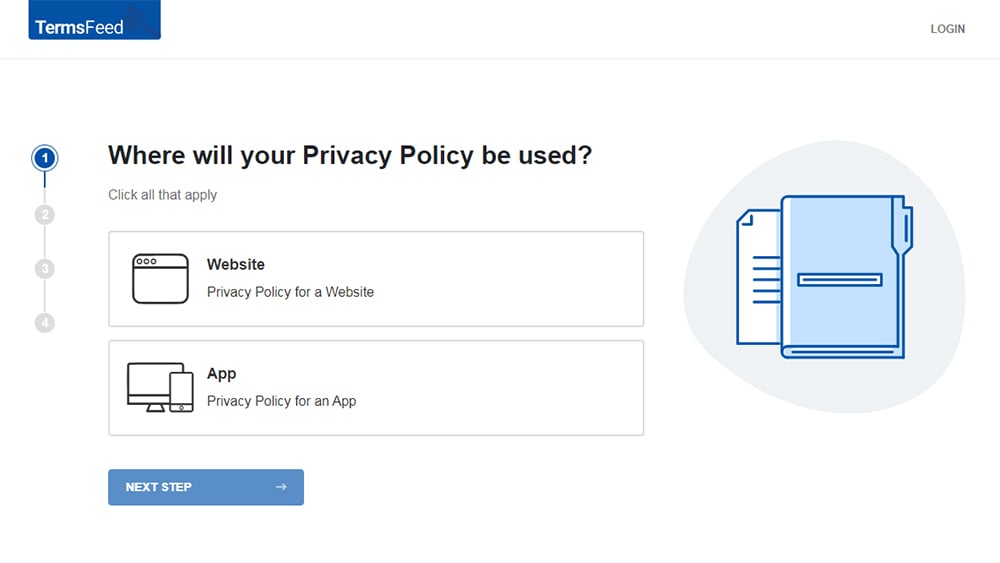
At Step 1, select the Website option or App option or both.
-
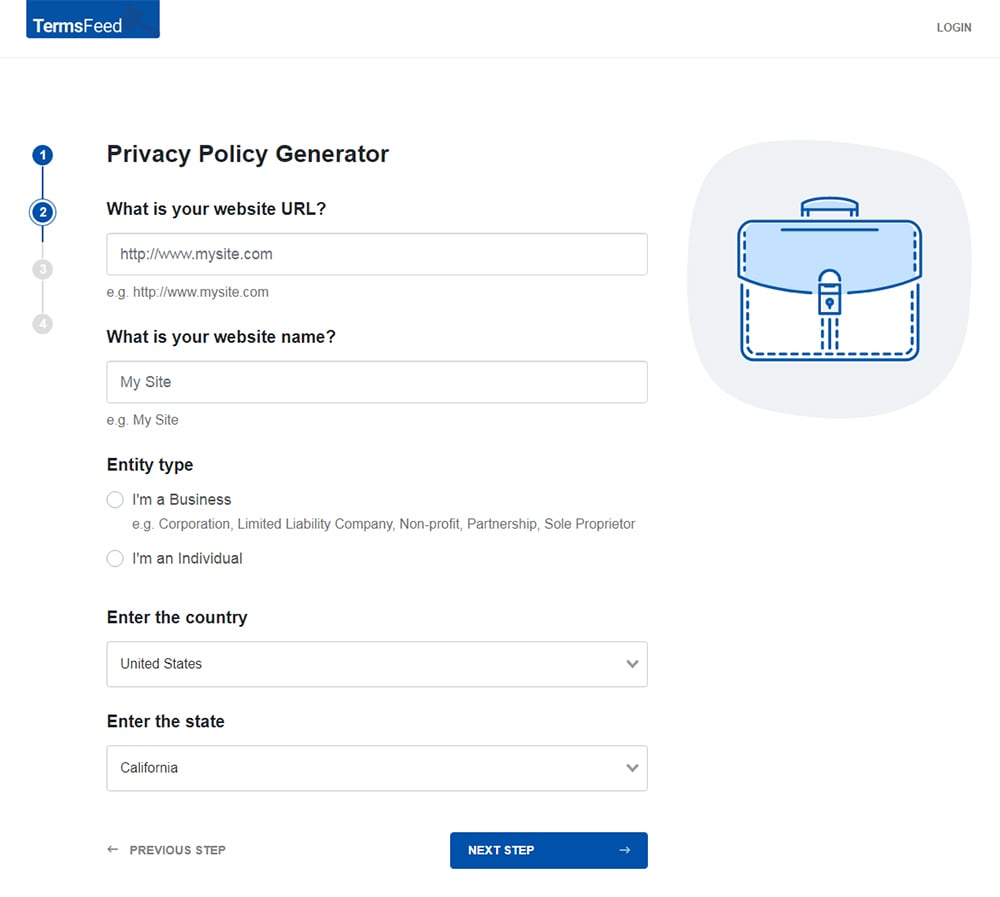
Answer some questions about your website or app.
-
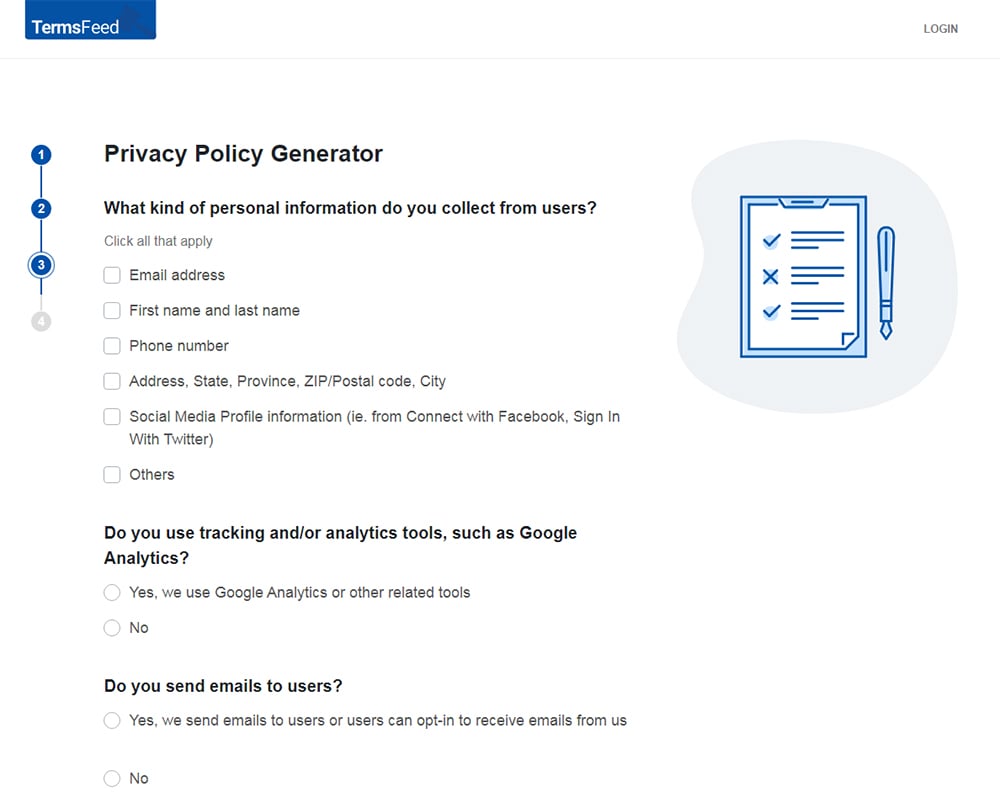
Answer some questions about your business.
-
Enter the email address where you'd like the Privacy Policy delivered and click "Generate."
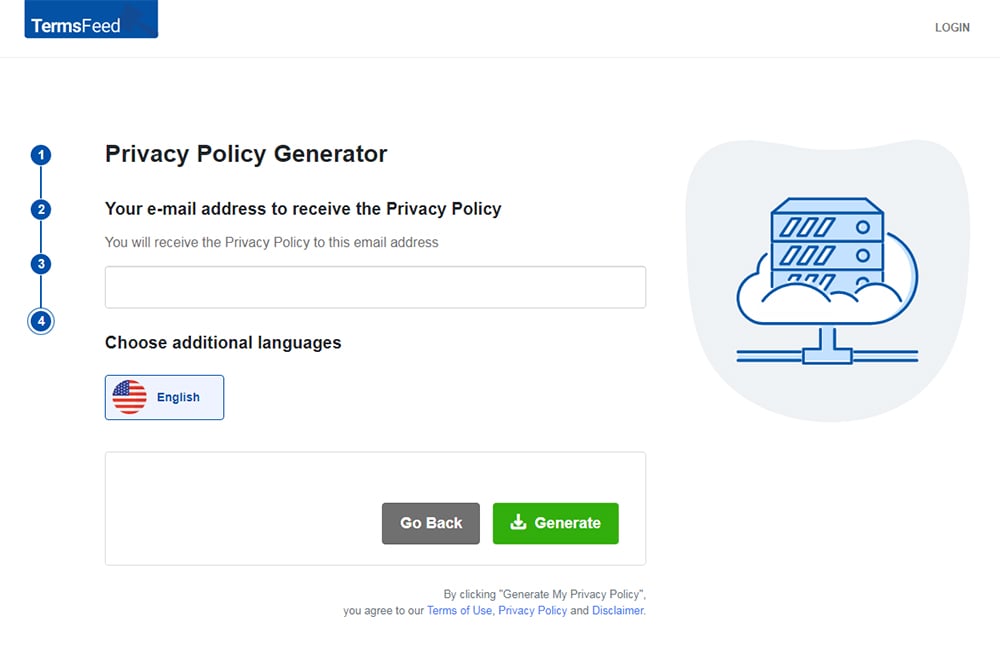
You'll be able to instantly access and download your new Privacy Policy.


- 1. What Is Data Mapping?
- 1.1. Why data mapping is essential
- 1.2. Data map components
- 1.3. Understanding RoPA (Record of Processing Activities)
- 1.4. The RoPA process
- 1.5. RoAA template examples
- 1.6. RoPA Requirements in non-GDRP jurisdictions
- 2. Key Benefits of Data Mapping
- 3. How to Implement a Jurisdiction-Aware Data Mapping Strategy
- 3.1. Step 1: Identify your data assets
- 3.2. Step 2: List all processing activities
- 3.3. Step 3: Track and Classify Vendors
- 3.4. Step 4: Understand Data Lineage
- 4. How Data Mapping Supports DPIAs and TIAs
- 4.1. When do you need Data Protection Impact Assessments (DPIAs)?
- 4.2. When to use Transfer Impact Statements (TIAs)
- 4.3. Why an up to date data map is critical
- 5. Gathering the Information You Need
- 5.1. Data map maintenance program
- 6. The Importance of Geolocation Tagging in Data Mapping
- 6.1. How to implement geolocation tagging
- 6.2. Why geolocation tagging matters
- 6.3. Other benefits of geolocation tagging
- 7. Data Mapping Tools and Frameworks
- 8. Summary
What Is Data Mapping?
Data mapping is the process of identifying, classifying, and documenting how personal data moves through your organization. It tells you:
- What data the business collects
- Where it's stored
- How it's used
- Who has access to it
Personal data is any information that can be used to identify an individual, as seen in the example from the California Consumer Privacy Act (CCPA). This includes names, email addresses, device IDs, photos, and behavioral data. More sensitive categories of personal data (such as health records or biometric data) are known as special category data, and stricter rules apply when handling them.

Why data mapping is essential
Without a data map, it is virtually impossible to show auditors or regulators that you have control over personal data and that you comply with relevant laws. And when data subject requests (customers requesting their personal data) come in or data breaches occur, it could be extremely difficult to fulfill their requests in a compliant manner.
Data map components
A proper data map contains the following elements:
- Personal data types: What data you collect and whether it falls into special categories.
- Processing activities: Every action your business takes with that data, from collection and storage to use and deletion.
- Assets: Any tools or systems where the data is stored or processed, such as databases, cloud servers, or CRMs.
- Vendors: External parties you share the data with, such as analytics providers or payment processors.
- Legal basis: The legal justification for collecting and using the data (e.g., consent, legal obligation, contract).
Understanding RoPA (Record of Processing Activities)
Under Article 30 of the GDPR, most businesses are required to maintain a Record of Processing Activities (RoPA). This is a formal document that outlines how personal data is handled across your organization.

You must maintain a RoPA if:
- You have more than 250 employees, or
- Your processing is likely to pose a risk to individuals, involve sensitive data, or is not occasional.
The RoPA process
The RoPA process flow map from the University System of Georgia highlights the entire process, which is never-ending, as long as you continue processing personal information.

RoAA template examples
The RoPA example below, from the French Commission Nationale de l'Informatique et des Libertés (CNIL), shows the level of granularity it requires.

Below, we can see an example of a RoPA template from the Qatari Ministry of Transportation and Communications. By segmenting each element into discrete columns, it ensures that businesses can track who is doing what with personal data, which supports transparency, accountability, and audit readiness.

The RoPA example below from the UK Information Commissioner's Office uses a color coding system, with green representing required documentation under the UK GDPR, and blue representing optional documentation.

To support compliant cross-border data transfers, the example RoPA includes sections on names of third countries or international organizations the data is transferred to and safeguards in place. Additionally, a section on Data Protection Impact Assessments, which are often needed to facilitate lawful cross-border data sharing under the GDPR and UK GDPR.

RoPA Requirements in non-GDRP jurisdictions
The LGPD (Brazil) has similar requirements under Article 37, though it is less prescriptive.

In jurisdictions such as California (CPRA), Thailand (PDPA), Canada (PIPEDA), South Africa (POPI), and Australia (Privacy Act), maintaining records of data handling is not always mandatory. However, it is strongly recommended for legal protection.
Even where RoPA isn't required, it can be used to:
- Help respond to data subject access requests (DSARs)
- Track where sensitive data resides across systems
- Demonstrate accountability to regulators
RoPA-style documentation helps bring structure and transparency to your data handling processes, making privacy management more strategic and effective.
Key Benefits of Data Mapping
Data mapping is not just a checkbox exercise. It brings a number of key benefits:
- Efficient response to data subject requests (DSRs): A data subject is the individual whose personal data you hold. Laws like GDPR and CPRA give them the right to access, delete, or correct their data. A good data map helps you locate their data fast, complying with time limits to respond to requests required by data privacy laws.
- Fast breach response: Supervisory authorities often impose strict time limits on reporting data breaches. For example, under the GDPR, breaches must be reported within 72 hours. Your map helps you determine what data was compromised and how many people were affected.
- Risk-based decision making: With clear visibility into how data flows, management can evaluate which practices present risks and take informed steps to address them. Additionally, risk information can help the C-suite decide which operations to move into, based on the level of risk they pose.
- Support for accountability: Regulators expect documentation to prove your compliance efforts. A robust data map shows that you take privacy seriously.
- Data minimization and efficiency: By visualizing your entire data ecosystem, you can identify unnecessary data collection and processing activities.
- Build a privacy-aware culture: Documented processes increase internal data privacy awareness within the business and emphasize the importance of responsible data handling for all employees.
How to Implement a Jurisdiction-Aware Data Mapping Strategy
Theoretically, data mapping could be done on an Excel sheet, but it really shouldn't be. To keep your business compliant and accurately map all processes, invest in data mapping software that lets you track all data through every part of its lifecycle.
Data mapping software can help you break down data mapping into the following elements and support compliance across a range of data privacy jurisdictions.
Step 1: Identify your data assets
A data asset is any system, tool, or platform that stores or processes personal data. The first step in data mapping is to create a list of all data assets. For each, include:
- Asset name (e.g., "Marketing CRM")
- Who manages the asset
- Where it is hosted (location/jurisdiction)
- What type of data it stores (e.g., emails, IP addresses)
Then, record:
- Purpose of the asset
- Whether it's internal or external (vendor-owned)
- Hosting details
- How many individuals' data it holds
- Technical and organizational security measures in place
Geolocation tagging for legal compliance: Geolocation tagging involves attaching information about a person's geographic location to the personal data a business collects. This can be done through IP addresses, billing or shipping addresses, GPS data, or user-declared preferences. Every business that operates across borders must implement geolocation tagging for all the data it collects to apply the correct laws to each data subject.
Step 2: List all processing activities
A processing activity is any action performed on personal data, such as collecting, storing, using, or deleting it. For each processing activity, record:
- Activity name and description
- Business function or team responsible
- Whether the activity is ongoing
- Geographic region of the data subjects
- Number of individuals affected
Before beginning any data collection and processing, you must have a clear, legal purpose for processing data in all affected jurisdictions. So be sure to include the following details when mapping processing activities:
- Legal basis for processing (e.g., consent, contract) referencing relevant data privacy law/s
- Whether your business is acting as a data controller (you decide the purpose) or processor (you act on someone else's instructions)
- Data retention period
- How the data is transferred (e.g., API, manual upload)
- Security and documentation details
You may also want to link each activity to the relevant data asset, making it clear where the data resides and how it is being handled. In more detailed records, you can document:
- Whether a Data Protection Impact Assessment (DPIA) is required (more details below)
- Known risks and mitigations
- Supporting legal or internal documentation (including TIAs and SCCs, discussed below)
Step 3: Track and Classify Vendors
Even if you hire third-party vendors to handle personal data on your behalf, your organization is still legally responsible. Your data map must include a detailed description of all third-party vendors with access to your data.
Some crucial information to add to your data map includes:
- Name of the organization
- Type of service (e.g., cloud storage, email marketing)
- Level of criticality (how essential they are to your operations)
- Risk level (based on the type of data they handle)
- Current status (active, in review, decommissioned)
Also record:
- Where the vendor is located
- Supporting documentation (such as Privacy Policy)
- Whether the vendor adheres to cross-border transfer mechanisms (such as model contracts or government-approved frameworks)
- Personnel policies, such as background checks, confidentiality agreements, and data security training
- Technical and organizational safeguards in place
This information helps you assess whether vendors meet your legal obligations, especially when data crosses borders. As we will discuss, you may need to implement Transfer Impact Assessments (TIAs) and follow other protocols to ensure that all cross-border data transfers and out-of-jurisdiction data processing are handled compliantly.
Step 4: Understand Data Lineage
Data lineage refers to the complete lifecycle of personal data. Mapping this gives you visibility from start to finish:
- Source: Where and how the data is collected (e.g., website form, app signup)
- Processing: Systems that store and manipulate the data
- Access: Who can view or use the data
- Transfers: Any movement across departments or borders
- Storage: Where the data is housed (including jurisdictions)
- Archiving and deletion: How long the data is retained and how it is disposed of
Understanding data lineage allows you to visualize dependencies and vulnerabilities, enabling stronger privacy-by-design practices.
It also supports regulatory compliance when specific laws require documentation of transfers or security safeguards, as in cross-border data flows under the GDPR.
How Data Mapping Supports DPIAs and TIAs
Data mapping plays a crucial role in determining when a Data Protection Impact Assessment (DPIA) or Transfer Impact Assessment (TIA) is legally required under the GDPR. These assessments help organizations manage the legal and reputational risks of handling personal data, especially when dealing with high-risk processing or international transfers.
As seen in the excerpt from GDPR.EU below, DPIAs must be prepared at the planning, ie, data mapping, stage, before starting any data processing:

When do you need Data Protection Impact Assessments (DPIAs)?
A DPIA is mandatory under GDPR Article 35 when the processing is likely to result in a high risk to the rights and freedoms of individuals. They are critical to lawful cross-border data transfers. DPIAs are required in the following scenarios:
- Large-scale processing of special category data (e.g., health, biometric, or racial data)
- Systematic monitoring of individuals (e.g., via tracking or profiling)
- Use of technologies that have legal or similarly significant effects on individuals
Mapping out processing activities helps businesses decide whether any of their data practices require a DPIA.
When to use Transfer Impact Statements (TIAs)
A Transfer Impact Assessment (TIA), referred to as a Transfer Risk Assessment (TRA) under UK GDPR, is required when transferring personal data from the EU or UK to a third country that does not have an adequacy decision. This includes major destinations like the United States and Brazil.
The roadmap below from the law firm Baker Donelson highlights the role of data mapping, Standard Contractual Clauses (SCCs), and supplementary data security measures required to make lawful international transfers outside the EEA.

Transfers to the United States: Although the U.S. now participates in the EU-U.S. Data Privacy Framework, only certified organizations are covered. Transfers to non-certified entities still require a TIA and appropriate safeguards such as Standard Contractual Clauses (SCCs).
Transfers to Brazil: Brazil does not currently benefit from an EU adequacy decision. As a result, all transfers from the EU/UK to Brazil must be assessed through a TIA. Organizations must evaluate whether Brazilian law offers data protection comparable to the GDPR, and if not, implement SCCs or other safeguards.
A Transfer Impact Assessment evaluates:
- The nature and sensitivity of the personal data
- The laws and practices of the destination country
- The technical and organizational measures in place to protect the data
If the TIA reveals gaps in protection, SCCs (standardized contractual terms approved by the European Commission) must be used to legally justify the transfer. SCCs obligate the data importer (e.g., a U.S. or Brazilian vendor) to apply GDPR-level protections, even in jurisdictions with lower privacy standards.
Why an up to date data map is critical
Maintaining a detailed, jurisdiction-aware data map lets your organization:
- Quickly identify which datasets involve EU/UK residents
- Track when data is sent to the U.S., Brazil, or other third countries
- Know whether the recipient falls under an adequacy decision
- Link transfers to specific systems, vendors, and processing activities
Without this clarity, it's easy to miss unlawful transfers or fail to apply required safeguards in time, leaving your business exposed to compliance penalties and enforcement actions.
Gathering the Information You Need
Creating an accurate and complete data map requires collecting information from across your business. It's good practice to send tailored questionnaires to system owners to gather this information.
Design the questionnaire to elicit the information necessary to assess whether the asset aligns with data protection requirements in the jurisdictions where your customers reside.
The questionnaire should:
- Clearly explain why the information is needed
- List the relevant privacy laws that apply
- Ask precise questions about how data is collected, stored, accessed, and shared
- Elicit details of all technical and organizational safeguards in place
Data map maintenance program
Your business is constantly changing, and so are data privacy laws. Therefore, your data map cannot remain static and stay compliant. Regular legal reviews and updates should be scheduled and implemented.
New questionnaires should be sent out and data map reviews undertaken whenever major operational changes occur, such as:
- Expanding into a new geographic market
- Launching a new product or service
- Adopting new software or cloud services
- Working with new vendors or partners
The Importance of Geolocation Tagging in Data Mapping
The key benefit of geolocation tagging is that it allows your organization to apply the correct legal rules to each data subject. Different jurisdictions grant different rights to individuals. For example:
- A user in California may have the right to opt out of the sale of their personal data under the CPRA.
- A user in Germany has the right to object to data processing under the GDPR and may require a legal basis, such as explicit consent.
- A user in Brazil may need to be informed in clear language under the LGPD requirements about data processing.
If you can't identify where a user is located, you can't ensure their rights are being respected, or that your obligations are being met. This could leave you in breach of regulations and in danger of being fined.
How to implement geolocation tagging
There are a few common ways to determine user location:
- IP address lookup: Infers location based on internet connection origin.
- Device location services: Used in apps or with explicit user consent.
- Address data: From billing/shipping information or registration forms.
- User declarations: If your site collects a country or region from a dropdown or account profile.
It is important to document not only the user's location at the time of data collection, but also the jurisdiction that governs that data. Some tools support dynamic tagging so that once data is tagged as belonging to an EU or California resident, it remains labeled accordingly through its entire lifecycle.
Why geolocation tagging matters
Laws like the GDPR prohibit exporting personal data outside the EU unless certain safeguards are in place. One requirement is adequacy: that the EU has determined another country or organization meets similar standards to the GDPR, as seen in this excerpt from Article 45.

If there is no adequate decision in place, the business must implement Article 46 of the GDPR, which requires the use of appropriate safeguards.

Therefore, before transferring EU or UK personal data to the U.S. or another third country, you may need to:
- Conduct a Transfer Impact Assessment (TIA) to evaluate whether the laws of the destination country adequately protect personal data in line with the GDPR. Under UK GDPR, this is known as a Transfer Risk Assessment (TRA).
- Use Standard Contractual Clauses (SCCs) or Binding Corporate Rules (BCRs) that establish safeguards for data being transferred outside of the EEA.
Geolocation tagging allows you to flag when these requirements are triggered.
However, each jurisdiction may treat data transfers differently. As shown below, in Canada, PIPEDA does not require that individuals be informed if their data is being sent to another jurisdiction.
Rather than relying on the concept of adequacy, as defined by the GDPR, the organization making the transfer is responsible for protecting personal data.

Other benefits of geolocation tagging
Geolocation data also helps businesses:
- Segment data for jurisdiction-specific retention or deletion rules
- Serve local privacy notices or cookie banners
- Apply region-specific risk assessments and mitigation steps
In short, tagging data by jurisdiction is the bridge between your data map and your legal compliance strategy.
Data Mapping Tools and Frameworks
Data mapping software platforms can help automate and maintain your data map. These tools typically:
- Discover personal data across your systems
- Track where data flows internally and externally
- Visualize data transfers across jurisdictions
- Allow tagging based on geographic origin and legal framework
- Store processing activity logs and vendor details
- Help prepare reports and respond to audits
These platforms may allow you to visualize cross-border data transfers on an interactive world map, click through to see details of each transfer, and automate risk assessments. Some offer built-in templates for records, such as RoPA or DPIA, and alert you when updates are needed.
While tools can simplify the process, your organization is still responsible for ensuring the data is mapped accurately and updated regularly.
Summary
Regardless of the jurisdiction they cover, data privacy laws require organizations to embed privacy by design in every aspect of their operations. This means that data mapping is no longer optional. Even small businesses must know how personal data flows through their systems and across borders.
Jurisdiction-aware data mapping helps you understand your legal obligations in each country or region. It allows you to document and demonstrate your compliance efforts, making it easier to handle data subject requests and potential breaches. Data mapping also allows businesses to manage risk and make smarter business decisions, while avoiding fines, data breaches, and damage to their brands.
Whether you're responding to a data subject request or preparing for a privacy audit, a well-maintained data map is your foundation. Build it, update it, and use it as a strategic asset.

The first step to compliance: A Privacy Policy.
Stay compliant with our agreements, policies, and consent banners — everything you need, all in one place.


