


AI Summarize


Share


CookieFirst is an Amsterdam-based consent management platform (CMP) that was developed by Digital Data Solutions BV. It helps businesses manage cookie consent with features such as customizable cookie banners, cookie scanning, a Cookie Policy generator in 44 languages, and integrations with Google Consent Mode v2 and Microsoft Universal Event Tracking (UET) Consent Mode.
CookieFirst targets small and medium-sized businesses (SMBs), mid-market companies, agencies, and resellers that need to comply with data protection laws such as the European Union (EU) General Data Protection Regulation (GDPR) and US state privacy laws like the California Consumer Privacy Act (CCPA). Buyers typically consider CookieFirst when they are looking for a cloud-based, Google-certified CMP that supports the Interactive Advertising Bureau (IAB) Transparency and Consent Framework (TCF) 2.2. Its platform flexibility and agency-friendly pricing model add to its appeal. Compared with platforms like TermsFeed that combine legal document generation with cookie compliance tools, CookieFirst is more focused on automated cookie consent management.
Use our Cookie Consent all-in-one solution (Privacy Consent) for cookies management to comply with GDPR & CCPA/CPRA and other privacy laws:
- For GDPR, CCPA/CPRA and other privacy laws
- Apply privacy requirements based on user location
- Get consent prior to third-party scripts loading
- Works for desktop, tables and mobile devices
- Customize the appearance to match your brand style
Create your Cookie Consent banner today to comply with GDPR, CCPA/CPRA and other privacy laws:
-
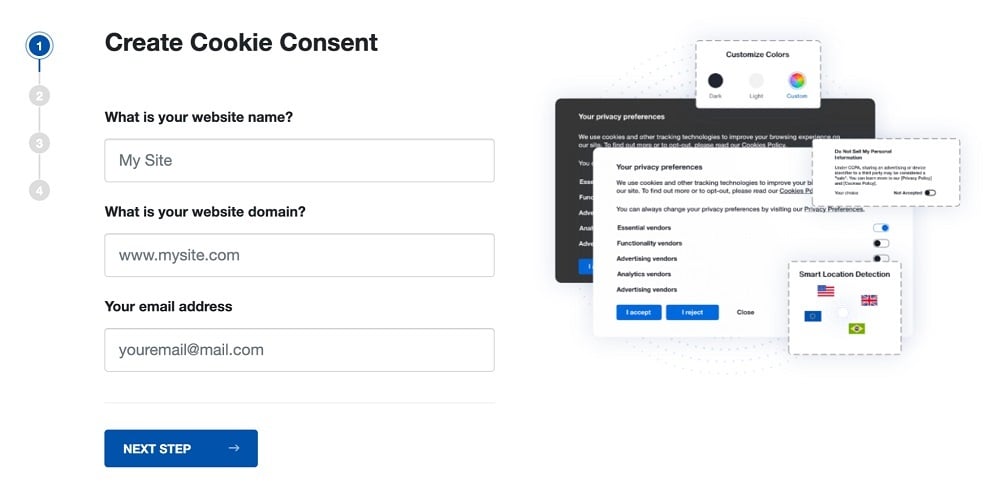
Start the Privacy Consent wizard to create the Cookie Consent code by adding your website information.
-
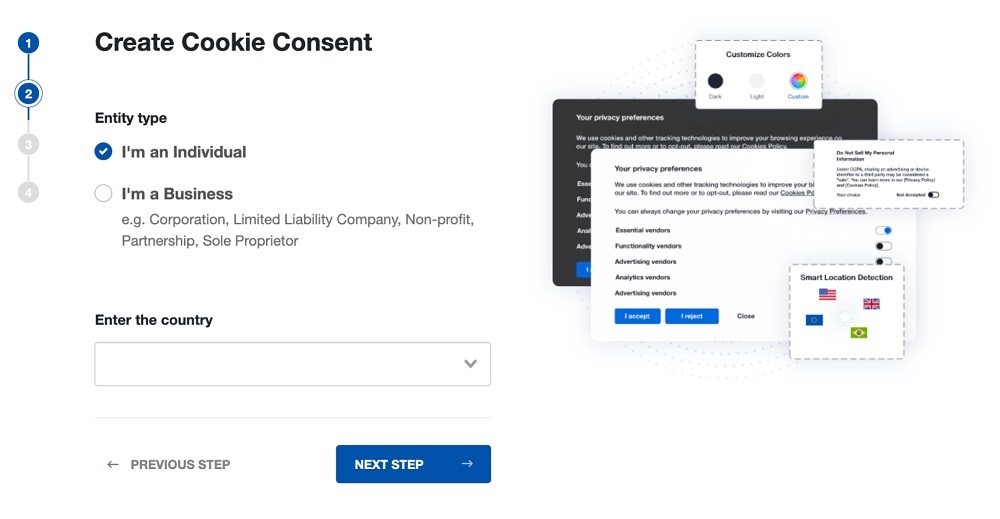
At Step 2, add in information about your business.
-
At Step 3, select a plan for the Cookie Consent.
-
You're done! Your Cookie Consent Banner is ready. Install the Cookie Consent banner on your website:
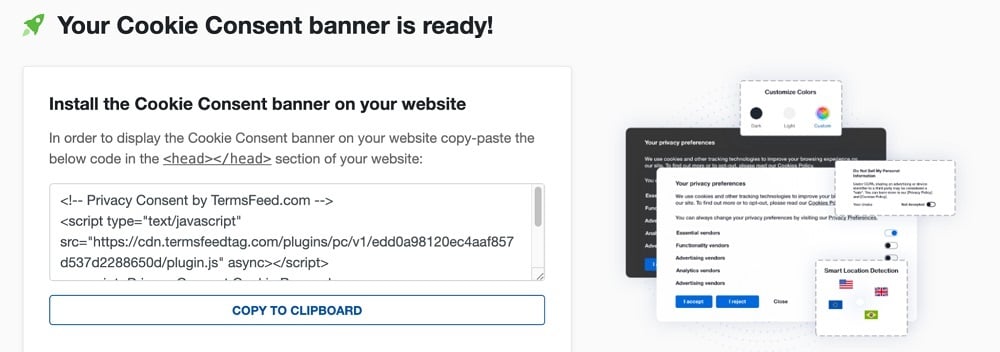
Display the Cookie Consent banner on your website by copy-paste the installation code in the
<head></head>section of your website. Instructions how to add in the code for specific platforms (WordPress, Shopify, Wix and more) are available on the Install page.


- 1. What is CookieFirst?
- 2. What is the CookieFirst Price?
- 3. What are the Best CookieFirst Features?
- 3.1. 1. Customizable Cookie Banner (GDPR, CCPA, LGPD, Law 25)
- 3.2. 2. Automated Cookie Scanner (Monthly Scans + Reports)
- 3.3. 3. Cookie Policy Generator (44 Languages, Auto-Updated)
- 3.4. 4. Google Consent Mode v2 Integration
- 3.5. 5. Microsoft Consent Mode UET Integration
- 3.6. 6. IAB TCF 2.2 Support (Google Certified CMP)
- 3.7. 7. Google Tag Manager Integration (Dedicated Template)
- 3.8. 8. Auto-Blocking of Third-Party Scripts (Autoblock)
- 3.9. 9. Granular Opt-In (Per-Category Consent)
- 3.10. 10. White-Label Banner & Panel
- 3.11. 11. Consent Audit Trails (Encrypted Logging)
- 3.12. 12. Consent Statistics & Opt-In Rate Optimization
- 3.13. 13. Multi-Platform Support (Shopify App, WordPress Plugin, React/NPM)
- 3.14. 14. WordPress Consent API Support
- 4. How does CookieFirst Work?
- 4.1. Before You Install
- 4.2. Quick Setup Guide
- 4.3. How the Scanner & Banner Engine Works
- 4.4. Things to Watch For
- 5. What are the Pros of CookieFirst?
- 6. What are the Cons of CookieFirst?
- 7. What are the alternatives to CookieFirst?
- 7.1. What is the history of CookieFirst?
What is CookieFirst?
CookieFirst is a CMP that helps businesses manage cookie consent and comply with state and global privacy laws.
CookieFirst features include:
- Customizable cookie banners
- Cookie scanner
- Cookie Policy generator
- Consent logging
- Integrations with Google Consent Mode v2 and Microsoft UET
CookieFirst positions itself as an EU-based, platform-agnostic, Google-certified CMP that supports the IAB TCF 2.2.
It provides services for:
- SMBs that need GDPR and multi-regulation compliance tools
- Agencies and web developers that want to use its Reseller program
- Mid-market businesses
- Enterprise organizations that need customizable plans
CookieFirst was founded in 2019 by brothers Kees van den Bos and Tom van den Bos and is headquartered in Amsterdam, Netherlands. It was developed by Digital Data Solutions B.V. and was acquired by iubenda (team.blue) in January 2025; the product continues under the CookieFirst brand.
What is the CookieFirst Price?
The CookieFirst price is dependent on the plan you choose. Plans are broken into 4 tiers, ranging from free to custom pricing for enterprise-level organizations.
CookieFirst offers a 2-week free trial, with no credit card required. Businesses pay monthly or yearly, but those that purchase an annual subscription receive 1 month for free.
Pricing for the Free, Basic, and Plus plans is public; pricing for the Enterprise plan is quote-based. Prices are displayed in euros (EUR) per month and exclude Value Added Tax (ex VAT).

Here is a breakdown of how much each plan costs and what it includes:
- Free: The Free plan is €0/month ($0) and includes 1 third-party script, a one-time cookie scan, 1 language, and a customer support response time of <96 hours.
- Basic: This plan costs €9/month (~$9.80) or €99/year (~$108) and includes all third-party scripts, a monthly cookie scan, multiple languages, and customer support response time of <72 hours. It unlocks external collaborators, enables banner customization and white-label banners, and provides consent statistics and cookie scan reports.
- Plus: The Plus plan costs €19/month (~$20.70) or €209/year (~$228) and includes everything in the Basic plan, as well as faster customer support response times (<24 hrs), a white-label panel, consent audit trails, opt-in rate optimization, scanner settings, and IAB TCF 2.2 support.
- Enterprise: Large organizations that have multiple domains or specific requirements must contact CookieFirst to get custom pricing for Enterprise plans.
In addition, CookieFirst offers Agency/Reseller plans with a 30% reseller discount.
What are the Best CookieFirst Features?
The Best CookieFirst Features are tools such as its customizable cookie banner and automated cookie scanner that help businesses comply with US and global privacy laws.
CookieFirst features include:
- Customizable cookie banner: Helps websites collect cookie consent in compliance with regional privacy laws.
- Automated cookie scanner: Automatically scans websites for cookies and trackers, then provides reports showing what was found and where.
- Cookie Policy generator: Creates and maintains a customized Cookie Policy based on information from the cookie scan.
- Google Consent Mode v2 integration: Connects cookie consent choices with Google tools so advertising and analytics tags adjust their behavior based on user preferences.
- Microsoft Consent Mode UET integration: Allows Microsoft Advertising UET tracking tools to respect user consent choices for privacy law compliance.
- IAB TCF 2.2 support: Enables standardized consent signals for advertising platforms.
- Google Tag Manager integration: Provides a Google Tag Manager (GTM) template to simplify cookie consent setup and tag management.
- Auto-blocking of third-party scripts: Automatically prevents third-party scripts and trackers from loading until users give consent.
- Granular opt-in: Lets visitors choose which cookie categories (such as functional, performance, or advertising) they accept or reject.
- White-label banner & panel: Allows businesses to customize consent banner and panel branding messaging to match their website.
- Consent audit trails: Securely records user consent decisions to provide proof of compliance during audits.
- Consent statistics & opt-in rate optimization: Provides analytics on consent choices to help businesses understand and improve user opt-in rates.
- Multi-platform support: Works across different website platforms and content management systems (CMS).
- WordPress Consent API support: Works with the WordPress Consent API to help plugins and services recognize user privacy preferences.
We'll explore these features in more detail below.
1. Customizable Cookie Banner (GDPR, CCPA, LGPD, Law 25)
The customizable cookie banner is a pop-up notification that informs users about cookies and tracking technologies used on a website and allows them to manage their cookie preferences.
The CookieFirst fully customizable cookie banner supports compliance with global and state data protection laws, including:
- EU: GDPR and the ePrivacy Directive
- US: CCPA
- Canada: Law 25 and the Personal Information Protection and Electronic Documents Act (PIPEDA)
- Brazil: Lei Geral de Proteção de Dados (LGPD)
- Thailand: Personal Data Protection Act (PDPA)
CookieFirst helps businesses manage regional cookie consent requirements by geo-targeting the cookie banner to display the appropriate notice based on visitor location.
Users choose from banner or box layouts and customize styling, colors, and messaging from the CookieFirst dashboard. They turn on Sync to website language from Banner Settings to make the cookie banner language match the website language for each visitor. Cookie banners are optimized for mobile and work on a variety of devices, including laptops, smartphones, and tablets.
The CookieFirst Cookie Banner page shows examples of how cookie banners appear on mobile devices.

Unlike cookie consent tools that focus on individual regions, CookieFirst supports compliance with multiple privacy regulations across the EU, US, Brazil, Canada, and Thailand within a single cookie banner.
2. Automated Cookie Scanner (Monthly Scans + Reports)
The automated cookie scanner is designed to regularly scan websites for cookies and tracking technologies.
The CookieFirst cookie scanner generates a list of cookies and local storage items detected on a website and uses this data to help keep the associated Cookie Policy up to date. Users receive cookie scan reports by email or have the ability to access scan results directly in their CookieFirst account.

Manual cookie audits are time-consuming and prone to mistakes, but the automated cookie scanner detects third-party cookies and trackers that are added to a website in under a minute. This helps support compliance with regulations like the GDPR that require transparency around data collection practices.
Free plan users get a one-time scan, while Basic and Plus plans include monthly scans.
Compared to setups that rely on manual audits or separate tools for scanning, reporting, and Cookie Policy management, CookieFirst brings these functions together in one platform.
3. Cookie Policy Generator (44 Languages, Auto-Updated)
The Cookie Policy generator is an automated tool that creates a Cookie Policy based on information from the CookieFirst cookie scan and how third-party tools are set up.
The multi-language generator helps businesses comply with privacy laws like the GDPR and the ePrivacy Directive by providing visitors with information about the cookies and tracking technologies used on their websites.
Article 13 of the GDPR requires data controllers to inform individuals about how their personal data is collected and used, including the purposes of processing.

The Cookie Policy is easy to implement. After setting up a CookieFirst account and completing a website scan, businesses copy and paste the embed script on a dedicated Cookie Policy page. The Cookie Policy lists cookies detected on the website and their purposes.
Not all similarly-priced CMPs offer the extensive language coverage CookieFirst provides. As of the time of this writing, CookieFirst supports 44 languages and is capable of adding new languages by request within a week.
4. Google Consent Mode v2 Integration
Google Consent Mode v2 integration is a feature that enables businesses to communicate visitor consent signals to Google products such as Google Ads, Google Analytics, and GTM.
Google requires Consent Mode v2 for certain Google Ads and measurement features when processing personal data from users in the European Economic Area (EEA). Advertisers using tags or SDKs for measurement, ad personalization, and remarketing must collect consent from EEA users and pass consent signals to Google through Consent Mode. This ensures that Google tags adjust their behavior based on end-user consent choices when users from the EEA interact with a website or app.
Businesses enable Google Consent Mode within the CookieFirst dashboard. CookieFirst then communicates user consent signals from the cookie banner to Google through Consent Mode. Google tags then adjust how they operate in Google Analytics and Google Ads based on those signals.
The CookieFirst Google Tag Manager and Google Consent Mode v2 page explains how to turn on Google Consent Mode through dashboard settings.

CookieFirst is a Google Certified CMP partner with Gold status, meaning it meets Google requirements for Consent Mode and GTM integration, as well as standards for customer support quality and ease of implementation.
5. Microsoft Consent Mode UET Integration
Microsoft Consent Mode UET integration is a feature that enables Microsoft UET tags to adjust how they track and measure user activity based on user consent choices.
Microsoft UET uses a tracking tag to record user actions on a website and sends that information to Microsoft Advertising. UET is required for conversion tracking, remarketing in paid searches, and automated bidding bid strategies.
Implementing Microsoft Consent Mode is necessary for maintaining full Microsoft Ads functionality for websites that receive traffic from the EEA, the United Kingdom (UK), or Switzerland.
Implementation of Microsoft Consent Mode helps organizations:
- Ensure proper consent management
- Avoid disruptions in conversion attribution and remarketing segments
- Comply with ePrivacy Directive and GDPR requirements
Users enable Microsoft Consent Mode in the CookieFirst dashboard from the Basic Settings tab. They set default consent states for users in the EEA and other regions, helping ensure the UET tag complies with regional privacy laws.
Users have the option to set the defaults for the UET consent over the CookieFirst cookie banner, but it's important that the banner runs before the UET code to ensure that visitor consent choices are communicated to Microsoft Ads effectively.
The CookieFirst Microsoft Ads consent mode page explains how users enable Microsoft Consent Mode and adjust default settings.

Many CMPs focus on Google Consent Mode v2, while Microsoft Consent Mode integration is less commonly offered as a standalone feature. CookieFirst enables businesses to manage consent settings and pass consent signals to both Microsoft and Google advertising tools in one place.
6. IAB TCF 2.2 Support (Google Certified CMP)
IAB TCF 2.2 support is a CookieFirst feature that implements the IAB TCF 2.2 to communicate user consent choices to ad tech vendors.
CookieFirst enables organizations to choose the vendors they want to share user consent with. Once TCF is enabled in the cookie banner, vendors receive consent signals and are allowed to create advertising profiles of website visitors.
Google requires organizations using its publisher products (including Google AdSense, Ad Manager, or AdMob) to use a Google-certified CMP that integrates with the IAB TCF when serving personalized ads to users in the EEA and Switzerland.
Users enable IAB TCF 2.2 in CookieFirst by taking the following steps:
- Navigate to Basic Settings, then down to TCF Settings in the dashboard.
- Toggle on the Enable TCF in banner setting.
- Choose the country where the website operates.
- Select the TCF vendors used on the site.
- Enable Google Ad Technology Providers (ATPs) and select vendors (optional). ATPs are advertising vendors that aren't registered on the IAB Europe Global Vendor List (GVL). Organizations that use these ATPs must ask for consent for these providers.
CookieFirst is registered on the IAB Europe CMP list and on the Google Certified CMP partners list, meaning that it supports consent frameworks used by major advertising platforms. This sets it apart from CMPs that are not included in both listings.
IAB TCF support is available at the Plus plan level and is not available on lower-tier plans.
7. Google Tag Manager Integration (Dedicated Template)
Google Tag Manager integration is a way to install CookieFirst through GTM instead of adding the script directly to a website.
CookieFirst provides a dedicated GTM template that helps users set up CookieFirst in their GTM workspace. This allows organizations to deploy the cookie banner via GTM without editing website code, and is particularly useful for businesses that manage all tags through GTM. CookieFirst then handles consent collection through the banner and applies consent settings to supported integrations such as Google Consent Mode, where enabled.
To implement CookieFirst into GTM, users must first have:
- A GTM account
- A container for their website
- The GTM script embedded on their website
- A CookieFirst account
Setup includes the following steps:
- Enable Google Consent Mode v2 for the cookie banner via Google consent mode settings under Basic Settings in the dashboard.
- Add the CookieFirst tag in GTM.
- Load the CookieFirst script through GTM or directly on the website.
- Set default consent states for cookie categories before user consent.
- Configure region-based default consent settings.
- Configure non-Google tags.
The CookieFirst Google Tag Manager and Google Consent Mode v2 page shows how users set up CookieFirst using the GTM Community Template Gallery.

CookieFirst supports both GTM deployment and Google Consent Mode integration within the same platform.
8. Auto-Blocking of Third-Party Scripts (Autoblock)
Auto-blocking of third-party scripts is a feature that helps prevent third-party tracking scripts from loading without visitor consent.
The autoblock feature detects third-party scripts on a website and prevents them from running until the visitor grants consent for the service or relevant cookie category. Once consent is provided, scripts load according to the selected preferences.
The ePrivacy Directive requires organizations to obtain consent before storing or accessing information through non-essential cookies and similar tracking technologies. Similarly, the GDPR requires a lawful basis, such as consent, when tracking technologies involve processing personal data.
Without script blocking, third-party scripts added directly to a website load before visitors provide consent.
The CookieFirst script blocking feature addresses this by identifying script tags and controlling when they run based on visitor consent preferences. Users have the choice of autoblocking everything or creating a custom configuration for individual third-party services. Once setup is complete, users put the CookieFirst script in the <head> section of their website or install the plugin, such as WordPress, Shopware, or Shopify.
The CookieFirst How does the autoblock feature work? page explains that users choose the third-party services present on their websites from the Scripts section of their dashboard, then enable autoblock.

CookieFirst provides cookie banner management, script blocking, and integrations such as GTM and Google Consent Mode within one platform to help businesses comply with global privacy laws.
9. Granular Opt-In (Per-Category Consent)
Granular opt-in is a feature that enables website visitors to give or deny consent by cookie category.
With granular opt-in, visitors choose whether to allow or reject different types of cookies, such as performance, advertising, and functional cookies, instead of accepting or rejecting all cookies at once.
Per-category consent helps businesses comply with laws like the GDPR that require consent to be specific and informed by giving users control over how their data is processed.
CookieFirst provides a configurable category system in the dashboard. Users set up cookie banners with separate options for each category, allowing visitors to make individual consent choices.
Like most CMPs, CookieFirst provides granular consent controls that allow visitors to consent by cookie type and purpose.
10. White-Label Banner & Panel
White-label banner & panel is a set of features that enables businesses to remove CookieFirst branding from their cookie banner and panel.
This set of features is designed for agency-managed sites and brand-conscious businesses that want their consent experience to fully integrate into their website design instead of showing a third-party CMP logo.
White-label settings are enabled in the CookieFirst dashboard. Once activated, the cookie banner and panel display the company branding instead of CookieFirst branding.
White-label banner functionality is included in the Basic plan and above, while white-label panel functionality is available starting from the Plus plan.
Like many CMPs, full white-labeling is only available in higher-tier CookieFirst plans.
11. Consent Audit Trails (Encrypted Logging)
Consent audit trails is a feature that records visitor consent decisions and stores them in an anonymous, encrypted database.
When a visitor accepts or rejects cookie categories, CookieFirst creates a consent log that documents the choice. This provides organizations with a record of consent activity to be used for audits.

The GDPR requires organizations to prove that valid consent was obtained when consent serves as the legal basis for processing personal data. Consent audit trails provide documentation of these consent decisions.
The CookieFirst consent audit trail includes details such as when and how consent was provided. Basic plan users have the ability to export consent data as a comma-separated values (CSV) file, while the Plus plan includes access to ongoing consent details and status.
As with many CMPs, CookieFirst stores encrypted consent records to document visitor consent choices.
12. Consent Statistics & Opt-In Rate Optimization
Consent statistics & opt-in rate optimization is a set of features that show cookie consent activity and allow users to set goals for returning visitors to improve opt-in rates.
The CookieFirst dashboard provides consent statistics, including how many visitors accept or reject cookie categories, the number of consents during a specified timeframe, and acceptance rates by category and device type.
Organizations review consent trends and adjust cookie banner settings based on visitor behavior. This supports improved opt-in rates for analytics and advertising tools that depend on user consent.
The CookieFirst Book a meeting page shows how users access information such as the number of consents given during a specific time period and acceptance rate per device and category via the Statistics section of the dashboard.

The re-consent feature lets organizations set goals for specific cookie categories and show the banner again to returning visitors who have not accepted those categories.
For example, if a visitor accepts performance cookies but not advertising cookies, an organization has the ability to show the banner to the user again after a certain period of time. This gives businesses an opportunity to increase consent rates for selected cookie categories while respecting previous consent choices.
Consent statistics are available on paid plans, while the re-consent feature is available starting with the Plus plan.
Consent statistics are a common feature in many CMPs. CookieFirst provides both consent statistics and advanced re-consent functionality within a single dashboard.
13. Multi-Platform Support (Shopify App, WordPress Plugin, React/NPM)
Multi-platform support is a capability that enables organizations to use CookieFirst with different website platforms and CMS.

CookieFirst is platform-agnostic, meaning it works across different types of websites. Organizations install CookieFirst using a script snippet or dedicated integrations for platforms like Shopify, WordPress, and React (cookiefirst-react).

These integration options help organizations add CookieFirst to standard websites and custom-built sites using a setup that fits their technology stack.
Each integration includes setup instructions. The React package is available through npmjs.com/package/cookiefirst-react, while Shopify and WordPress integrations install directly through their respective platforms.

Multi-platform support is a common feature in consent tools. CookieFirst provides multiple installation options, including integrations for CMS platforms and custom-built websites.
14. WordPress Consent API Support
WordPress Consent API support is a feature that allows CookieFirst to share visitor consent choices with WordPress plugins.
The CookieFirst WordPress plugin supports the WordPress Consent API, which helps WordPress plugins check whether visitors have accepted or rejected specific cookie categories. When visitors interact with the CookieFirst banner, their consent status is automatically shared through the API with supporting plugins.
Managing cookie consent across multiple plugins and third-party tools is challenging and often results in user experience issues and compliance gaps. CookieFirst support for the WordPress Consent API allows compatible tools, including analytics, advertising, and embedded content plugins, to access and respond to visitor consent preferences shared through the CookieFirst banner.
WordPress Consent API support is a newer standard, and not every consent tool includes this capability. CookieFirst WordPress Consent API support helps organizations maintain consistent consent handling across compatible WordPress tools.
How does CookieFirst Work?
CookieFirst works by connecting a website to its consent system through a simple dashboard setup and a script snippet added to the site.
Here's how it works:
- Create an account. Users have the option to sign up for a free trial (no credit card required) to see which plan works best for their needs.
- Configure settings. Users customize their cookie banner and choose to manage third-party tracking scripts or enable the autoblock feature through the CookieFirst dashboard.
- Get consent. Once setup is complete, users add a script snippet to their website to activate the CookieFirst banner. Third-party scripts load only after visitors give consent, helping organizations comply with privacy laws like the GDPR and the ePrivacy Directive.
Before You Install
Before you install CookieFirst, you'll need to setup prerequisites:
- Create an account: The first step is to sign up for an account. A 14-day free trial is available, with no credit card required.
- Choose a plan: The Free plan is permanent, but Basic and Plus plans require a subscription. Users must contact CookieFirst to get information about its Enterprise plan.
- Identify third-party scripts: Review existing third-party scripts on the site such as analytics and advertising tools and embedded services that will require consent management.
- Choose the integration path (optional): Options include a single script snippet, Shopify app, WordPress plugin, React NPM package, or GTM template.
Quick Setup Guide
The quick setup guide is a 3-step process that includes:
- Step 1: Create a CookieFirst account and start the free trial.
- Step 2: Scan your website for cookies and third-party trackers. Either configure each script manually or enable Autoblock to defer all third-party scripts until consent is provided.
- Step 3: Add the CookieFirst snippet to your website
<head>, or use a plugin or GTM template. Then customize your cookie banner.
How the Scanner & Banner Engine Works
The scanner & banner engine works by scanning a website to find active cookies and local storage items. CookieFirst assigns a category to each item, such as performance, advertising, functional, or necessary.
Users configure cookie categories in the CookieFirst dashboard, and the banner uses those settings to present per-category toggles to website visitors.
When the autoblock feature is enabled, CookieFirst blocks third-party scripts from running until a visitor gives consent for the related category.
Consent choices are recorded in the CookieFirst encrypted database and are accessible from the dashboard, where organizations have the ability to review consent rates and related analytics.
Things to Watch For
Things to watch for with CookieFirst include limitations such as restricted feature availability on the Free plan and the risk of the autoblock feature not functioning properly if scripts are misconfigured.
The CookieFirst Free plan only supports 1 third-party script, which is restrictive for most modern websites. Even a typical small business site using tools such as Google Analytics, Meta Pixel, and YouTube embeds will need at least the Basic plan to support their needs.
Businesses that require multi-language support, monthly scans, or white-label banner or panel branding control must sign up for a paid plan.
CookieFirst edge cases include situations where misconfiguration leads to unexpected cookie banner behavior or prevents the autoblock feature from functioning properly.
Autoblock behavior depends on script load order. The CookieFirst banner must load before the third-party scripts it controls. If the CookieFirst embed script loads too low in the <head>, data transfer could start before CookieFirst blocks it.
Finally, it's important to be aware that CookieFirst was acquired by iubenda in 2025, with potential impact on future product direction and integration.
What are the Pros of CookieFirst?
The pros of CookieFirst are features such as consent framework compatibility, multilanguage support, and white-label capabilities that help businesses manage consent and comply with regional privacy laws.
CookieFirst pros include:
- Google Certified CMP status with IAB TCF 2.2 support. This enables consent information to be shared with major advertising platforms in a consistent way.
- Support for both Google Consent Mode v2 and Microsoft UET Consent Mode. This allows integration with two widely used consent mechanisms in a single CMP setup.
- EU-based vendor. CookieFirst is located in Amsterdam, Netherlands, and operates under EU privacy laws such as the GDPR, which requires strong privacy protections for personal data.
- Cookie Policy generator supports 44 languages. This helps organizations manage multilingual compliance needs across different regions.
- Platform-agnostic CMP. CookieFirst provides a dedicated Shopify App, a WordPress plugin with WordPress Consent API support, and a React NPM package for custom builds.
- Permanent free tier. The Free plan is available permanently rather than as a time-limited trial, allowing ongoing use at no cost.
- Reseller and agency program. CookieFirst offers a partner program with commissions for referrals and pricing benefits for agencies.
- White-label capabilities. White-label banners are available starting from the Basic tier at € 9/month, providing branding control at a lower cost compared to some competitors that restrict this to higher tiers.
- Backed by iubenda. iubenda acquired CookieFirst in 2025, indicating ongoing development and future integration with related tools.
What are the Cons of CookieFirst?
The cons of CookieFirst are issues such as limited feature availability on the Free plan, potential product direction uncertainty, and EU pricing.
CookieFirst cons include:
- The Free plan is restrictive. Free plan features are limited to 1 third-party script, 1 language, and a one-time scan, making it unsuitable for many small business websites.
- Feature descriptions unclear. The public pricing page does not clearly explain how many domains each plan supports or what each feature does.
- No documentation of IAB TCF v2.3 support. CookieFirst advertises IAB TCF 2.2 support on public-facing pages, but v2.3 is not mentioned in any vendor docs reviewed as of June 2026, while competitors like CookieScript have moved to v2.3.
- Uncertain future. The acquisition by iubenda in 2025 introduces some uncertainty about long-term product direction for users who prefer the stability of an independent product.
- EU pricing. Pricing is listed in euros and billed from a Dutch entity, inconveniencing US-based buyers who prefer USD billing or a US-based vendor structure.
What are the alternatives to CookieFirst?
The alternatives to CookieFirst are platforms like TermsFeed that provide legal policy generators and consent management tools for businesses of all sizes.
Other CookieFirst alternatives include:
- iubenda: Acquired CookieFirst in January 2025. Offers legal document generation, cookie banners, and consent management capabilities, and has plans for businesses of all sizes.
- Cookiebot: Google Gold Certified CMP, owned by Usercentrics. Provides cookie scanning, consent management, and compliance reporting tools. Best for businesses looking for a cost-effective approach to managing privacy requirements.
- CookieYes: Google Certified CMP that offers cookie scanning, autoblocking, and Google Consent Mode integration. Designed for SMBs that need an accessible cookie consent solution.
- Usercentrics: Offers consent management solutions for mid-market to enterprise organizations, with customizable banners, cookie scanning, and multi-domain support. Usercentrics also owns Cookiebot, giving businesses more options for managing consent.
- Termly: A US-based CMP that offers consent management and legal policy generation tools. It supports small businesses that need both cookie consent and legal document creation in one platform.
- Osano: An enterprise privacy platform that provides consent management and vendor risk monitoring, as well as a $500,000 "No Fines, No Penalties" Guarantee.
What is the history of CookieFirst?
The history of CookieFirst is a progression from an Amsterdam-based compliance tool into a broader privacy platform.
CookieFirst launched in 2019 in Amsterdam, founded by brothers Kees van den Bos and Tom van den Bos. The company operated under Digital Data Solutions B.V., based in Amsterdam at Plantage Middenlaan 42A, 1018 DH.
In January 2025, iubenda acquired CookieFirst, as announced in the team.blue Newsroom.
Following the iubenda acquisition, the product continues to operate under the CookieFirst brand and offer cookie scanning and consent management tools to help businesses comply with laws like the GDPR and the ePrivacy Directive.

The first step to compliance: A Privacy Policy.
Stay compliant with our agreements, policies, and consent banners — everything you need, all in one place.


