AI Summarize


Share


A "Do Not Sell or Share My Personal Information" page gives California residents a way to exercise their right to opt out of the sale or sharing of their personal information. The California Consumer Privacy Act (CCPA) and the California Privacy Rights Act (CPRA) require certain for-profit businesses that sell or share personal information (including through behavioral advertising cookies) to honor this right.
Failure to comply with the CCPA carries the risk of enforcement actions and fines. The California Attorney General and the California Privacy Protection Agency (CPPA) enforce the CCPA and the Attorney General has taken action against businesses for missing opt-out links, confusing opt-out processes, and requiring unnecessary information to process privacy requests. A Do Not Sell or Share link must be easy to find, and the Privacy Policy must explain how consumers (California residents) exercise the opt-out right.
This guide explains what the CCPA requires, who must comply, what activities count as "selling" or "sharing", what a Do Not Sell or Share page needs to include, and where to place the link. It covers how to honor opt-out requests, Global Privacy Control (GPC), penalties for noncompliance, and similar requirements in other states. The template, checklist, FAQ, and TermsFeed Privacy Policy Generator help businesses address CCPA requirements.
- 1. What Is a "Do Not Sell My Personal Information" Page?
- 1.1. "Do Not Sell" vs. "Do Not Sell or Share" (CCPA vs. CPRA)
- 2. Who Needs a "Do Not Sell My Personal Information" Page?
- 2.1. Does the CCPA/CPRA Apply to Your Business?
- 2.2. Do You Actually Sell or Share Personal Information?
- 2.3. What If You Do Not Sell Personal Information?
- 3. What Counts as "Selling" or "Sharing" Personal Information?
- 3.1. The Legal Definition of "Sale" (Valuable Consideration)
- 3.2. What "Sharing" Means Under the CPRA
- 3.3. Third Parties vs. Service Providers vs. Contractors
- 3.4. Does Using Cookies Count as "Selling"?
- 4. CCPA/CPRA Consumer Rights You Must Honor
- 4.1. The Right to Opt Out of Sale or Sharing
- 4.2. Other CCPA Rights (Know, Delete, Non-Discrimination)
- 4.3. Sensitive Personal Information and the Right to Limit Use
- 4.4. Children's Personal Information
- 5. What to Include on Your "Do Not Sell" Page
- 5.1. An Explanation of the Right to Opt Out
- 5.2. An Interactive Opt-Out Web Form
- 5.3. A Second Opt-Out Method
- 5.4. No Account Required
- 6. Where to Display Your "Do Not Sell" Link
- 6.1. On Your Homepage and Website Footer
- 6.2. In Your Privacy Policy
- 6.3. In Your Cookie Consent Notice
- 6.4. The Alternative Opt-Out Link
- 7. How to Create a "Do Not Sell My Personal Information" Page
- 7.1. Use a Managed Solution (TermsFeed)
- 7.2. Build It Yourself
- 8. "Do Not Sell My Personal Information" Page Template
- 9. How to Honor an Opt-Out Request
- 9.1. The 15-Day Deadline
- 9.2. Managing Opt-Outs via Cookies and Scripts (CMP)
- 9.3. Managing Opt-Outs via Other and Non-Automatable Channels
- 10. Global Privacy Control and Universal Opt-Out Mechanisms
- 11. Avoiding Dark Patterns in Your Opt-Out Design
- 12. CCPA/CPRA Privacy Policy Requirements (What to Disclose)
- 13. "Do Not Sell" Compliance Checklist
- 14. CCPA/CPRA Penalties and Fines
- 15. Do Other State Laws Require a "Do Not Sell" Link?
- 16. "Do Not Sell My Personal Information" Page: Frequently Asked Questions
- 17. Summary and Key Takeaways
What Is a "Do Not Sell My Personal Information" Page?
A Do Not Sell My Personal Information page is a dedicated web page or clearly linked section of a Privacy Policy that explains the right of California consumers to opt out of the sale or sharing of their personal information and provides a way to exercise that right.
The CCPA, as amended by the CPRA on January 1, 2023, requires certain for-profit businesses that sell or share personal information belonging to California consumers to provide a way to opt-out.
When a consumer clicks a Do Not Sell or Share link, it must either immediately opt the consumer out or take them to a page where they learn about and exercise the opt-out right.
Visitors can access the Pret Do Not Sell or Share My Personal Information page by clicking the corresponding link located in the footer of the Pret homepage.

The link takes visitors to a dedicated page that explains opt-out rights and how users opt out of the sale or sharing of personal information.

"Do Not Sell" vs. "Do Not Sell or Share" (CCPA vs. CPRA)
The original CCPA required businesses to provide a "Do Not Sell My Personal Information" link for consumers to opt out of the sale of their personal information. The law defined a sale as the transfer of personal information to another business or third party for monetary or other valuable consideration.
The CPRA amended the CCPA by adding the "sharing" requirement. "Sharing" refers to transferring or making personal information available to a third party for cross-context behavioral advertising, even when the business receives no money in return.
The opt-out link now uses the wording "Do Not Sell or Share My Personal Information." The amended law covers both the sale and sharing of personal information and continues to be referred to as CCPA.
Who Needs a "Do Not Sell My Personal Information" Page?
You need a Do Not Sell page if two things are true:
- The CCPA/CPRA applies to your business, and
- Your business sells or shares personal information.
The CCPA applies to certain for-profit businesses that meet specific thresholds based on factors such as annual revenue, the amount of personal information handled, and revenue from selling or sharing personal information.
The CCPA defines selling and sharing broadly, and certain transfers of personal information to third parties qualify even when a business does not receive money in return.
For example, businesses subject to the CCPA that share personal information for cross-context behavioral advertising must honor opt-out requirements.
The sections below explain the CCPA applicability thresholds, what counts as selling or sharing personal information, and what the rules mean for businesses that do not sell or share personal information.
Does the CCPA/CPRA Apply to Your Business?
A business does not need to be based in California or the US for the CCPA to apply. Applicability depends on whether a company does business in California and meets at least one of the CCPA thresholds.
The CPPA FAQ page explains the thresholds that determine whether the CCPA applies to a business.

The CCPA applies to for-profit businesses that:
- Collect personal information from California consumers (or have others collect personal information on their behalf)
- Decide how and why personal information will be processed
- Do business in California
In addition to these conditions, businesses must meet at least one of the following CCPA thresholds:
- Have a gross annual revenue of $26.625 million or more (effective January 1, 2025) for the preceding calendar year
- Buy, sell, or share the personal information of 100,000 or more California consumers or households
- Get 50% or more of their annual revenue from selling or sharing personal information belonging to California residents
Buying, selling, or sharing personal information covers a broad range of activities involving obtaining, accessing, or making personal information available to other businesses or third parties.
The CCPA also covers certain entities controlled by covered businesses, some joint ventures and partnerships involving covered businesses, and people who voluntarily agree to follow the CCPA.
The CCPA has separate requirements for service providers, contractors, and other recipients that receive personal information from covered businesses.
For example, small businesses that don't meet the thresholds still have CCPA obligations when they provide services to a business covered by the CCPA.
The CCPA typically doesn't apply to nonprofit organizations or government agencies.
Do You Actually Sell or Share Personal Information?
The CCPA uses broad definitions for selling and sharing personal information.
A sale involves providing personal information to a third party for monetary or other valuable consideration.
(ad) (1)
"Sell," "selling," "sale," or "sold,'' means selling, renting, releasing, disclosing, disseminating, making available, transferring, or otherwise communicating orally, in writing, or by electronic or other means, a consumer's personal information by the business to a third party for monetary or other valuable consideration.
- CCPA, Section 1798.140
The CPRA added "sharing" as a separate activity involving personal information used for cross-context behavioral advertising.
(ah) (1)
"Share," "shared," or "sharing" means sharing, renting, releasing, disclosing, disseminating, making available, transferring, or otherwise communicating orally, in writing, or by electronic or other means, a consumer's personal information by the business to a third party for cross-context behavioral advertising, whether or not for monetary or other valuable consideration, including transactions between a business and a third party for cross-context behavioral advertising for the benefit of a business in which no money is exchanged.
- CCPA, Section 1798.140
Certain activities don't count as selling or sharing under the CCPA, including intentional consumer-directed disclosures, certain uses of opt-out identifiers, and transfers made as part of a merger, acquisition, bankruptcy, or similar transaction.
Businesses subject to the CCPA that sell or share personal information must give consumers a way to opt out.
What If You Do Not Sell Personal Information?
The CCPA doesn't require businesses that don't sell or share personal information to maintain a Do Not Sell or Share page as long as they state that fact in their Privacy Policy.
The Privacy Policy needs to include the following information:
- A statement that the business doesn't sell or share personal information
- Details about personal information collected during the previous 12 months, including where it came from and why it was collected
- A description of the categories of personal information disclosed to third parties for a business purpose during the preceding 12 months and why it was disclosed
- A list of consumer rights under the CCPA and how to exercise them
- The date the Privacy Policy was last updated
Some businesses that don't sell or share personal information still publish a Do Not Sell or Share page to provide transparency or prepare to sell or share personal information in the future.
What Counts as "Selling" or "Sharing" Personal Information?
Selling personal information means far more than exchanging data for cash. The CCPA defines a sale broadly to include providing personal information to a third party for monetary or other valuable consideration.
The law also covers sharing personal information for cross-context behavioral advertising, whether or not money or other valuable consideration is involved.
The following sections explain the CCPA definition of a sale, what counts as valuable consideration, how sharing works under the CPRA, and which parties and activities fall within these definitions.
The Legal Definition of "Sale" (Valuable Consideration)
Under the CCPA, a sale includes renting, releasing, disclosing, disseminating, making available, transferring, or otherwise communicating personal information to a third party for monetary or other valuable consideration.
Valuable consideration extends beyond money. It includes anything of value that a business receives in exchange for personal information.
For example, receiving advertising services in exchange for personal information involves valuable consideration.
The following activities don't count as sales under the CCPA:
- A consumer intentionally directs a business to disclose personal information or interact with a third party
- A business uses an identifier to communicate that a consumer opted out of the sale of personal information or limited the use of sensitive personal information
- A business transfers personal information as part of a merger, acquisition, bankruptcy, or similar transaction (as long as the information is used in compliance with the CCPA)
What "Sharing" Means Under the CPRA
The CPRA added "sharing" to cover certain transfers of personal information for cross-context behavioral advertising, even when no money or other valuable consideration is involved.
This closed the CCPA loophole where businesses could transfer data for ad services as long as no money was exchanged. As a result, the current opt-out link is "Do Not Sell or Share My Personal Information."
Third Parties vs. Service Providers vs. Contractors
The CCPA differentiates between third parties, service providers, and contractors. Each category has different rules for handling personal information.
The CCPA distinguishes between three types of recipients:
-
Contractors: Receive personal information to perform specific duties for a business and are bound by a written contract.
For example, an accounting firm under contract to handle payroll for a business qualifies as a contractor. The contract must limit how the contractor uses personal information and prohibit the contractor from selling or sharing it.
-
Service providers: Process personal information on behalf of a business in order to provide a service.
For example, a marketing agency that uses customer information to send promotional emails for a client counts as a service provider. A written contract is required to limit how the service provider uses personal information.
-
Third parties: Receive personal information but don't qualify as the business, a service provider, or a contractor.
For example, ad-tech networks that receive personal information for behavioral advertising are commonly considered third parties under the CCPA. Transfers of personal information to third parties often count as a sale or sharing, depending on the circumstances.
Keep in mind that an opt-out request requires a business to stop selling or sharing personal information, but it does not stop all transfers. Transfers of personal information to service providers and contractors are permitted as long as they meet CCPA requirements and abide by contract terms.
Businesses often use a data processing addendum (DPA) or similar contract to limit how service providers and contractors use personal information.
Does Using Cookies Count as "Selling"?
Using cookies does not automatically count as selling personal information under the CCPA.
Several factors determine whether cookie-related activity counts as selling or sharing, including:
- Whether personal information is exchanged for monetary or other valuable consideration
- Whether personal information is provided to a third party for cross-context behavioral advertising
- The role of the recipient as a service provider, contractor, or third party
- Applicable CCPA exceptions
Cookies, IP addresses, and mobile ad IDs are considered personal information under the CCPA when they identify, relate to, or are associated with a consumer or household.
For example, when a website lets a third-party ad network use cookies to track consumer activity across websites and target ads, it counts as sharing under the CCPA.
This is why many sites that use third-party advertising or analytics tools need to provide a way for consumers to opt out of the sale or sharing of their personal information.
CCPA/CPRA Consumer Rights You Must Honor
The Do Not Sell page is one part of a broader set of CCPA/CPRA consumer rights.
The CCPA gives California consumers rights over how businesses collect, use, and disclose their personal information. These rights include:
- The right to know what personal information a business collects and how it is used
- The right to delete personal information
- The right to correct inaccurate information
- The right to opt out of the sale or sharing of personal information
- The right to limit certain uses of sensitive personal information
- The right to receive equal treatment for exercising their privacy rights
The following sections explain these rights and how to respond to consumer requests.
The Right to Opt Out of Sale or Sharing
California consumers have the right, at any time, to tell a business to stop selling or sharing their personal information.
To comply with the CCPA, businesses must:
- Notify consumers that their personal information is sold or shared and that they have the right to opt out of the sale or sharing of their personal information
- Refrain from selling or sharing personal information of children ages 13 to 15 without consent and children under 13 without parental consent
- Honor opt-out requests within 15 business days
- Wait at least 12 months before asking the consumer to opt back in
- Ensure the opt-out doesn't require more steps than opting back in
Other CCPA Rights (Know, Delete, Non-Discrimination)
Other CCPA rights give consumers control over the personal information businesses collect, use, and disclose.
Consumers have the right to know what personal information a business collects, why it collects it, and the categories of third parties that receive it.
Consumers also have the right to request that their personal information be deleted, and the right to exercise their rights without discrimination. This means that businesses can't deny goods or services, charge different prices, or provide a different level or quality of service because a consumer exercises CCPA rights.
Businesses must verify identity when responding to requests to know or delete personal information. Identity verification is not required for an opt-out request, although a business is allowed to ask for information needed to process the request.
Sensitive Personal Information and the Right to Limit Use
The CCPA gives consumers the right to limit the use and disclosure of their sensitive personal information.
The CPRA added protections for sensitive personal information, which includes:
- Social Security numbers
- Financial account information
- Precise geolocation
- Racial and ethnic origin
- Health and biometric information
Businesses that use sensitive personal information for purposes other than those specifically allowed by the CCPA (such as providing a product or service the consumer reasonably expects or preventing fraud or illegal activity) must provide at least two ways to submit a request to limit that use.
The methods for limiting the use or disclosure of sensitive personal information must be easy to use and can't require consumers to create an account or provide excessive information.
For instance, a website that uses precise geolocation for targeted advertising must provide an online method for consumers to submit a request to limit, such as a "Limit the Use of My Sensitive Personal Information" link on its homepage, and at least one additional method, such as a designated email address.
Children's Personal Information
The CCPA requires businesses to get consent before selling or sharing the personal information of children under 16.
Businesses are not allowed to sell or share personal information of children under 13 without consent from a parent or guardian. Children ages 13 to 15 must provide consent before a business sells or shares their personal information.
Businesses must follow these consent requirements before selling or sharing personal information belonging to children under 16. They must also describe their consent and opt-in processes in their Privacy Policy. Failure to do so carries a risk of significant penalties.
For example, in 2024, mobile gaming company Tilting Point agreed to a $500,000 settlement for illegally collecting and sharing data belonging to children.

The settlement required Tilting Point to get parental consent for children under 13 and opt-in consent for ages 13 to 15.
What to Include on Your "Do Not Sell" Page
A compliant Do Not Sell page must contain three things:
- An explanation of the right to opt out of the sale or sharing of personal information
- A way for consumers to submit an opt-out request
- Information about other available opt-out methods
The Notice of Right to Opt-Out of Sale/Sharing must explain that California consumers have the right to tell a business to stop selling or sharing personal information and provide an opportunity to exercise that right.
For businesses that collect personal information online, the CCPA requires an opt-out preference signal and an interactive form accessible through the Do Not Sell or Share link, an Alternative Opt-Out Link, or, under specified conditions, the Privacy Policy.
The following sections explain what to include on the page and how to provide the required opt-out methods.
An Explanation of the Right to Opt Out
The Do Not Sell or Share page must clearly explain that consumers have the right to opt out of the sale or sharing of their personal information.
Here's how to explain the right to opt out:
- Use direct language and avoid confusing double negatives
- Explain how consumers submit an opt-out request
- Describe the types of personal information the business sells or shares
- Note exceptions, such as transfers to service providers that use personal information for permitted purposes
- Link to the Privacy Policy for more details about consumer privacy rights
The NBA California Consumer Privacy Statement page describes the privacy rights California residents have, including the right to opt out of the sale of their personal information or the sharing of their personal information for cross-context behavioral advertising purposes.

The page explains how users opt-out of the sale or sharing of their personal information by clicking a link to submit an opt-out request or broadcasting the GPC through a supported browser.
An Interactive Opt-Out Web Form
The CCPA requires businesses that collect personal information from consumers online to provide an interactive web form for submitting opt-out requests. Simply providing an email address is not enough to comply with the law.
The interactive opt-out web form must:
- Be easy to understand and use and require minimal steps
- Ask only for information needed to process the request
- Not require consumers to create an account, provide more information than necessary, or submit a verifiable consumer request
Identity verification is required for requests to know or delete personal information under the CCPA, but not for opt-out requests. If a business has a good-faith, reasonable, and documented belief that an opt-out request is fraudulent, it has the right to deny the request, but must explain the reason to the requestor.
A simple toggle within the form helps make the opt-out process easier for consumers.

For example, the Wix Do Not Sell or Share My Personal Information page includes a toggle that provides an easy way for consumers to submit an opt-out request.
A Second Opt-Out Method
The CCPA requires businesses to provide at least two methods for consumers to submit opt-out requests.
When choosing opt-out methods, businesses need to consider how they collect personal information they disclose to third parties, what technology they use, and how easy it is for consumers to submit opt-out requests.
At least one method must reflect how the business primarily interacts with consumers. Businesses that collect personal information online must provide an interactive web form and honor opt-out preference signals, such as GPC.
Other options for submitting opt-out requests include:
- A toll-free telephone number
- A designated email address
- A form submitted in person or through the mail (for offline businesses)
For example, the Dell California Residents Do Not Sell or Share My Personal Information page explains how consumers submit opt-out requests by clicking on a link or sending an email.

Opt-out methods must be easy for consumers to find and use and available free of charge. If a business provides a telephone number for opt-out requests, the number must be toll-free.
A cookie banner alone doesn't work as an opt-out method, as it typically addresses the collection of personal information rather than the sale or sharing of personal information.
Providing multiple options helps consumers opt out in a way that fits how they interact with the business.
No Account Required
The CCPA prohibits businesses from requiring a consumer to create an account in order to submit an opt-out request.
If an opt-out form includes a field for an account number or other account information, that field must be optional.
This rule applies to all opt-out requests.
Where to Display Your "Do Not Sell" Link
Your "Do Not Sell" link must be clear, conspicuous, and easy to find.
The link text must clearly read "Do Not Sell or Share My Personal Information."
Businesses that use an Alternative Opt-Out Link must label it "Your Privacy Choices" or "Your California Privacy Choices," and include an opt-out icon.
Do Not Sell or Share links must meet the following requirements:
- Be easy to read and understand
- For websites, appear in a similar manner to other links posted on the business homepage
- For mobile apps, be included in the business Privacy Policy, which must be accessible through the mobile app platform or download page
- Appear in either the header or footer of the business homepage
The following sections explain where to display the Do Not Sell or Share link on websites, Privacy Policies, cookie consent notices, and opt-out buttons.
On Your Homepage and Website Footer
The Do Not Sell or Share link must appear in the header or footer of the business homepage or on a separate homepage dedicated to California consumers that the business directs California consumers to.
The website footer is a common location for the link because consumers often look there for privacy and other legal information. Footers appear across a website, keeping the link accessible from multiple pages.
For example, T-Mobile places its Do Not Sell or Share link in the website footer alongside other legal links.

Keep in mind that the link needs to use a font size and color similar to other links on the homepage.
In Your Privacy Policy
Businesses that sell or share personal information must include a Notice of Right to Opt-out of Sale/Sharing or a Do Not Sell or Share link in their Privacy Policy.
A Privacy Policy explains how a business handles personal information and how individuals exercise their privacy rights. Some businesses use a general Privacy Policy for everyone, while others maintain a separate CCPA-specific Privacy Policy specifically for California consumers.
The Five Star Privacy Notice for California Residents includes a Do Not Sell or Share link.

In Your Cookie Consent Notice
Businesses often include the Do Not Sell or Share link in a cookie consent banner that appears when a consumer first visits the website.
Weber includes a Do Not Sell or Share link within its cookie banner.

This gives consumers an early opportunity to opt out. However, since cookie consent banners often appear only once, the Do Not Sell or Share link also needs to be available in a permanent location, such as the website footer or Privacy Policy.
The Alternative Opt-Out Link
Instead of posting both a Do Not Sell or Share link and a Limit the Use of Sensitive Personal Information link, businesses have the option to post a single Alternative Opt-Out Link.
The Alternative Opt-Out Link enables consumers to exercise both the right to opt-out of the sale or sharing of their personal information and the right to limit the use of their sensitive personal information through a single link.
The Alternative Opt-Out Link must meet the following requirements:
- Direct consumers to a webpage that explains and provides a way to exercise both the right to opt out and the right to limit use
- Use the title "Your Privacy Choices" or "Your California Privacy Choices"
- Include the official opt-out icon next to the title
- Be conspicuous
- Appear in the header or footer of the business homepage
- Be approximately the same size as other icons in the homepage header or footer
Businesses using an Alternative Opt-Out Link must post a Notice of Right to Opt-out of Sale/Sharing and the opt-out icon, while those that use the Do Not Sell or Share link do not need to add the icon.
Section 7015 of the California Code of Regulations (CCR) shows an example of the official icon and explains that businesses are allowed to adjust the color of the icon to make it more conspicuous.

How to Create a "Do Not Sell My Personal Information" Page
Here are your options for building a Do Not Sell page:
- Use a managed solution. Many businesses use a generator that creates a Do Not Sell or Share page based on how they collect and use personal information. This option helps businesses save time and maintain a CCPA-compliant page.
- Build the page yourself. Businesses also have the option to build their own Do Not Sell or Share page. The page needs to include all required information and provide consumers with a way to submit an opt-out request.
The sections below explain how a managed solution works and what to include if you build a Do Not Sell or Share page yourself.
Use a Managed Solution (TermsFeed)
The TermsFeed Privacy Policy generator can create the document with the CCPA-required disclosures, while the TermsFeed Privacy Consent solution can help with the opt-out link requirement.

When creating a Privacy Policy, select CCPA/CPRA coverage.

Choose the Privacy Consent solution to help you with the opt-out link requirement. Select "Yes" for Use a sticky button "Do Not Sell My Personal Information"? in the customization section.

Use a managed solution like TermsFeed to reduce the time and effort of creating the page yourself, ensure a CCPA-compliant document, and keep your Privacy Policy and opt-out requirement updated as privacy laws change.
Build It Yourself
Another option is to build your own Do Not Sell or Share page. Businesses that go this route need to make sure the page includes all required information and a way for consumers to submit opt-out requests.
A DIY Do Not Sell or Share page needs to:
- Explain the consumer right to opt out of the sale or sharing of personal information
- Include an interactive web form for submitting opt-out requests
- Provide at least two designated methods for submitting opt-out requests
If a business goes DIY, it needs to be thorough and ensure the form actually receives and processes opt-out requests. Missing required information or failing to process opt-out requests properly creates compliance risks.
Use the template below as a starting point for building a Do Not Sell or Share page.
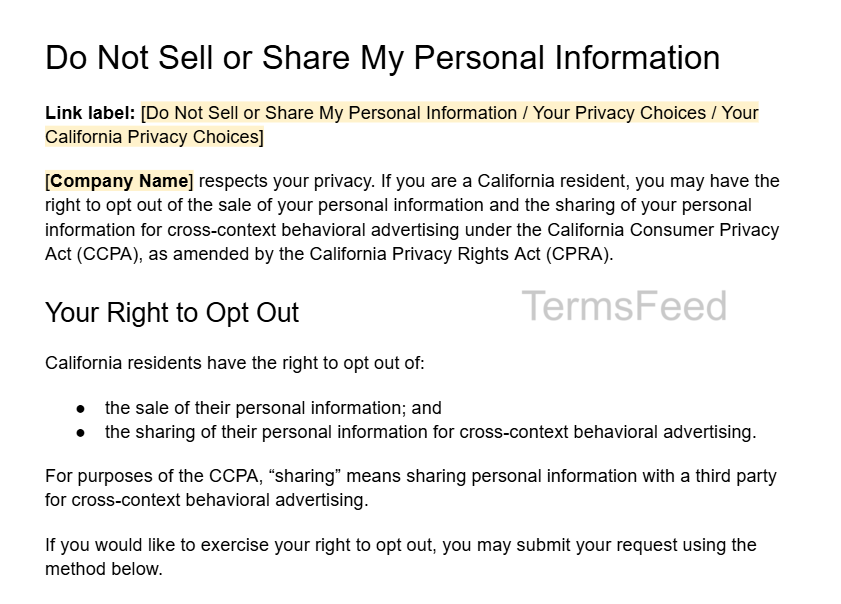
"Do Not Sell My Personal Information" Page Template
This Do Not Sell or Share page template covers key sections, including a notice that the business sells or shares personal information, an explanation of the opt-out right, an opt-out form, other opt-out methods, a Privacy Policy link, and information about what happens after a consumer submits a request.
Replace the bracketed placeholders with information about your business and privacy practices.
Download the Sample Do Not Sell or Share My Personal Information Template as a PDF file.
Download the Sample Do Not Sell or Share My Personal Information Template.

How to Honor an Opt-Out Request
Collecting opt-out requests is only half the job. You must actually act on them.
Businesses need to ensure the systems they use to process requests are functional, communicate requests to relevant teams and third parties, and stop selling or sharing personal information within 15 business days of receiving an opt-out request.
The following sections cover the 15-day CCPA deadline and how to manage opt-out requests through cookies, scripts, and other channels.
The 15-Day Deadline
The CCPA requires businesses to stop selling and sharing personal information as soon as possible, and no later than 15 business days after receiving an opt-out request.
The tight window is why automation matters. While 15 days might sound like plenty of time to fulfill an opt-out request, businesses also have obligations to third parties during this period.
If a business sells or shares personal information after receiving an opt-out request but before complying with it, the business must inform all third parties of the opt-out request and direct them to comply with the request and forward it to anyone else the personal information was disclosed to during that time.
Manually processing the request, identifying all third parties the personal information has been shared with or sold to, and notifying each third party is time-consuming. Using automated tools that track opt-out requests, identify relevant third parties, and communicate consumer choices helps businesses save time and comply with the opt-out request response deadline.
For example, the privacy rights management platform OneTrust provides tools for capturing, enforcing, and communicating opt-out choices to downstream systems and third parties.

Managing Opt-Outs via Cookies and Scripts (CMP)
Businesses often use third-party cookies and scripts to collect and transmit information about consumers. When a consumer opts out, businesses need a way to prevent these technologies from continuing to share personal information.
A consent management platform (CMP) helps automate this process by identifying third-party cookies and tracking technologies and blocking them after an opt-out.
Osano is a privacy compliance platform that helps businesses control how personal information flows to third parties based on consumer consent choices.

Managing Opt-Outs via Other and Non-Automatable Channels
Businesses that accept opt-out requests through channels such as phone or email need a process for ensuring those requests reach the teams and systems responsible for stopping data sharing.
Privacy rights platforms help businesses keep track of consumer choices across different channels.
For example, when an employee receives an opt-out by phone or email, they record the request in the platform. The platform then shares that choice with connected tools, helping the business apply the opt-out consistently. The Transcend Manually Submit a DSR page explains how companies submit data subject requests (DSRs) received outside the Privacy Center through the Admin Dashboard.

Global Privacy Control and Universal Opt-Out Mechanisms
Consumers don't have to click your link to opt out. They can send a browser-level signal that communicates their opt-out preference to websites they visit.
GPC is an opt-out preference signal that gives consumers a way to tell websites they don't want their personal information sold or shared.
Consumers enable GPC through supported browsers and browser extensions. Websites detect GPC through navigator.globalPrivacyControl, which shows whether a consumer consents to the selling or sharing of personal information and enables consent platforms or tag managers to process the opt-out preference. For example, the Mozilla Global Privacy Control page explains how users turn on GPC through Firefox Settings.

The CCPA regulations require businesses to treat opt-out preference signals as valid requests to opt out of the sale or sharing of personal information.
Businesses need to configure their CMP or other privacy technology to detect and honor GPC signals.
Avoiding Dark Patterns in Your Opt-Out Design
California banned design tricks that undermine opt-out choice. The CCPA prohibits dark patterns that "subvert or impair" the ability of a consumer to opt out of the sale or sharing of personal information.
Businesses must make the opt-out process at least as easy as opting in. They cannot:
- Require more steps to opt out than to opt in
- Use confusing language or double-negatives, such as giving the choices "Yes" or "No" next to the statement "Do Not Sell or Share My Personal Information"
- Force users to click through reasons not to opt out or messages designed to discourage them from opting out
- Bury the opt-out link so users must search through the Privacy Policy to find it
CCPA/CPRA Privacy Policy Requirements (What to Disclose)
Your Privacy Policy must back up your Do Not Sell page with disclosures about how your business collects, uses, sells, and shares personal information.
Required CCPA Privacy Policy disclosures include:
- The categories of personal information the business collected during the preceding 12 months
- The categories of sources from which the business collected personal information
- The categories of personal information the business sold or shared during the preceding 12 months, or a statement that the business has not sold or shared personal information during that time
- The categories of third parties, service providers, and contractors that received personal information during the preceding 12 months
- Why personal information is collected, sold, or shared
- A statement about whether the business sells or shares the personal information of consumers under 16 years of age
- A statement about whether the business uses or discloses sensitive personal information for purposes other than those permitted by the CCPA
- Consumer privacy rights under the CCPA, including the right to opt out, and how to exercise them
- The date the Privacy Policy was last updated
- The contents of the Notice of Right to Opt-Out of Sale/Sharing or a link to that notice
Noodles & Company maintains a California Privacy Notice that explains data processing activities and outlines privacy rights under the CCPA.

The Privacy Policy must be easily accessible through a conspicuous "Privacy" link on the website homepage or through the mobile app platform or download page. Mobile apps must also include a link to the Privacy Policy in the app settings menu.
"Do Not Sell" Compliance Checklist
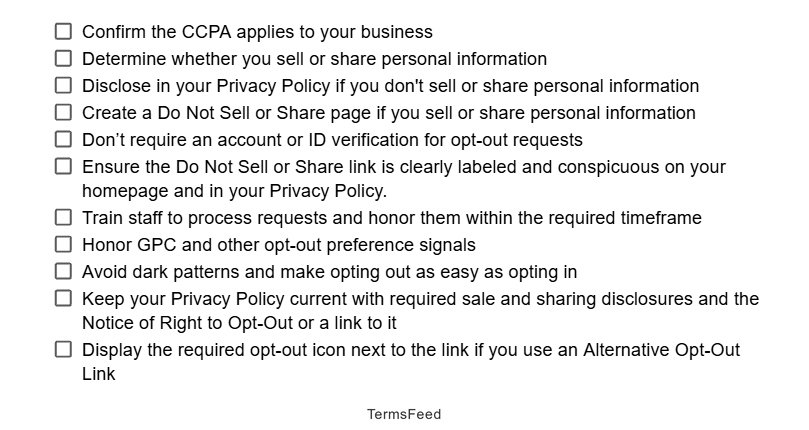
Use this printable, step-by-step checklist to make sure your business meets the CCPA Do Not Sell or Share requirements:
☐ Confirm the CCPA applies to your business
☐ Determine whether you sell or share personal information
☐ Disclose in your Privacy Policy if you don't sell or share personal information
☐ Create a Do Not Sell or Share page if you sell or share personal information
☐ Don’t require an account or ID verification for opt-out requests
☐ Ensure the Do Not Sell or Share link is clearly labeled and conspicuous on your homepage and in your Privacy Policy.
☐ Train staff to process requests and honor them within the required timeframe
☐ Honor GPC and other opt-out preference signals
☐ Avoid dark patterns and make opting out as easy as opting in
☐ Keep your Privacy Policy current with required sale and sharing disclosures and the Notice of Right to Opt-Out or a link to it
☐ Display the required opt-out icon next to the link if you use an Alternative Opt-Out Link
Download the Do Not Sell or Share My Personal Information checklist.

CCPA/CPRA Penalties and Fines
Failure to comply with the CCPA carries the risk of enforcement actions and hefty fines. Businesses face fines of up to $2,663 per violation. Intentional violations or violations involving consumers under 16 carry fines of up to $7,988 per violation. The California Attorney General and the CPPA enforce the CCPA.
Consumers cannot sue businesses for most CCPA violations, including a missing Do Not Sell or Share link. The CCPA provides a private right of action for certain data breaches involving personal information.
CCPA penalties vary based on the type and severity of the violation:
| Violation or claim | Maximum amount | Who takes action |
| Standard CCPA violation | $2,663 per violation | CPPA or California Attorney General |
| Intentional violation or violation involving a consumer under 16 | $7,988 per violation | CPPA or California Attorney General |
| Certain data-breach claims | $107–$799 per consumer, per incident, or actual damages, whichever is greater | Consumer |
A missing or non-compliant Do Not Sell or Share link creates a CCPA compliance problem. The California Attorney General has taken action against businesses for missing links, broken opt-out methods, and processes that made opting out unnecessarily difficult.
To comply with the CCPA, businesses must:
- Provide required opt-out methods
- Honor opt-outs (including GPC signals) as soon as possible and no later than 15 business days after receiving the request
- Wait at least 12 months before asking a consumer who opted out to consent to the sale or sharing of their personal information
Do Other State Laws Require a "Do Not Sell" Link?
California isn't alone. A growing number of state privacy laws give consumers an opt-out right to stop the sale of their personal data or its use for targeted advertising.
US state laws with similar opt-out rights include:
- Virginia (VCDPA)
- Colorado (CPA)
- Connecticut (CTDPA)
- Utah (UCPA)
- Texas (TDPSA)
Privacy law requirements vary by state. Several states, including Connecticut, Delaware, and Oregon, require businesses to maintain conspicuous opt-out links and honor universal opt-out signals such as GPC.
If you serve multiple states, build your opt-out system so that it satisfies all applicable requirements.
For example, use a single web form for direct requests, recognize GPC, and route all opt-out requests into the same system so that consumer choices are applied consistently. Privacy platforms like OneTrust provide tools that help businesses manage opt-outs and other privacy requirements across multiple states.

"Do Not Sell My Personal Information" Page: Frequently Asked Questions
Here are answers to common questions about CCPA Do Not Sell or Share and opt-out requirements.
Yes, if the CCPA applies to your business and you sell or share personal information, the CCPA requires a clear and conspicuous way for consumers to opt out. Businesses typically use a Do Not Sell or Share page with a link on their homepage and in their Privacy Policy.
A Do Not Sell page needs to explain the right to opt out and provide a way to submit an opt-out request. Businesses also need to provide alternative opt-out methods and avoid requiring an account or unnecessary identity verification for an opt-out request.
No. Businesses cannot require consumers to create an account or verify their identity to submit an opt-out request. A business is allowed to ask for basic information, such as a name or email address, to identify the consumer and apply the opt-out to the correct information.
Businesses need to honor an opt-out request as soon as feasibly possible and no later than 15 business days after receiving it. The business needs to stop selling or sharing personal information within that timeframe.
GPC is a browser or device signal that tells businesses a consumer wants to opt out of the sale or sharing of personal information. Businesses that receive a GPC signal need to treat it as a consumer opt-out request.
Businesses face CCPA civil penalties of up to $2,663 per violation and up to $7,988 per intentional violation or violation involving a consumer under 16. The California Attorney General and the CPPA enforce the CCPA, and enforcement actions have included businesses with missing opt-out links or noncompliant opt-out processes.
Yes. Businesses are allowed to put the Do Not Sell or Share information and opt-out form in their Privacy Policy. However, the homepage still needs a clear and conspicuous Do Not Sell or Share link that takes consumers directly to the section of the Privacy Policy containing that information. Businesses cannot require consumers to search through the Privacy Policy to find the opt-out process.
The CCPA defines "selling” as exchanging personal information for money or other valuable consideration, while "sharing” covers disclosures of personal information for cross-context behavioral advertising, even when the business does not receive money in exchange.
Summary and Key Takeaways
Here are the key points to remember when creating a CCPA Do Not Sell or Share page:
- You need a Do Not Sell or Share page if the CCPA applies to you and you sell or share personal information (including via ad cookies).
- The definition of "selling" is broad and includes any transfer of personal information for valuable consideration, while "sharing" covers behavioral advertising even without an exchange of money.
- The Do Not Sell or Share page needs an explanation of the opt-out right, an interactive web form, and a second opt-out method. Don't require consumers to create an account or verify their identity in order to submit an opt-out request.
- Place a clearly labeled Do Not Sell or Share link in a conspicuous location on the homepage header or footer and in the Privacy Policy. Businesses also often include an opt-out option in cookie banners or privacy preference centers.
- Respond to opt-out requests as soon as feasibly possible and no later than 15 business days, honor GPC signals, and wait at least 12 months before asking consumers to opt back in.
- Avoid dark patterns and make sure to keep opting-out as easy as opting back in.
- Keep your Privacy Policy up to date with required CCPA disclosures and the Notice of Right to Opt-Out or a link to it.
- CCPA violations carry administrative fines of up to $2,663 per violation and up to $7,988 per intentional violation or violation involving a consumer known to be under 16.
Need a CCPA-compliant Privacy Policy for your website? Use the TermsFeed Privacy Policy Generator to create a customized policy for your business.

The first step to compliance: A Privacy Policy.
Stay compliant with our agreements, policies, and consent banners — everything you need, all in one place.