


AI Summarize


Share


Captain Compliance is a privacy technology company that provides compliance software for individuals and businesses. It handles your data privacy requirements, including compliance with privacy laws such as the GDPR, CCPA/CPRA.
The main features of Captain Compliance include:
- Cookie Scanner
- Cookie Consent Manager
- Privacy Notice Generator
- DSR Portal
- Compliance Shield
Captain Compliance offers a free version for personal use. The Professional version costs $449 per month. The Enterprise version price is only available when a business requests a quote.
Captain Compliance suits businesses that need to manage cookie consent banners and data privacy requirements online. Businesses requiring a wider selection of legal document generators are better served by TermsFeed, which offers Privacy Policies, Terms of Service, End-User License Agreements (EULAs), and other legal documents.
- 1. What is Captain Compliance?
- 2. What is the Captain Compliance Price?
- 3. What are the Best Captain Compliance Features?
- 3.1. 1. All-in-One Cookie Consent Manager
- 3.2. 2. Adaptive Privacy Notice Generator
- 3.3. 3. Cookie Scanner
- 3.4. 4. DSR Portal
- 3.5. 5. Vendor Risk Management
- 3.6. 6. Multi-Jurisdiction Regulatory Coverage
- 3.7. 7. Custom Banner Designer
- 3.8. 8. Geolocation-Based Targeting
- 3.9. 9. Google Consent Mode v2 Integration
- 3.10. 10. Partner Program
- 3.11. 11. Multi-Site & Team Permission Management
- 3.12. 12. Compliance Shield
- 3.13. 13. GRC Suite (Governance, Risk & Compliance)
- 3.14. 14. DPIA Consulting
- 4. How does Captain Compliance Work?
- 4.1. Account and Setup Requirements
- 4.2. End-to-End Onboarding Flow
- 4.3. How does the All-in-One Stack operate?
- 4.4. Boundaries and Edge Cases
- 5. What are the Pros of Captain Compliance?
- 6. What are the Cons of Captain Compliance?
- 7. What are the Alternatives to Captain Compliance?
- 7.1. What is the History of Captain Compliance?
What is Captain Compliance?
Captain Compliance is a privacy compliance software platform that helps companies and websites meet cookie and privacy law requirements. The platform provides tools for cookie scanning, consent management, and cookie transparency, helping organizations manage privacy compliance from a single dashboard.

The Captain Compliance platform offers a Privacy Notice generator to help businesses comply with disclosure requirements under the GDPR and CCPA / CPRA. Captain Compliance provides a list of new and upcoming state regulations for the US and international privacy laws. This list explains what businesses need to do to prepare for these laws, as you can see in the image below:

Captain Compliance is intended to be used by professionals, businesses, and large enterprises.
Captain Compliance was founded in 2023 and is headquartered in Fort Lauderdale, Florida.
What is the Captain Compliance Price?
The Captain Compliance price is variable, depending on the needs and size of your business. It ranges from the free Personal version, to $449 for the Professional version and quote-based prices for the Enterprise version. The Personal version is free for individual use, with no time limit or trial restriction.
Excerpt from the Captain Compliance pricing page is below.

In the above image you can see more information about what each version provides the user, including:
- Number of domains,
- Available page scans,
- Available page views,
- Number of team members, and
- Features available.
A credit card is not required to sign up for the free version. For both the Professional and Enterprise versions, demos are available. The Professional version price is billed monthly.
What are the Best Captain Compliance Features?
Captain Compliance combines consent management, privacy compliance, and governance tools in a single platform. The key features of the Captain Compliance platform are outlined below.
- All-in-One Cookie Consent Manager
- Adaptive Privacy Policy Generator
- Cookie Scanner
- DSR Portal
- Vendor Risk Management
- Multi-Jurisdiction Regulatory Coverage
- Custom Banner Designer
- Geolocation-Based Targeting
- Google Consent Mode v2 Integration
- Partner Program
- Multi-Site & Team Permission Management
- Compliance Shield (litigation guarantee, Pro + Enterprise plans)
- GRC Suite (Governance, Risk & Compliance)
- DPIA Consulting (Data Protection Impact Assessment service)
The following sections go into more detail on each of these features.
1. All-in-One Cookie Consent Manager
All-in-One Cookie Consent Manager is the Captain Compliance tool for generating customizable, geolocation-based cookie consent banners and scanning your website for cookies.
In the image below you can see the Captain Compliance cookie consent management dashboard, and key features that set Captain Compliance apart. These include customized solutions, regulatory expertise, and the user-focused interface.

The Captain Compliance Cookie Consent Manager helps businesses to keep cookie consent processes aligned with global regulations. The Captain Compliance cookie consent banners are deployed with either a JavaScript snippet or using Google Tag Manager (GTM).
This feature is a particular differentiator compared to similar tools, due to the integration of the Cookie Consent Manager with other tools in the dashboard. Many similar platforms offer these tools separately instead of on an all-in-one basis.
The Cookie Consent Manager is available on the Professional version or above, but can be tested on the free version.
2. Adaptive Privacy Notice Generator
Adaptive Privacy Notice Generator is the Captain Compliance tool that allows users to generate privacy policies or notices for websites or apps, tailored to the privacy practices of the business or organization.
The adaptive Privacy Notice Generator creates a policy based on a questionnaire filled out by the user. The Captain Compliance dashboard allows geo-targeting, so users choose which regionally-specific privacy notice to use.
The Privacy Notice Generator allows users to select multiple jurisdictions in which they operate. The privacy notice covers all jurisdictions required. It generates a separate EU / UK privacy notice alongside a US- and Canada-based policy.
The privacy laws that Captain Compliance covers include:
- California Privacy Rights Act (CPRA)
- General Data Protection Regulation (GDPR)
- California Invasion of Privacy Act (CIPA)
- Video Privacy Protection Act (VPPA)
- Lei Geral de Proteção de Dados (LGPD), Brazil
- Personal Information Protection and Electronic Documents Act (PIPEDA), Canada
An example of the Privacy Policy generator tool is shown in the image below. The generator has 48 steps and is quite comprehensive.

Other tools such as TermsFeed and Iubenda offer comparable generators. The Captain Compliance tool is differentiated by its in-depth question flow on different US laws. However, other companies offer a wider range of generators overall.
The Privacy Policy Generator is available for the free version or above.
3. Cookie Scanner
Cookie Scanner is the Captain Compliance tool that scans the types of cookies on your website and provides detailed reports.
The cookie scanner classifies cookies into categories, such as first-party cookies, third-party cookies, and other tracking technologies.
Businesses use this categorization to inform their cookie notice disclosures about cookie use. The scanner is used to determine whether third-party websites pose a privacy risk.
You can see in the image below some of the outputs of the cookie scanner, including the cookie classification, number of cookies, and the specific cookies.

The Cookie Scanner is available for the free version and above.
4. DSR Portal
DSR Portal is the Captain Compliance feature that helps businesses receive, track, and respond to Data Subject Requests (DSRs).
The DSR Portal allows website visitors to submit requests to access, delete, or correct their data. The Captain Compliance dashboard displays these requests under the DSR Portal tab.
An example of the DSR Portal dashboard is shown in the image below.

Businesses use the DSR Portal to help manage compliance and privacy law requirements, under laws such as the GDPR and CCPA. These laws grant data subjects rights to access, correct, delete, or revoke consent to sharing their data.
The DSR Portal is useful for businesses when it comes to auditing and record-keeping purposes.
Captain Compliance differentiates itself by making the DSR Portal a default module for all versions, as it can be tested on the free version and comes with all other versions. The Enterprise version automates the DSR process. Some competitors offer DSR only as an add-on.
The DSR Portal is available for full use in the Professional version or above.
5. Vendor Risk Management
Vendor Risk Management is the Captain Compliance offer that helps businesses determine the privacy and compliance status of third-party vendors.
Compliance experts at Captain Compliance work with users to look at vendor risk management issues. The consultancy service helps businesses consider regulatory requirements for contracts, so that businesses comply with more confidence.
Vendor Risk Management is not offered explicitly under any plan. Rather, Vendor Risk Management is available as a separately purchased consultancy service, independent of the Professional or Enterprise version.
6. Multi-Jurisdiction Regulatory Coverage
Multi-Jurisdiction Regulatory Coverage is the Captain Compliance ability to support privacy compliance across multiple jurisdictions, including the US, Canada, the EU and the UK.
Captain Compliance offers privacy notice generation for all of these jurisdictions. Cookie banners are customized and configured to meet the requirements of the GDPR, CCPA/CPRA, PIPEDA, and LGPD, among other laws.
This is particularly useful for businesses that have customers in many different jurisdictions. The cookie consent banner and the privacy notice are created or displayed in a geolocation based manner.
Multi-jurisdiction regulatory coverage is available on the Professional version and above for the cookie banner. The Privacy Notice Generator offers multi-jurisdiction regulatory coverage for the free version and above.
7. Custom Banner Designer
Custom Banner Designer is the Captain Compliance feature that allows users to customize the appearance of the cookie consent banner.
Users are able to change the color, text, logo, layouts, button styles, and banner placement on the website. These changes help to coordinate the banner more closely with the website design or branding of the user.
Here is an example of the Cookie Banner Designer in the Captain Compliance dashboard.

Businesses use the Custom Banner Designer to create a consent experience for the website visitor that aligns with the rest of the website. The disclosures and buttons on the banner are designed to meet privacy requirements, to help businesses comply with their legal obligations.
The Custom Banner Designer is available on the Professional version or above.
8. Geolocation-Based Targeting
Geolocation-Based Targeting is the Captain Compliance ability to display different cookie banners and privacy notices to the website visitor depending on which geographical location they are accessing the website from.
Different regions and jurisdictions have different privacy laws. Geolocation-based targeting means visitors from the EU, for example, receive a notice based on the GDPR. Visitors from the US will receive a notice based on the relevant state law.
The image of the Captain Compliance dashboard below shows an example of the geolocation-based settings.

This feature helps businesses to provide an accurate cookie banner and privacy notice without having to set up separate websites for different jurisdictions. This feature is useful for businesses operating internationally.
Geolocation-based targeting is available on the Professional version and above.
9. Google Consent Mode v2 Integration
Google Consent Mode v2 Integration is the Captain Compliance feature that integrates website visitor consent choices with Google advertising and analytics services.
Captain Compliance sends signals to Google when a website visitor chooses to accept or deny consent to cookies on a cookie banner. The Google Consent Mode v2 integration passes the consent signals.
Depending on whether the website visitor accepts or declines cookie consent, the Google Consent Mode v2 Integration determines Google tag behavior. It shifts cookies to a limited mode functionality when consent is declined.
Google Consent Mode v2 is helpful for businesses who need to comply with strict privacy requirements in some jurisdictions. This is particularly useful for websites and apps in the EU that use Google Ads or Google Analytics. Businesses use Google Consent Mode v2 to maintain privacy-compliant measurement, support conversion tracking, and preserve advertising performance insights.
Google made Consent Mode v2 mandatory for advertisers targeting EU users starting in March 2024.
Google Consent Mode v2 is available for the Professional version and above.
10. Partner Program
Partner Program is the Captain Compliance initiative to connect with agencies, consultants, developers, and service providers, who need to provide their customers with privacy compliance services.
The Partner Program allows partners to implement Captain Compliance over several different client accounts. It provides tools, resources, and consultancy support for professional service providers. Once a client is set up with Captain Compliance through the Partner, Captain Compliance handles any ongoing maintenance.
The Partner Program provides discounts for Captain Compliance licenses. Partners sell independently to their clients. Partners generate additional revenue from on-selling Captain Compliance licenses.
In the image below you can see the information that is required to get started with the Partner Program, including name and email address, company, and number of clients.

There are no upfront costs to join the Partner Program. The Partner Program is available independent of the Captain Compliance version, and is accessed by application.
11. Multi-Site & Team Permission Management
Multi-Site and team permission management is the Captain Compliance feature that allows businesses or larger organizations to manage several websites and teams from one dashboard.
The dashboard allows businesses to assign different users or team members different permissions. This controls who accesses consent settings, privacy notices, scanning results, and compliance workflows.
Businesses that have multiple websites or brands manage all of these through the integrated Captain Compliance dashboard.
This feature is useful for larger businesses that need to manage more than one website, domain, or team.
Multi-site and team permission management is available on the Professional version or above.
12. Compliance Shield
Compliance Shield is the Captain Compliance litigation and regulatory protection program.
The Compliance Shield is the Captain Compliance commitment to reduce or cover (in qualifying circumstances) privacy-related financial exposure if compliance claims are made against businesses who use Captain Compliance.
Compliance Shield is only valid if Captain Compliance is lawfully and properly installed, with recommended settings enabled, and not overridden or bypassed through other tools.
Compliance Shield covers financial exposure for users from qualifying claims, including:
- Regulatory enforcement actions from privacy regulators
- Fines or penalties relating to consent, notice, or data-rights execution
- Lawsuits from private parties alleging issues with consent or disclosure
- Legal claims coming from cookie deployment, tracking disclosures, or opt-out enforcement
- GPC signal handling (if enabled)
Compliance Shield does not cover legal issues for breaches unrelated to Captain Compliance.
In the image below you can see the ways in which the Compliance shield differentiates Captain Compliance from similar competitors.

Compliance Shield is a strong differentiator for Captain Compliance. Most competitors do not offer support for managing legal risk. Captain Compliance provides financial backing for qualifying claims, and takes a litigation-first approach (i.e. assuming that litigation could occur). This is a significant differentiator between Captain Compliance and competitor CMP tools.
Compliance Shield is available on the Professional version ($449) and the Enterprise version (custom pricing).
13. GRC Suite (Governance, Risk & Compliance)
GRC Suite is the Captain Compliance broader governance, risk and compliance offering, separate from the consent and DSR tools.
The Captain Compliance GRC Suite provides custom GRC software tailored to the specific business. This offering helps businesses to proactively identify risks.
The GRC Suite includes real-time data analysis, risk forecasting, and automated compliance management. It provides industry-specific compliance templates and risk management tools. The GRC Suite is scalable and cloud-based.
In the image below you can see the Captain Compliance recommendation for how to implement a GRC solution:

The GRC Suite is not part of the standard Professional or Enterprise version. Instead, it is accessed through a separate partnership with Captain Compliance.
14. DPIA Consulting
DPIA Consulting is the Captain Compliance Data Protection Impact Assessment consulting service.
This service provides guidance on whether a DPIA is necessary, the DPIA assessment process, and documentation of the results. Captain Compliance DPIA Consulting helps businesses to identify privacy risks, particularly when using new technologies.
Captain Compliance considers DPIA outcomes in light of relevant laws, such as the GDPR, and works closely with businesses and project teams.
Privacy commitments are integrated into business decision-making with support from the DPIA Consulting service. In the image below you can see some reasons DPIA support from Captain Compliance is helpful for businesses.

DPIA Consulting is a solid differentiator for Captain Compliance. Many similar CMP tools offer software or a platform with comparable features, but do not offer additional consulting services.
DPIA Consulting is not a part of any Captain Compliance version. It is accessed by scheduling a consultation with Captain Compliance.
How does Captain Compliance Work?
Captain Compliance works by combining website scanning, privacy policy generation, consent management, and documentation management in a single platform.
- Users sign up to Captain Compliance and access the dashboard. Users connect their website to the platform.
- Captain Compliance deploys onto a website using a JavaScript snippet, through Google Tag Manager, or as a plugin for platforms such as Shopify and WordPress. Scanning and consent management then begin.
- The scan finds what cookies, trackers, scripts, and third-party technologies are operating on the website. This helps businesses to understand this data collection, and to manage their consent management and privacy disclosures.
- After cookies and data have been discovered and classified, Captain Compliance helps users set up consent notices.
- Captain Compliance records the website visitor choices when visitors choose to allow or deny consent to cookies. Depending on what the visitor selects, tracking technologies will be allowed, restricted, or blocked.
- Captain Compliance keeps records of visitor consent decisions, interactions with the cookie banner, cookie scan results, and the configuration state of the banner at the time a visitor interacted with them. This creates an audit trail that businesses use to demonstrate compliance.
- Captain Compliance provides a DSR portal for visitors to privacy requests, such as requests to access, delete, or correct personal information.
Overall, Captain Compliance is intended to be an all-in-one platform with an integrated workflow. Discovery, disclosure, consent, and privacy rights management, are all included and accessed through the same dashboard.
Account and Setup Requirements
Account and setup requirements are dependent on the organization and its needs.
Captain Compliance offers a free Personal plan that supports a single domain with limited monthly traffic and cookie scanning capabilities. For the Professional plan, users have access to more features that need to be set up.
You can see in the image below the simple form that needs to be filled out to get started with making an account:

To begin, Captain Compliance users need:
- A website or web application to connect to the platform.
- Administrative access to deploy consent and compliance components.
- Domain verification and configuration.
- Privacy and data-processing information needed to generate notices and disclosures.
- Internal processes for handling DSARs and privacy inquiries.
Users with the free plan only need a website or web application. The Professional and Enterprise versions require all of the above information.
End-to-End Onboarding Flow
The end-to-end onboarding flow is the process of getting set up for Captain Compliance, and it includes account creation, scanning, configuration, and generating privacy notices.
The steps are as follows:
- Create the account and register the business website.
- Scan the website to discover cookies, trackers, and related technologies.
- Configure consent management. This includes publishing a banner, integrating Google Tag Manager, as well as testing.
- Integrate Captain Compliance with any third-party integrations, such as with WordPress.
- Create and deploy a DSR portal.
Once the user has gone through these steps, everything is managed through the Captain Compliance dashboard.
In the image below you can see a sample of the consent management aspect of the dashboard for configuring GTM:

The free version has limited capacity. Modules are available for set up and testing on the free version. The Professional and Enterprise version complete all the steps to configure additional Captain Compliance features.
How does the All-in-One Stack operate?
The all-in-one stack operates by connecting the Captain Compliance features into a single dashboard and workflow.
The Cookie Scanner tool feeds its results into the consent manager. The consent manager then creates accurate cookie disclosure banners that reflect how cookies are actually working on the website.
The consent manager records visitor choices and passes information through integrated tools such as Google Consent Mode v2, Google Tag Manager, or other tag scripts.
The same data is used for the Privacy Notice Generator. The DSR portal is available in the same dashboard.
This all-in-one approach is a key differentiating feature that makes Captain Compliance appealing to buyers.
The free version does not include most of these features. The Professional version is a relatively expensive starting point, at $449. The Enterprise version gives access to the all-in-one dashboard as well as additional features, for a price available to businesses as a quote.
Boundaries and Edge Cases
Boundaries and edge cases highlight some of the limitations of Captain Compliance, and it doesn't replace legal advice or organizational governance steps.
Firstly, Captain Compliance identifies cookies, generates privacy notices, and provides an all-in-one dashboard for consent management. However, it does not determine whether business privacy practices are legal or compliant.
Secondly, Captain Compliance has very limited legal document generation abilities. It does not generate Terms of Service agreements, EULAs, Cookie Policies, or other disclaimers. The Privacy Policy generator only creates policies in English. You can see this in the image below:

Thirdly, although Captain Compliance provides multi-jurisdiction coverage, businesses still determine which jurisdictions apply to them and which laws are relevant.
Finally, the Compliance Shield only applies when Captain Compliance is installed correctly, with recommended settings enabled and no overrides from other tools.
The free version covers one domain with 2,500 monthly views. This excludes most commercial use. There is no middle-tier version and the high price of the Professional tier creates a friction point for small businesses.
What are the Pros of Captain Compliance?
The pros of Captain Compliance are:
- It offers an all-in-one bundle (consent, policies, and DSAR in one product). This is particularly useful for businesses who want to manage everything in one place.
- The Dashboard is clear and consolidates many functions. Everything is displayed in the sidebar and is accessed without difficulty or complex navigation routes. However, more complex configurations have been noted by reviewers to be time-consuming.
- Automatically-generated policies reduce time to compliance for new sites. This helps small- and medium-size businesses get up and running.
- It has a modern UI compared to legacy enterprise platforms. The website and Dashboard have a simple, clean design. This makes it easier to navigate and use.
- The Privacy Notice generator covers a wide range of jurisdictions, including individual state privacy laws and required disclosures. This feature is particularly useful for businesses operating globally.
- The Privacy Notice generator is simple and easy to use. For startups or businesses without legal teams, this speeds up the process of getting a basic Privacy Policy established.
- The Partner Platform is competitive for agencies. This makes agencies more likely to use Captain Compliance for a wide range of their clients.
What are the Cons of Captain Compliance?
The cons of Captain Compliance are:
- Captain Compliance is a newer brand, and is less well-known and established than OneTrust, Cookiebot, or Iubenda. This means it has not been tested over longer periods of time.
-
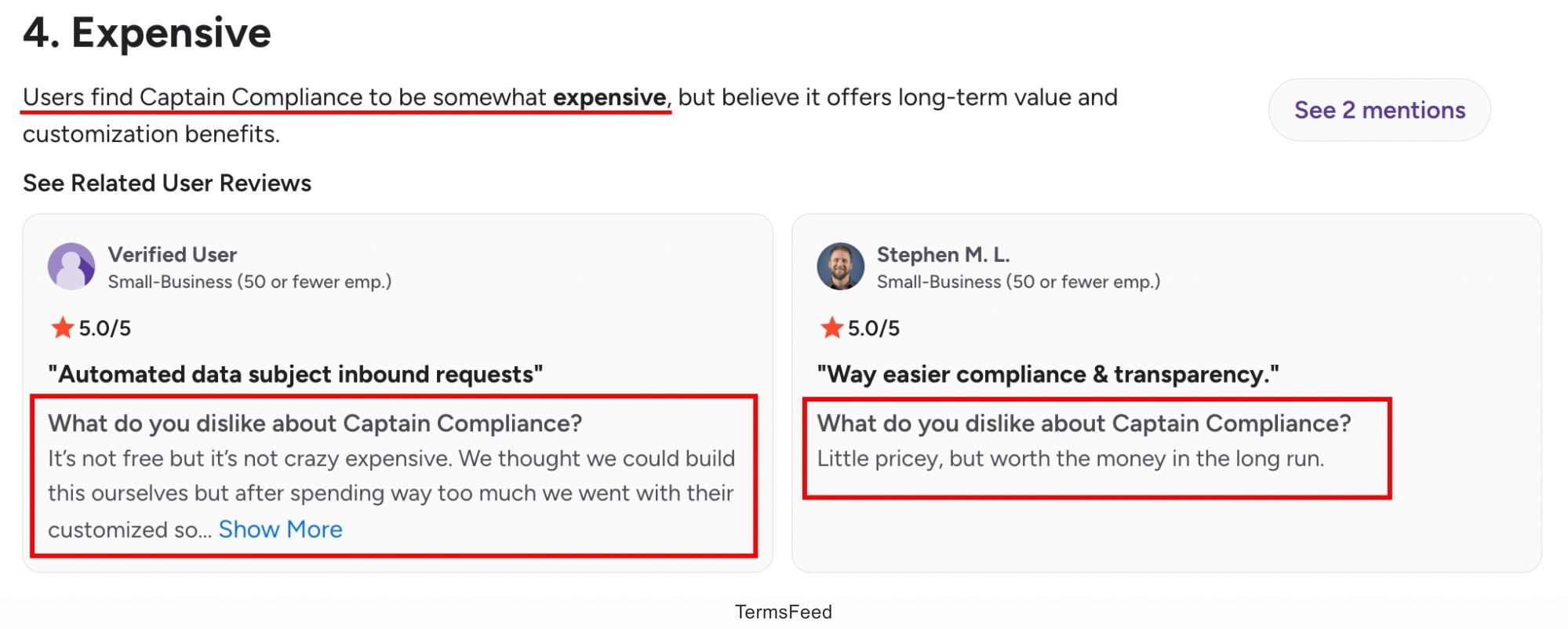
The financial jump between the free version and the Professional version is significant, going from free to $449. This makes it difficult for smaller businesses or individuals to purchase Captain Compliance. You can see below some reviews relating to the price of Captain Compliance:
- It has limited legal agreement generation. For businesses needing a wider range of agreements, Captain Compliance is not suitable.
- Generated legal agreements still require legal review for high-stakes use, as the inputs are not verified and checked against actual company legal requirements.
- It offers fewer third-party integrations than mature competitors. This is a limiting factor for companies requiring many integrations.
- Reviewers mention that the overall dashboard for Captain Compliance has a steep learning curve, high complexity, and setup difficulties by reviewers.
- The dashboard often loses connection to the cookie scanner, producing no results.
- The Privacy Notice generator is only in English. For companies in non-English speaking countries, the Privacy Notice is potentially non-compliant.
- It has a smaller community and fewer available learning resources. The Help Center on the Dashboard has relatively limited guide pages.

What are the Alternatives to Captain Compliance?
The alternatives to Captain Compliance are tools including privacy and legal document generators, consent management platforms, and broader privacy compliance software.
More information about Captain Compliance alternatives suitable for different business sizes and needs is listed below.
-
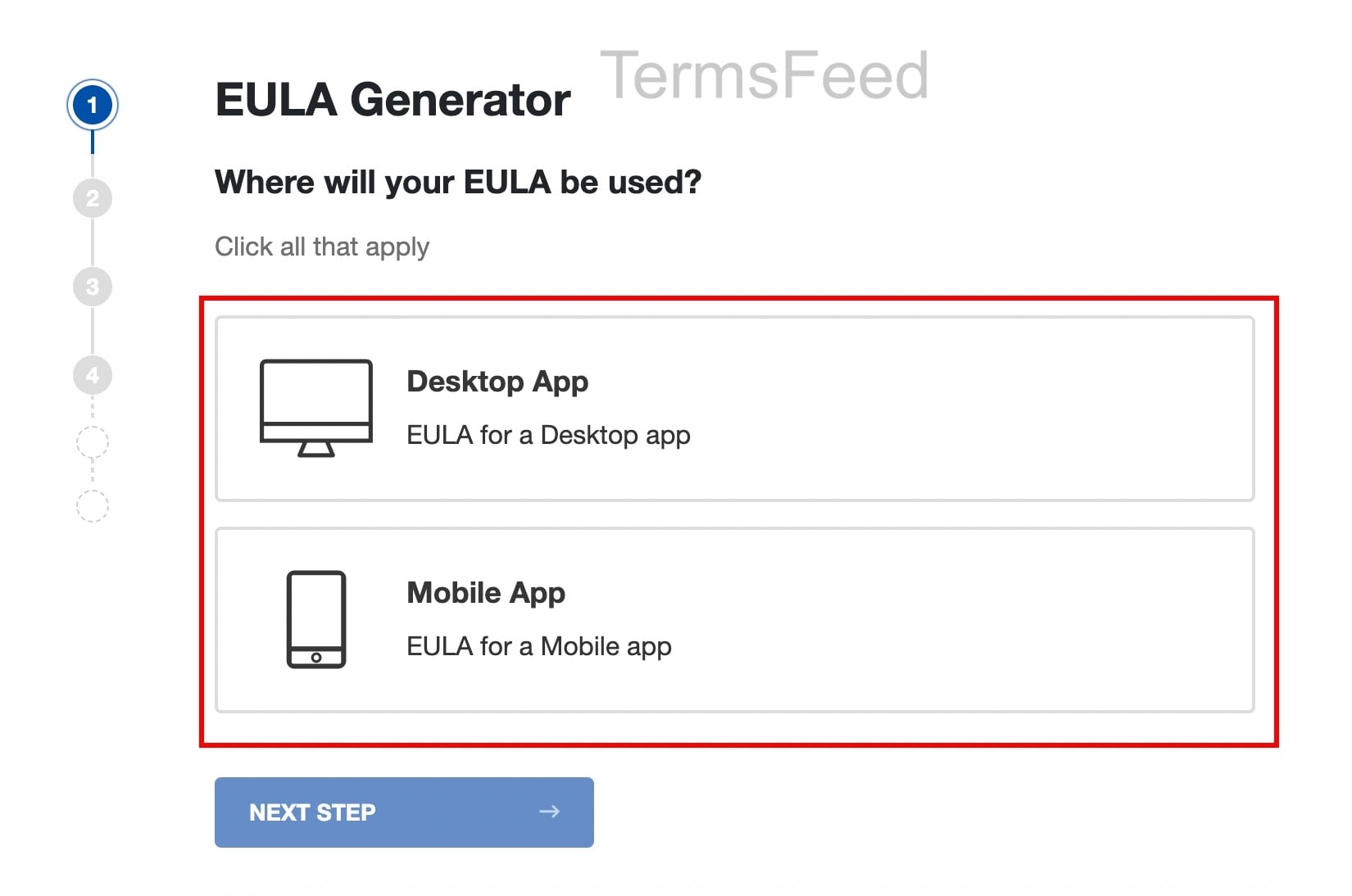
TermsFeed is a legal agreement and Privacy Policy generator that helps businesses create Privacy Policies, Cookie Policies, Terms and Conditions, and End-User License Agreements (EULAs), among other things. In the image below you can see a sample of the TermsFeed EULA generator. The UI and steps are simple and easy to move through.
It is a simpler, more affordable option for most buyers. TermsFeed is a more focused, mature alternative for the same all-in-one business needs at lower cost.
For businesses that need a wider range of document generation, TermsFeed is a good choice. TermsFeed is suitable for businesses with simple compliance requirements, and provides a quick and affordable option for setting up legal agreements.
- Iubenda is a platform that combines privacy policy and Terms and Conditions generation, cookie consent management, and other compliance tools. It is the closest direct competitor to Captain Compliance, but with a longer track record. Iubenda is a good fit for businesses looking for integrated compliance platforms.
- Termly is a tool that provides privacy policy generation, cookie scanning and consent management, and compliance documentation. It is a comparable all-in-one privacy compliance solution and is suitable for small- and medium-size businesses. Unlike Captain Compliance, Termly offers a more gradual pricing structure.
- OneTrust is an enterprise privacy management platform that provides consent management, DSAR automation, vendor risk assessment and governance tools. It provides a more-established enterprise version of Captain Compliance, with more functionality but correspondingly higher prices. OneTrust is a good fit for large organizations that already have established privacy teams and complex regulatory obligations.
- Osano is a data privacy platform that overlaps with Captain Compliance in the DSR and consent spaces, but with different positioning. Osano focuses on data mapping, vendor monitoring, and privacy program management, rather than document generation. The Osano pricing structure is more gradual, which makes it more accessible for smaller and medium-size businesses.

What is the History of Captain Compliance?
The history of Captain Compliance is one that begins in 2023, when it was founded by Richart Ruddie. He is a long-term founder and entrepreneur who previously sold a large online reputation management and branding agency before he started Captain Compliance.
He started Captain Compliance to empower businesses to serve their customers in a responsible and compliant way.
Captain Compliance is headquartered in Fort Lauderdale, in the United States.
Captain Compliance has 15 employees. The company won the Early Stage Showcase award at the Venture Atlanta technology investment conference in 2025, and now serves over 14,000 customers.

The first step to compliance: A Privacy Policy.
Stay compliant with our agreements, policies, and consent banners — everything you need, all in one place.


