


AI Summarize


Share


Many organisations allow their employees to use personal laptops, phones, or tablets to access business accounts, networks, emails, or databases. However, while this is a common practice, there are a number of steps that you need to follow to make sure that any "bring your own device" (BYOD) practices that you use in your business are compliant with privacy laws such as the General Data Protection Regulation (GDPR).
This article will cover what BYOD is, what some of the security and privacy risks are, how the GDPR applies to BYOD policies, best practices for BYOD, and how to enforce BYOD compliance.
Let's get started.
Our Privacy Policy Generator makes it easy to create a Privacy Policy for your business. Just follow these steps:
-
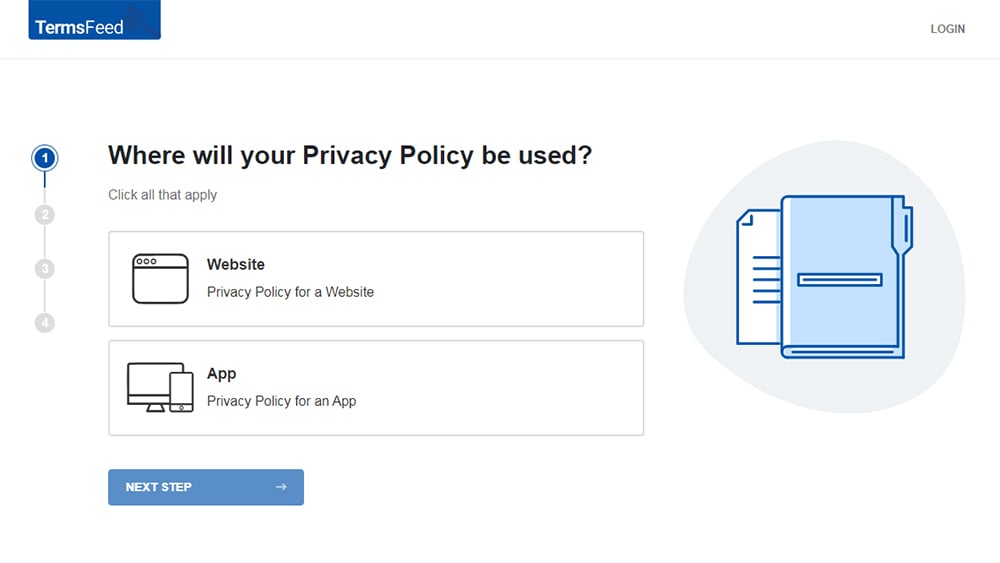
At Step 1, select the Website option or App option or both.
-
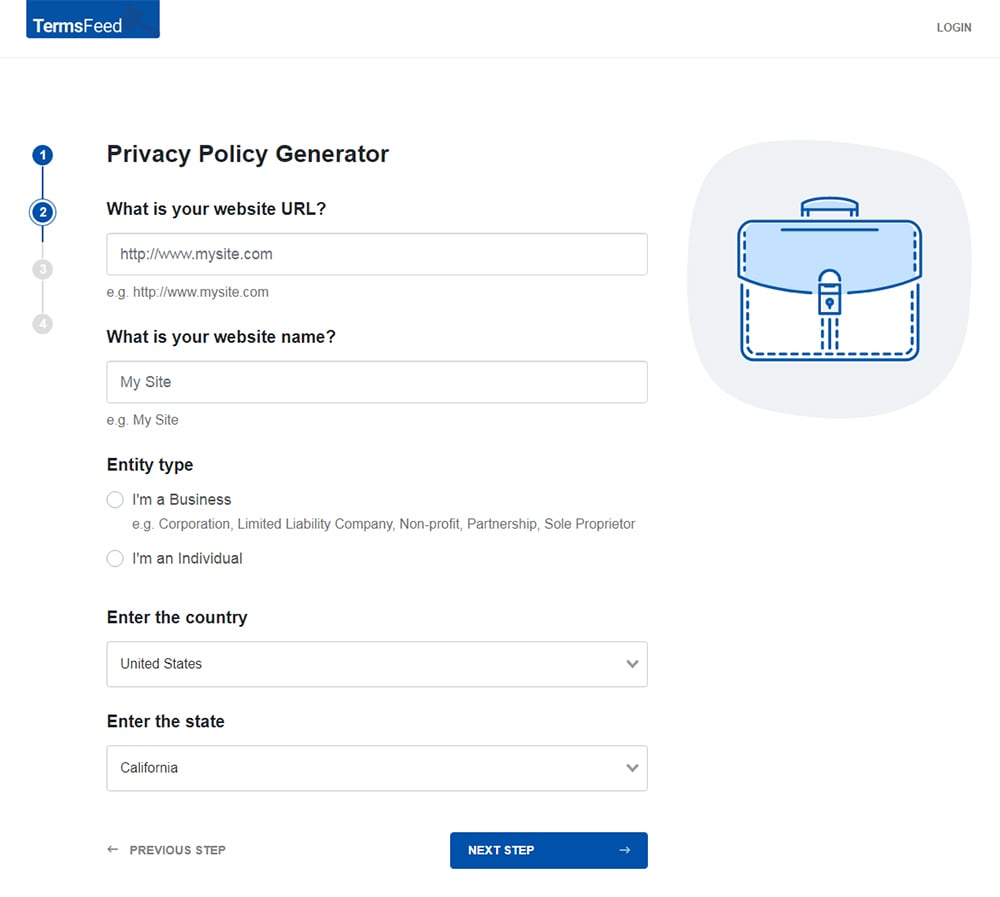
Answer some questions about your website or app.
-
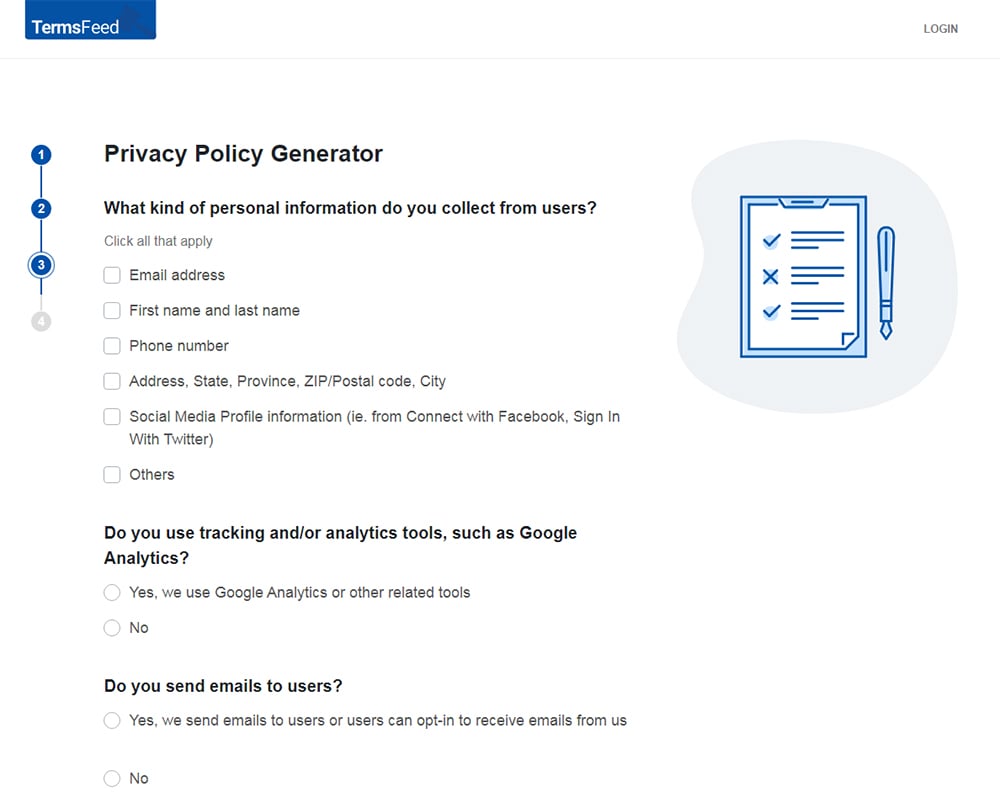
Answer some questions about your business.
-
Enter the email address where you'd like the Privacy Policy delivered and click "Generate."
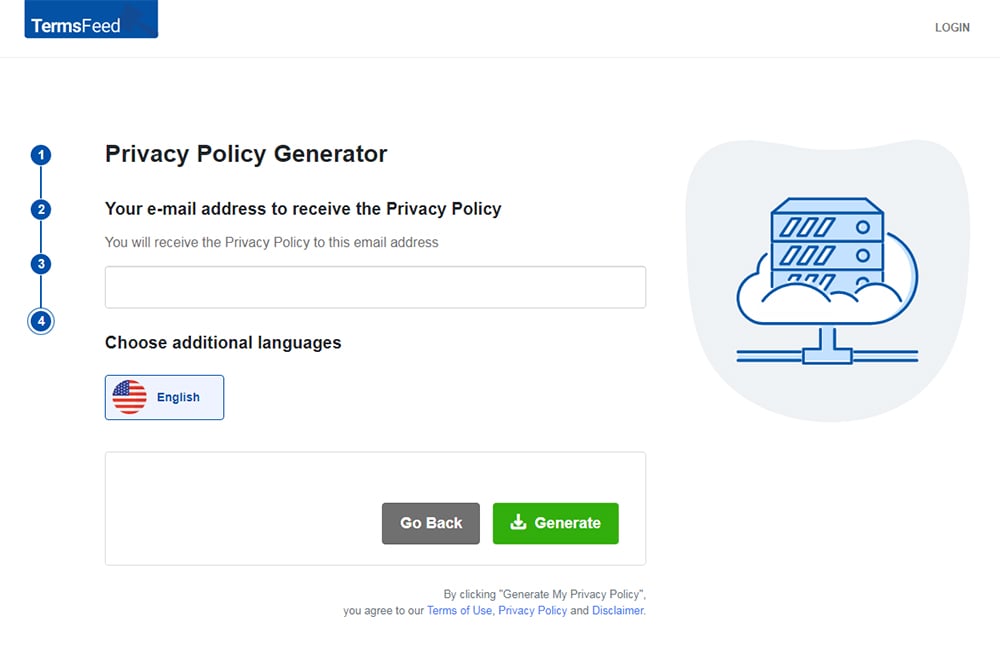
You'll be able to instantly access and download your new Privacy Policy.


- 1. What is BYOD?
- 2. What are the Risks of BYOD?
- 3. How Does the GDPR Apply to BYOD?
- 4. What are BYOD Best Practices?
- 4.1. Data Protection Impact Assessment
- 4.2. Set Up A BYOD Policy
- 4.2.1. Clear User Expectations
- 4.2.2. Privacy Practices
- 4.2.3. Non-Compliance Consequences
- 4.2.4. Compromised Devices
- 4.2.5. Offboarding
- 4.3. Security Measures
- 4.4. Employee Training
- 5. How Can You Enforce BYOD Compliance?
- 5.1. Preparation and Checklists
- 5.2. Contractual Agreements
- 5.3. Audits and Assessments
- 6. Summary
What is BYOD?
BYOD stands for bring your own device, which is an approach where businesses or organisations let employees use their personal computers, laptops, phones, tablets, or other devices for work purposes.
With increasing remote work around the world, BYOD policies have become widespread. Devices are also brought into the office, and connect to office networks.
The benefits of BYOD include flexibility and simplicity for remote employees, but many businesses continue to use BYOD policies even as workers return to the office.
There are a number of risks that come with BYOD, and if you are based in the EU or have employees, clients, or customers who are, you'll need to consider how those risks, and compliance issues with the GDPR affect your BYOD policy.
What are the Risks of BYOD?
The main risks of BYOD are related to security and privacy issues. Personal devices often don't have the same level of protection or control as a computer or tablet set up by a business or organisation. This leaves the device open to a number of vulnerabilities that can be exploited by malicious actors.
In addition, employees can pose a risk themselves, such as when they use unapproved or dangerous apps. While many employees install these apps for ease of use, they can have vulnerabilities or security issues that the user is not aware of. When a device is a personal one, the IT department may not be aware of it either. For example, a number of privacy and security issues have arisen in relation to Dropbox, which can easily be used to share work-related files without authorisation, posing security risks to your business.
The Information Commissioner's Office in the UK has produced a short guide outlining some of the risks involved with both BYOD combined with company software, and BYOD with freely installed software. The ICO's list in relation to BYOD with company software is shown in the image below:

You can see that some of the risks include organisational data being moved into personal storage, security issues (such as out-of-date or unpatched operating systems), as well as access problems or weaknesses with passwords. The ICO recommends using multi-factor authentication, as well as data separation.
When using BYOD without company software, the risks are increased. You can see some of these risks in the image below:

BYOD without company software includes risks like out-of-date software or operating systems, personal data being shared with additional persons such as family members, a lack of encryption on the device, poor access control or weak passwords, insecure storage, and insecure communication methods.
As mentioned, the installation of unapproved apps instead of approved software is a common practice on personal devices, and creates many additional risks.
These risks leave devices data to unauthorised access, data breaches, phishing, malware attacks, and employee error that reveals personal data. Some of these risks may cause compliance issues for your business, particularly in relation to the GDPR and other privacy laws.
How Does the GDPR Apply to BYOD?
The General Data Protection Regulation (GDPR) applies if your business is based in the EU, or if you collect or process the data of EU citizens or residents. If you allow BYOD practices in your business, you'll need to make sure your employees handle personal data in line with the GDPR.
Personal data includes, among other things:
- Name and usernames
- Email address and physical address
- Telephone number
- IP address
- Cookies and marketing profiles associated with a person
- Credit card information
- Social security information
If you are collecting or processing the personal data of EU citizens, you'll need to comply with the GDPR's rules, even when employees are using BYOD approaches.
You'll still be considered the data controller (the person responsible), even if your employees are using their own laptops or phones to do their work.
This includes Article 32 of the GDPR, which states that "the controller and the processor shall implement appropriate technical and organisational measures to ensure a level of security appropriate to the risk."
You also need to follow principles set out in Article 5 of the GDPR such as:
- Lawfulness, fairness and transparency: making sure data is processed "lawfully, fairly and in a transparent manner"
- Purpose limitation: only collecting data "for specified, explicit and legitimate purposes" and making sure it is "not further processed in a manner that is incompatible with those purposes"
- Data minimisation: making sure data collection and processing is "adequate, relevant and limited to what is necessary"
- Accuracy: ensuring that data is "accurate and, where necessary, kept up to date"
- Storage limitation: ensuring that data is "kept in a form which permits identification of data subjects for no longer than is necessary"
- Integrity and confidentiality: making sure data is "processed in a manner that ensures appropriate security of the personal data"
BYOD and personal data can be difficult to control and monitor. This leaves you vulnerable to breaching GDPR principles and security compliance obligations.
However, there are a number of best practices and enforcement steps that you can take to make sure you stay compliant.
Let's take a look at those now.
What are BYOD Best Practices?
There are a number of BYOD best practices that you can carry out to make sure that your business or organisation is compliant with the GDPR. These steps include:
- Carry out a Data Protection Impact Assessment (DPIA)
- Setting up a BYOD Policy with clear user expectations
- Taking security measures
- Employee training
- Compliance and enforcement measures
Each one of these steps works together to make sure that your BYOD practices don't create risks or compliance issues for your business.
Data Protection Impact Assessment
One of the first steps you can take is to carry out a Data Protection Impact Assessment (DPIA). In cases where there is a higher risk to the rights and freedoms of individuals and their data (such as when allowing BYOD), you should carry out a DPIA.
This would be particularly relevant if you are working with sensitive data, such as health or financial information.
A DPIA should:
- Describe the processing and purposes of it
- Assess whether it is necessary and proportional in relation to the purpose of processing
- Make an assessment about the risks to the rights and freedoms of data subjects
If you want to allow BYOD in your organisation, you need to consider whether it is safe in relation to the risks that data may be subject to. For instance, if your business works with highly-sensitive health data, you may consider that having a BYOD policy is not a good idea, and that employees should only use approved company devices.
Conducting a DPIA is not always necessary, however.
The GDPR states in Article 35 that if your business is "in particular using new technologies, and taking into account the nature, scope, context and purposes of the processing" and the processing "is likely to result in a high risk to the rights and freedoms of natural persons", you need to carry out a DPIA.
This means in many cases, especially regarding data with low risk, you might conclude that a DPIA is not necessary before you establish a BYOD Policy. Nonetheless, it can be a useful exercise to carry out to determine privacy and organisational risk in your business.
Set Up A BYOD Policy
First, make sure you set up a comprehensive BYOD Policy for your employees or users. This policy can help employees understand what is expected of them, data privacy and security practices they should follow, what to do if issues arise, and how non-compliance is handled.
Your BYOD Policy should set out:
- Employee expectations or obligations
- Data privacy practices
- Consequences for non-compliance, and prohibited practices
- How you will deal with security issues such as compromised devices
- A process for dealing with offboarding when an employee leaves (e.g. wiping devices)
Let's take a look at those sections in more detail.
Clear User Expectations
In your BYOD Policy you need to set out a section with user responsibilities. This establishes what your users or employees need to do if they are connecting to your business networks or accessing business data, including the personal data of any of your clients, customers, or other individuals.
Here's one example from Southern Regional College that sets out what users need to do when they connect to the college network or use college data:

You can see that users are expected to keep data securely, register their devices, allow audits and inspections, and support legal and operational obligations in relation to data.
In addition, they should familiarise themselves with device security features and use separate accounts on shared devices, so that business data is kept separate from personal data.
Here's another example from the NHS Confederation:

In this example you can see similar requirements, including using security features such as firewalls, anti-virus software, patches for applications and operating systems, strong passwords, and up-to-date devices.
In addition, devices must be logged out of when not in use, and CRM systems of the business are not permitted to be accessed from personal devices. This protects a large amount of personal data that the business might have.
Figure out what is necessary to protect personal data and security in your business, and make sure the user or employee BYOD obligations are appropriate for the task.
Privacy Practices
Your BYOD Policy can also explicitly outline privacy practices and GDPR obligations, to make sure your employees are familiar with these.
Here's an example from the St Elizabeth's Centre:

You can see that many of the sections echo what the GDPR requires, such as purpose limitation, data minimisation, storage limitation, accuracy, and the right to deletion.
Explicitly outlining these requirements in your policy can help employees to understand how they should deal with any personal data that they are accessing as part of their job.
Non-Compliance Consequences
You should also state in your BYOD Policy what the consequences for non-compliance are. This can help to make sure that your employees or users are aware that this is a serious issue, and prevent possible breaches.
Here's an example from the University of Reading:

You can see that the section explicitly refers to the GDPR and the requirement for appropriate technical and organisational measures.
It also sets out that non-compliance can result in revoked access to the systems, disciplinary action including dismissal, and the termination of contracts.
St Elizabeth's Centre also includes a similar section, which you can see below:

In this section similar penalties are included, such as disciplinary action, revocation of access, suspension, dismissal, and even criminal prosecution.
Compromised Devices
Your BYOD Policy should also cover what you do in cases where a device has been compromised, whether through loss, theft, or other types of unauthorised access.
Here's an example from the University of Reading:

This is quite a simple section and just requires that issues should be reported. Here's another example from Newman University, which is much more comprehensive:

In this section you can see that any loss, theft, or other issues with a compromised device should be promptly reported, and that passwords will be changed. It also outlines that the device may be wiped by the IT services, and that personal data may be lost.
Offboarding
You also need a section in your BYOD Policy that explains how you offboard devices. This is important for BYOD because personal devices need to be cleared and wiped of company data, including personal data of clients or customers.
Here's an example from St Elizabeth's Centre about staff departure:

You can see that access to systems will cease, business information will be wiped, and that data must be kept confidential afterwards.
Wiping of devices and removal of access helps to meet GDPR obligations to maintain security, and upholds privacy principles of data minimisation, purpose limitation, and storage limitation.
Security Measures
Security measures are another important part of BYOD best practices.
Article 32 of the GDPR requires organizations to use "appropriate technical and organizational measures" to secure personal data.
This means that you need to enable security practices and processes for dealing with devices in your organisation, including when employees can BYOD.
This includes:
- Using device encryption
- Requiring strong authentication/password policies, such as multi-factor authentication
- Being able to remotely reset or wipe devices that have been lost, stolen, or otherwise compromised
- Monitoring unauthorised access, viruses, malware, or other unusual behaviour
Here's an example from St Elizabeth's Centre's BYOD policy on how they approach security, and what they require of employees in respect of security measures for BYOD.

You can see that they require passwords and PIN protection, locking devices when idle, locking after failed login attempts, and following security protocols for employees.
Rooted and jailbroken devices are not permitted to access business networks, as they are more vulnerable to breaches. In addition, non-approved devices are also not allowed.
With appropriate security measures that are implemented, understood, checked and updated, you can ensure that BYOD practices do not create security issues or lead to GDPR breaches.
Employee Training
In addition, you need to make sure that your employees have had appropriate training that they know how to assess their devices and comply with your BYOD Policy.
One of the biggest issues is often a lack of awareness: employees are not made aware of the relevant policies, and do not know that they are using their devices in a way that is insecure or unsafe.
Now let's take a look at how you can enforce and maintain compliance.
How Can You Enforce BYOD Compliance?
Once you've set up your BYOD Policy, you also need to consider how you will ensure compliance. This involves both preparatory steps, contractual agreements, as well as continual checking of your processes.
First, you can establish preparation measures such as checklists that employees must go through, to ensure they are aware of what is required of them. Second, you can establish a contract with your employees that shows their legal agreement to the BYOD Policy.
In addition, once your employees have the BYOD Policy and have confirmed they are using devices appropriately, carry out audit and assessment processes regularly. Let's take a look at each of those now.
Preparation and Checklists
In your BYOD Policy you can include a checklist or practical list of things that employees need to do, before they connect to work systems or data from their own device.
In this example from NHS Confederation you can see a list of requirements, as well as a box in which the employee needs to tick whether or not they have agreed to it. There is also a box for the employee to add their initials.
Some of the requirements include taking responsibility for the device, the right of the business to wipe the device, requirements to inform the business of theft or loss, confirming they have installed antivirus, as well as checks of passwords and software.

This approach helps to make sure employees are aware of the requirements, and that the device has been checked for security before it is connected to the network or accesses company data.
Contractual Agreements
Another way that you can help to ensure compliance, is to make contractual agreements with your employees about BYOD practices.
This agreement can, for instance, set out that you can monitor employee devices that are used for work purposes, and conduct security audits and checks when necessary. It can also contain sections that are intended to enforce what has been set out in the BYOD Policy.
Here's one example from Bloomberg Law that shows an example section of what this can look like:

Any agreement that you make with your employees should reflect your BYOD Policy and be consistent with it, so that no confusion arises.
Audits and Assessments
Another important step is making assessments and carrying out audits of security and privacy in relation to BYOD practices. In this example from St Elizabeth's Centre you can see what audit processes may be carried out.

This includes auditing to verify compliance, to ensure regulatory compliance, to demonstrate compliance to regulators, and to cooperate with investigations.
With these enforcement and compliance steps, you can have more certainty that your employees are following your BYOD Policy to the best of their abilities.
You can also audit practices regularly to make sure there are no breaches or anomalies, and meet your compliance obligations.
Summary
BYOD approaches are commonplace, particularly with remote work and multiple devices becoming more widespread.
If you allow BYOD in your business or organisation, make sure that you do so in a GDPR-compliant way. This means you need to set up a BYOD Policy with clear expectations, establish security measures for personal devices, train your employees, and take enforcement steps such as audits, assessments, and establishing non-compliance penalties.

The first step to compliance: A Privacy Policy.
Stay compliant with our agreements, policies, and consent banners — everything you need, all in one place.


