


AI Summarize


Share


Software as a Service (SaaS) apps must comply with data privacy laws and requirements when handling protected personal information, including personal information collected through the use of cookies.
Most SaaS apps include cookie banners on their marketing site, but keep tracking users after login. If your dashboard uses session recordings, heatmaps, or feature flags, you may be violating global privacy laws without even realizing it.
This article will look at why and how to implement cookie consent on SaaS dashboards, with a focus on how tools like session recordings, heatmaps, and feature flags can trigger cookie consent requirements.
Use our Cookie Consent all-in-one solution (Privacy Consent) for cookies management to comply with GDPR & CCPA/CPRA and other privacy laws:
- For GDPR, CCPA/CPRA and other privacy laws
- Apply privacy requirements based on user location
- Get consent prior to third-party scripts loading
- Works for desktop, tables and mobile devices
- Customize the appearance to match your brand style
Create your Cookie Consent banner today to comply with GDPR, CCPA/CPRA and other privacy laws:
-
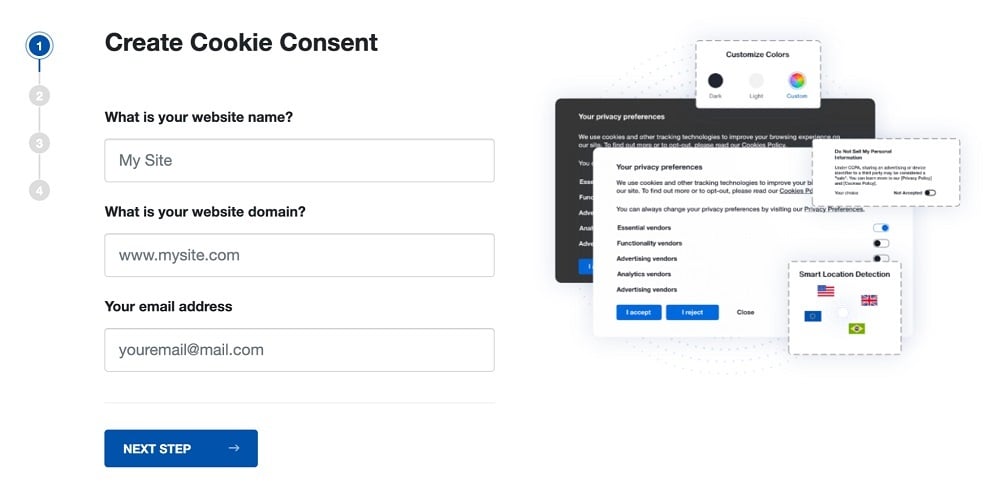
Start the Privacy Consent wizard to create the Cookie Consent code by adding your website information.
-
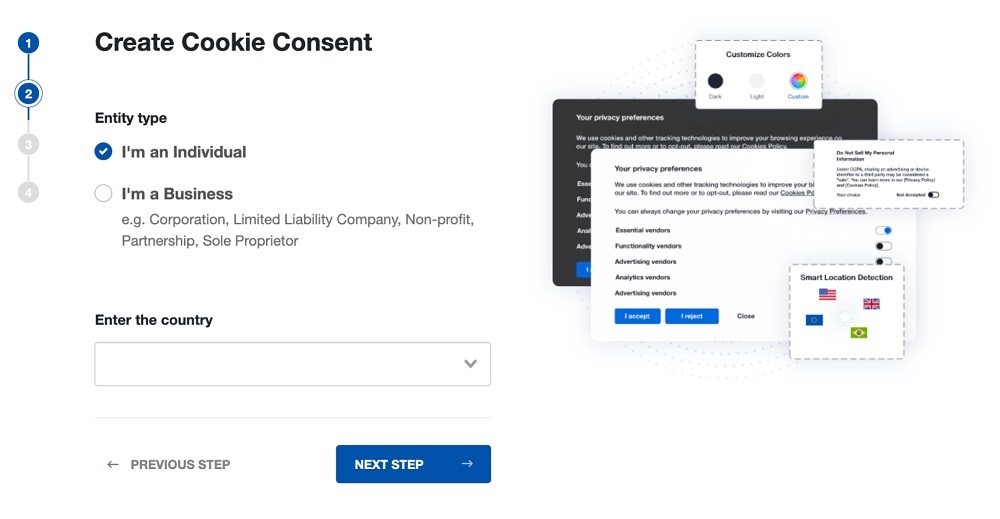
At Step 2, add in information about your business.
-
At Step 3, select a plan for the Cookie Consent.
-
You're done! Your Cookie Consent Banner is ready. Install the Cookie Consent banner on your website:
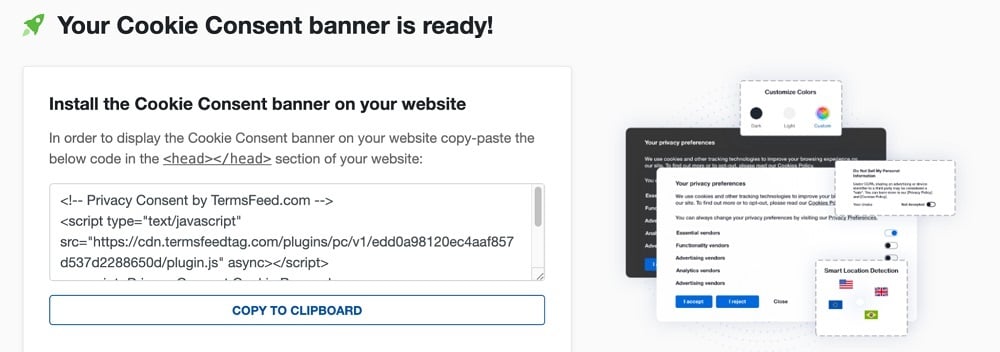
Display the Cookie Consent banner on your website by copy-paste the installation code in the
<head></head>section of your website. Instructions how to add in the code for specific platforms (WordPress, Shopify, Wix and more) are available on the Install page.


- 1. What are Cookies?
- 2. What is Cookie Consent?
- 3. What are Some Laws that Require Cookie Consent?
- 4. What Types of Cookies are Used in SaaS Dashboards?
- 5. What Unique Challenges Do SaaS Apps Face When it Comes to Cookie Consent?
- 6. Session Recordings and Consent Requirements
- 6.1. Why Do Session Recordings Trigger Cookie Consent Requirements?
- 6.2. What are Some Best Practices for Session Recordings?
- 7. Heatmaps and Consent Requirements
- 7.1. Why Do Heatmaps Trigger Cookie Consent Requirements?
- 7.2. What are Some Best Practices for Heatmaps?
- 8. Feature Flags and Consent Requirements
- 8.1. Why Do Feature Flags Trigger Consent Requirements?
- 8.2. What are Some Best Practices for Feature Flags?
- 9. How Do You Compliantly Implement Cookie Consent on SaaS Dashboards?
- 9.1. 1. Use a Consent Management Platform (CMP)
- 9.2. 2. Conduct a Thorough Cookies Audit
- 9.3. 3. Implement a Cookie Consent Notice/Banner
- 9.4. 4. Have an Updated Privacy Policy and/or Cookies Policy
- 10. Summary
What are Cookies?
Cookies are small text files that are stored on a user's device and are used to do things like track user behavior, remember preferences users select, and enable different functionality features to be used.
What is Cookie Consent?
Cookie consent refers to the process of obtaining explicit user permission, or consent, before placing non-essential cookies on the user's device.
Cookie consent is usually obtained through a pop-up form that requires the user to take some action to give consent, such as by checking a box or clicking a toggle button to "I consent" or something similar. The user should also be given an option to reject/not consent to cookies.
Here's an example of a standard, very effective method of obtaining consent for the use of cookies:

What are Some Laws that Require Cookie Consent?
Because many cookies collect personal data to function, the use of cookies is subject to privacy regulations including (but not limited to) the following:
- General Data Protection Regulation (GDPR) - Under this regulation, explicit, informed, and freely given consent must be obtained before setting non-essential cookies (e.g., tracking, advertising, or analytics cookies).
- ePrivacy Directive - Under this directive, users must be informed about the use of cookies, and consent must be obtained for non-essential cookies before they can be used.
- Personal Information Protection and Electronic Documents Act (PIPEDA) - Consent must be obtained before collecting, using, or disclosing personal information via non-essential cookies.
What Types of Cookies are Used in SaaS Dashboards?
In SaaS dashboards, cookies play an important role in enhancing user experience when using the app. For example, cookies in SaaS dashboards can personalize the content or different settings (such as a light or dark theme, language settings, and remembering your login password for convenience).
Cookies can also help the SaaS provider by collecting useful information about the users and how the app is used, such as by gathering analytics data.
The cookies used in SaaS dashboards are the same types of cookies used elsewhere:
- Strictly Necessary Cookies: This type of cookie is used to enable important functionality of the SaaS dashboard such as user authentication, session management, and security features. These types of cookies are commonly exempt from consent requirements because they are essential for the service to operate.
- Performance Cookies: This type of cookie collects useful data about how users interact with the dashboard and how the dashboard works for them, such as how long it takes a page to load, and any crashes or errors that occur.
- Functional Cookies: This type of cookie is used to remember user preferences and settings in the SaaS dashboard.
- Targeting/Advertising Cookies: This type of cookie is used to track user behavior for marketing and advertising purposes.
SaaS dashboards very commonly use performance and functional cookies to monitor the performance and health of the SaaS app, while also optimizing the end user experience.
Tools such as session recordings, heatmaps, and feature flags often rely on these types of cookies, thus triggering cookie consent requirements.
What Unique Challenges Do SaaS Apps Face When it Comes to Cookie Consent?
SaaS dashboards face some unique challenges when it comes to obtaining cookie consent.
Unlike standard websites that anyone can access pretty anonymously, SaaS dashboards are restricted to users who log in to a personal account and can be authenticated. This log-in requirement has led some SaaS providers and developers to assume that by logging in to the dashboard, consent for data collection is granted or can be implied.
However, this is not a correct assumption. Privacy laws and cookie consent requirements apply to any personal data processing, regardless of authentication or login status.
This means that tracking users via cookies even after they have logged in to an account will still require explicit cookie consent.
Session Recordings and Consent Requirements
Session recordings collect information about a user's specific interactions with the SaaS dashboard such as how the user scrolls on the page, and how the mouse is moved and clicked.
Recording this type of information helps SaaS providers/developers identify any issues with usability of the app. This helps with finding errors that can be debugged and making sure that the user interfaces can consistently be improved and optimized.
However, it can also trigger consent requirements.
Why Do Session Recordings Trigger Cookie Consent Requirements?
Session recordings can trigger cookie consent requirements because they can sometimes collect protected personal information like names, user IDs, email addresses and IP addresses.
Session recordings are considered a tracking technology that monitors and records user behavior in detail. Tracking technology usage can trigger consent requirements.
Third parties are also often involved in session recordings, as SaaS apps will outsource this service to companies like FullStory, Hotjar or LogRocket. When third parties are involved in collecting, using or sharing personal information, consent requirements can be triggered.
What are Some Best Practices for Session Recordings?
If you engage in session recordings with your SaaS app, you should do the following to ensure you are complying with relevant privacy laws:
- Always obtain explicit cookie consent: Before you enable session recordings on a user's dashboard, provide the user with a compliant cookie consent banner and request explicit consent. Don't forget to give the user the option to opt out/decline consent.
- Mask all protected personal information: Take steps to make sure that any protected personal information is not recorded. There are tools that automatically redact this information (such as information entered into form fields) from recordings.
- Limit the scope of purposes that you record sessions for: Don't simply record all sessions for everything. Make sure that you're only recording sessions for very specific and limited purposes, such as troubleshooting or detecting coding errors. Always try to avoid continuous recording, even if you have consent.
- Be transparent with your users: Transparency is a huge part of privacy law compliance. Make sure you provide a Privacy Policy and Cookies Policy with your SaaS app that are clear about your use of session recordings. Explain what information is collected during session recordings, and why.
Heatmaps and Consent Requirements
Heatmaps help SaaS providers/developers easily visualize how users interact with the SaaS dashboard by highlighting areas of high engagement like clicks, hovers or scrolling. Think how a weather map looks, with areas of higher temperatures marked differently than cooler-temperature areas.
Here's an example of a heatmap that shows areas of a web page where users click the most. Areas with the most clicks are in a dark orange or red color:

Heatmap data can help SaaS providers/devs improve the user's dashboard experience and optimize the layout and design of the dashboard itself.
Like session recordings, heatmaps often rely on cookies or similar tracking technologies to collect this useful information about user behavior. This can trigger cookie consent requirements.
Why Do Heatmaps Trigger Cookie Consent Requirements?
Heatmaps can trigger cookie consent requirements because they use non-essential cookies (such as performance or functional cookies) and other tracking technologies to collect data. The use of these types of cookies and tracking technologies will trigger cookie consent requirements under privacy laws.
Heatmaps work by aggregating data about user interactions, which may include protected personal information like User IDs and IP addresses, thus requiring consent before using cookies that collect this data.
SaaS providers and developers often use third-party heatmap-generating tools like Microsoft Clarity or Crazy Egg. When third parties are involved in collecting, using or sharing personal information, consent requirements can be triggered.
What are Some Best Practices for Heatmaps?
If you use heatmaps with your SaaS app, you should do the following to ensure you are complying with relevant privacy laws:
- Always obtain explicit cookie consent: Make sure that you don't collect any data that would go to generate a heat map unless you have first obtained explicit consent from a user via a cookie consent notice or banner.
- Anonymize the data you collect: If you can, always configure heatmap tools to anonymize the data it collects wherever possible.
- Minimize the data you collect: If possible, limit the focus of your heatmaps to very specific sections of your SaaS dashboard, or on very specific features. This will limit the scope of data tracking.
- Be transparent with your SaaS users: Make sure that you provide a Privacy Policy and/or Cookies Policy that discloses your use of heatmaps. Let users know that you collect data to create heatmaps. Note any third-party involvement in this as well.
Feature Flags and Consent Requirements
Feature flags - also known as feature toggles or switches - are used in SaaS dashboards to quickly enable or disable different user features. They're a convenient way to control the rollout of new features, conduct dashboard testing, or manage beta releases to a select group of users without having to adjust the entire dashboard as a whole.
Feature flags often rely on specific user attributes like user location, tier of subscription service or types of user behavior to determine what features to display to what users.
Why Do Feature Flags Trigger Consent Requirements?
If any of the attributes used to determine how features will be rolled out end up using protected personal information for personalization or tracking users, consent may be required.
For example, if a feature ever wanted to be tested on all people with a certain last name, or who live on a certain street in a certain city, consent would likely be required.
Feature flags that are used for A/B testing will use cookies or other tracking technologies to track user interactions in order to measure performance. This can trigger a consent requirement.
Some feature flag platforms are set up by third-party services like Optimizely or LaunchDarkly. If third parties are used and data is shared with them, consent will be required.
What are Some Best Practices for Feature Flags?
If you use feature flags with your SaaS app, you should do the following to ensure you are complying with relevant privacy laws:
- Obtain cookie consent: If you use feature flags for A/B testing or analytics purposes, let users know this and request consent to place the cookies required for this before doing so. Use a cookie consent notice banner to do this.
- Limit how much data you share: If you use a third-party platform for feature flags, always try to configure the platform to send the minimal amount of data to the third party.
- Always be transparent: Disclose your use of feature flags in your Privacy Policy and/or Cookies Policy. Let users know that you place and use cookies that collect certain types of data, and how this data will be used.
How Do You Compliantly Implement Cookie Consent on SaaS Dashboards?
Here are some steps you can take to compliantly implement cookie consent on your SaaS dashboard:
1. Use a Consent Management Platform (CMP)
A Consent Management Platform (CMP) streamlines how you obtain cookie consent by doing the following:
- Scans your SaaS dashboard for all cookies and tracking technologies that you're using (cookie audit)
- Helps you create and customize a cookie consent banner to present to users
- Easily allows users to manage their cookie consent preferences including granting consent, or opting out
- Automatically blocks non-essential cookies until consent is granted, which helps you comply with privacy and data protection laws
- Helps ensure global compliance
The most convenient way to ensure ongoing compliance is to implement a CMP.
2. Conduct a Thorough Cookies Audit
If you implement a CMP, the cookies audit report may automatically be done for you. Otherwise, you will need to conduct a thorough audit of all the cookies and tracking technologies you're using in your SaaS dashboard.
Don't forget to include any and all cookies that are associated with session recordings, heatmaps, and feature flags.
Once you know all the cookies you're using, categorize them as strictly necessary, performance, functional, or targeting. This will help you determine which of the cookies require consent.
Here's an example of a chart used by Slack that helps organize exactly what cookies are used and other important information about them:

3. Implement a Cookie Consent Notice/Banner
Again, if you set up a CMP, this will automatically be done for you. Otherwise, you can use other third-party tools or an in-house development team to create a compliant cookie consent notice banner.
Your cookie consent notice banner should include the following elements:
- Clear language: Avoid complex legal jargon. Simply explain that you use cookies and for what purposes in plain terms that won't confuse the average end user.
- Granular requests for consent: While you could include "Accept All" or "Reject All" buttons for users, it's best to offer granular consent options. This means you allow users to choose which specific categories of cookies they allow and deny.
- Easy withdrawal of consent: Make it easy for users to withdraw or revoke consent at any time. This is usually done through a settings link where consent options can be managed.
- Link to Privacy/Cookies Policy or more information: Include a link to more information, such as your legal policies.
Here's an example of a cookie consent notice banner from Zoom that has convenient toggle buttons at the bottom to allow users to quickly adjust what types of cookies they wish to allow:

4. Have an Updated Privacy Policy and/or Cookies Policy
Whether or not you use a CMP, you should always have a publicly-accessible Privacy Policy and/or Cookies Policy with current, accurate information on the following points:
- Which cookies and tracking technologies you're using
- Why you're using the cookies and tracking technologies - for what purposes
- Whether or not any third-party platforms or services are involved with your SaaS dashboard and thus having access to your users' personal information
- How users can manage or revoke cookie consent at any time
Here's how Slack notes its use of cookies in a Cookies Policy:

Here's how opting out and managing settings is mentioned, and a link provided directly to an area where users can adjust what they are consenting to at any time:

You should consider adding a "Privacy Center" section within your SaaS dashboard where users can access this information and adjust settings at any time. At a minimum, provide a link to your Privacy/Cookies Policy from within the dashboard, such as in a Legal or About menu.
Summary
Cookie consent on SaaS dashboards is something that many SaaS providers and developers may overlook. However, it is a critical aspect of privacy law compliance, particularly when tools like session recordings, heatmaps, and feature flags are being used.
These tools, while powerful and very helpful, often use cookies to collect protected personal information. This triggers cookie consent requirements under laws like the GDPR.
SaaS providers/developers can meet cookie consent requirements on SaaS dashboards by implementing a Consent Management Platform (CMP). Without an all-inclusive CMP, SaaS providers/developers will have to conduct a thorough cookies audit and integrate a compliant cookie consent notice banner.
Always remember to have and post an accurate Privacy/Cookies Policy to maintain transparency and meet privacy law requirements.
Ultimately, requesting cookie consent is not just a legal obligation but an opportunity to build trust with users of your SaaS app. By respecting user privacy and privacy laws, as well as providing users with control over the collection of their data, SaaS providers can create dashboards that are both legally compliant and very user-centric.

The first step to compliance: A Privacy Policy.
Stay compliant with our agreements, policies, and consent banners — everything you need, all in one place.


